This topic provides answers to some frequently asked questions about the integration and use of Alibaba Cloud SDK for Node.js to help you improve your development efficiency.
Prerequisites
Node.js 8.x or later is installed in your development environment.
Alibaba Cloud APIs are reachable over your network.
Overview
What do I do if the API request times out and the "Error: connect ETIMEDOUT" message is returned?
What do I do if the "MissingRequiredParameter" message is returned when I call an API operation?
How do I handle the errors reported by the npm install command?
How do I resolve a version conflict of a dependency package?
Questions and solutions
How do I handle AccessKey errors?
Problem: The following error message is returned after running code. The error message indicates that the AccessKey pair is not correctly configured.
Alibaba Cloud SDK V2.0 for Node.js: Cannot read properties of undefined (reading 'getCredential').
Alibaba Cloud SDK V1.0 for Node.js: AssertionError [ERR_ASSERTION]: must pass "config.accessKeyId".
Solutions:
Run the following commands to check whether the ALIBABA_CLOUD_ACCESS_KEY_ID and ALIBABA_CLOUD_ACCESS_KEY_SECRET environment variables are configured.
Linux/macOS
echo $ALIBABA_CLOUD_ACCESS_KEY_ID
echo $ALIBABA_CLOUD_ACCESS_KEY_SECRET
Windows
echo %ALIBABA_CLOUD_ACCESS_KEY_ID%
echo %ALIBABA_CLOUD_ACCESS_KEY_SECRET%
If a valid AccessKey pair is returned, the environment variables are properly configured. If no AccessKey pair or an invalid AccessKey pair is returned, configure the environment variables as required. For more information, see Configure environment variables in Linux, macOS, and Windows.
Check for errors related to the AccessKey pair in the code.
Sample error request:
 let config = new OpenApi.Config({
      accessKeyId: process.env['yourAccessKeyID'],
      accessKeySecret: process.env['yourAccessKeySecret'],
    });
Sample success request:
let config = new OpenApi.Config({ accessKeyId: process.env['ALIBABA_CLOUD_ACCESS_KEY_ID'], accessKeySecret: process.env['ALIBABA_CLOUD_ACCESS_KEY_SECRET'], });Noteprocess.env['ALIBABA_CLOUD_ACCESS_KEY_ID'] and process.env['ALIBABA_CLOUD_ACCESS_KEY_SECRET']
indicate that the AccessKey ID and AccessKey secret are obtained from the ALIBABA_CLOUD_ACCESS_KEY_ID and ALIBABA_CLOUD_ACCESS_KEY_SECRET environment variables.
ImportantTo prevent security risks, do not write the AccessKey pair in the online code.
What do I do if the "tsc: Fail to recognize the tsc command as the name of a cmdlet, a function, a script, or a executable program..." error message is returned after I run a tsc command?

Causes:
The PATH environment variable is not correctly configured: The globally installed
tscfile path is not added to the PATH environment variable.PowerShell execution policy: The default PowerShell execution policy may be set to
Restricted, which prohibits running.ps1scripts.The PATH environment variable is not correctly configured: The globally installed
tscfile path, such asD:\node.js\node_global, is not added to the PATH environment variable.
Solutions:
Check whether
TypeScriptis globally installed:npm list -g typescriptIf the output is empty or indicates that TypeScript is not installed, TypeScript is not correctly installed.
Run the
npm install -g typescriptcommand to globally install TypeScript.Run the following command to query the global installation path of
npm:npm config get prefix # Sample output: D:\node.js\node_globalInclude the returned path in the following command to check whether the
tscfile exists in the directory:ls D:\node.js\node_global | Select-String 'tsc'Run the following command to query the execution policy of
PowerShell:Get-ExecutionPolicyIf the output is
Restricted, PowerShell prohibits running scripts.Change the execution policy to
RemoteSignedto allow script execution.Set-ExecutionPolicy RemoteSigned -Scope CurrentUserRun the
Get-ExecutionPolicycommand again to query the execution policy. The expected output isRemoteSigned.Specify the PATH environment variable of the current session on your terminal:
$env:Path += ";D:\node.js\node_global"Check whether the PATH environment variable contains the global path:
$env:Path -split ';' | Select-String 'node_global'Run the
tsccommand to compile the.tsTypeScript file to a.jsJavaScript file based on thetsconfig.jsonconfiguration file.
Replace the D:\node.js\node_global path in the example with the actual file path returned by the npm config get prefix command.
What do I do if the API request times out and the "Error: connect ETIMEDOUT" message is returned?
Common causes and solutions:
An API call timeout may be caused by multiple factors. The following section describes the common causes and the corresponding solutions:
Cause 1: Network connection issues
Cause: The request cannot reach the server because the network connection between the client and server fails or the network is unstable.
Solution:
Run the ping or curl command to test the connectivity between the on-premises host and the endpoint of the cloud service. For example, run the ping dysmsapi.aliyuncs.com or curl -v https://dysmsapi.aliyuncs.com command to test the connectivity between your on-premises host and the endpoint of the Short Message Service (SMS) API.
If the command times out or does not receive a response, check for blocking policies on your on-premises firewall or routers.
If a response is returned, we recommend that you specify a proper timeout period to prevent request failures caused by improper timeout configurations. For more information, see Configure a timeout period. Sample code:
JavaScript
// Create a RuntimeOptions instance and specify runtime parameters.
    const runtime = new RuntimeOptions({
        // Configure a timeout period for connection requests.
        connectTimeout: 10000,
    });
TypeScript
// Create a RuntimeOptions instance and specify runtime parameters.
        const runtime = new $Util.RuntimeOptions({
            // Configure a timeout period for connection requests.
            connectTimeout: 10000,
        });
Cause 2: Extended period of time for processing the request
Description: The duration for processing the API request exceeds the specified read timeout period.
Solution: Configure the timeout period to adapt to the extended API response time. For more information, see Configure a timeout period. For example, you can configure the read timeout parameter to extend the read timeout period. Sample code:
JavaScript
// Create a RuntimeOptions instance and specify runtime parameters.
    const runtime = new RuntimeOptions({
        // Configure a timeout period for read requests.
        readTimeout: 10000,
    });
TypeScript
// Create a RuntimeOptions instance and specify runtime parameters.
        const runtime = new $Util.RuntimeOptions({
            // Configure a timeout period for read requests.
            readTimeout: 10000,
        });
What do I do if the "MissingRequiredParameter" error is reported when I call an API operation?
In this example, the SendSms operation of the Short Message Service (SMS) service is called.
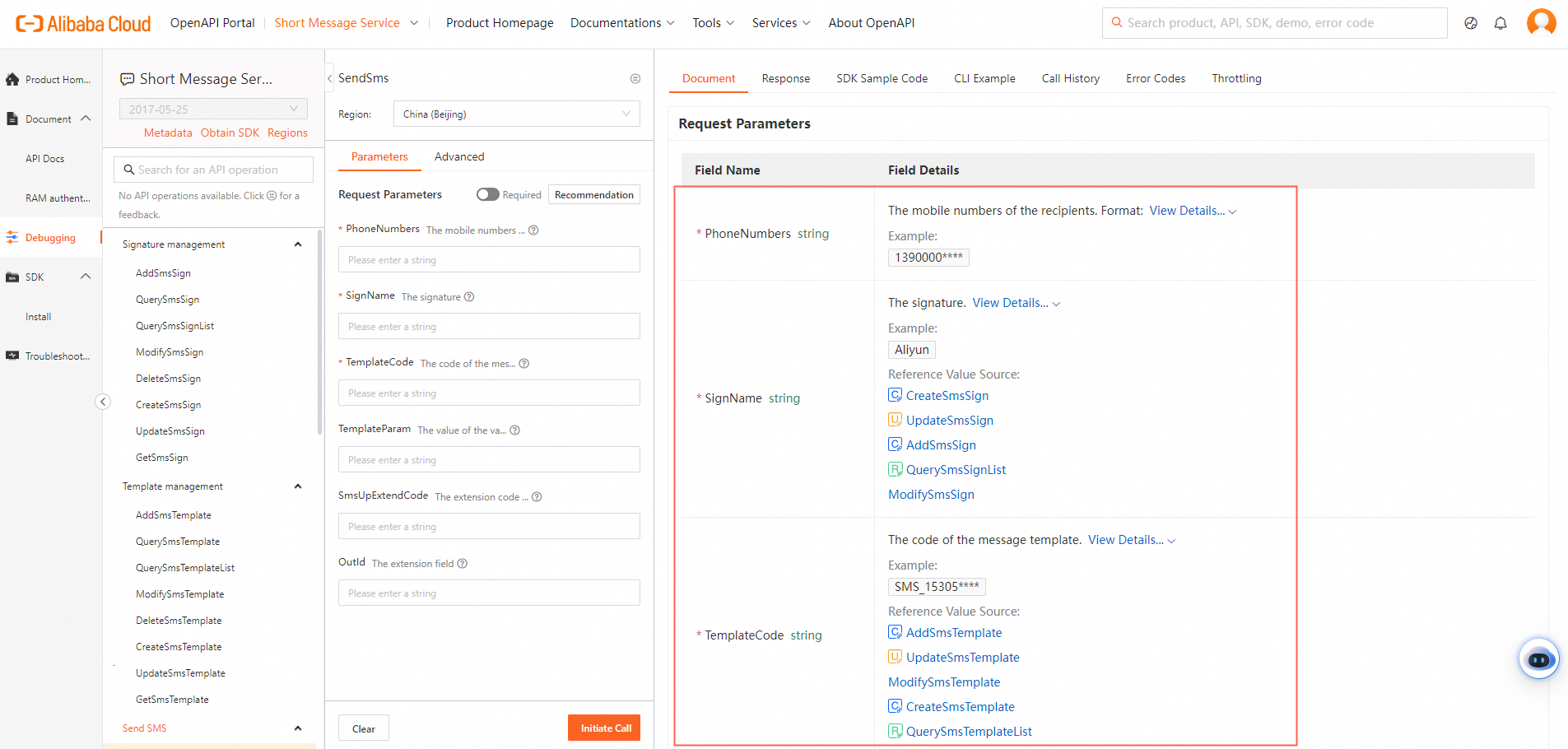
Log on to OpenAPI Explorer. Go to the API debugging page of the Alibaba Cloud service that you want to call. Find the API operation that you want to call.
Check whether all required parameters such as phoneNumbers and signName are specified in the constructed request object. In this example, the
SendSmsRequestobject is used.Verify that all the required parameters are specified based on the API reference.
Make sure that the values of the required parameters are valid. For example, check whether mobile numbers are specified in valid formats.
Before the SDK sends an API request, the SDK automatically verifies the parameters. If one or more required parameters are not specified, an error such as
MissingRequiredParameteris reported. For example, if the phoneNumbers parameter is not specified, the "MissingPhoneNumbers: code: 400" error is reported. In this case, specify the parameter based on the error message.
JavaScript
let sendSmsRequest = new Dysmsapi20170525.SendSmsRequest({
      phoneNumbers: '<YOUR_VALUE>',
      signName: '<YOUR_VALUE>',
      templateCode: '<YOUR_VALUE>',
    });
TypeScript
let sendSmsRequest = new $Dysmsapi20170525.SendSmsRequest({
      phoneNumbers: "<YOUR_VALUE>",
      signName: "<YOUR_VALUE>",
      templateCode: "<YOUR_VALUE>",
    });
What do I do if I fail to call an API operation because the operation is not supported in the specified region and the "getaddrinfo ENOTFOUND" message is returned?
Make sure that the region that you select supports the service that you want to access. Find the endpoint of the service on the product homepage in OpenAPI Explorer. The following figure shows how to find the endpoint of the SMS service.

How do I handle the errors reported by the npm install command?
Make sure that Node.js and npm are correctly installed. For more information, see Install Node.js on Windows.
Possible causes:
The image source configurations contain conflicts. The global npm configurations use a third-party image source, such as Taobao, but no independent official source is configured for the
@alicloudscope.Cache or network issues cause damages on the npm local cache, or network policies such as enterprise firewalls block requests to the image source.
The package version does not exist. For example, the specified version
3.1.1does not exist in the image source.
Solutions:
Run the following command to clear the npm cache to fix cache damages, and then re-install the SDK.
npm cache clean --forceUse an official npm source.
Configure an official source for the
@alicloudscope. Run the following command to configure an npm source only for packages that start with@alicloud.npm config set @alicloud:registry=https://registry.npmjs.orgRun the following command to check the npm configurations, and make sure that the scope takes effect:
npm config get @alicloud:registry
# Expected output: https://registry.npmjs.org
Run the
npm install @alicloud/XXXcommand to install the Alibaba Cloud SDK.
Check the Alibaba Cloud image source. Run the following command to temporarily switch to the desired image source (optional):
# In this example, the SMS SDK is installed.
npm install @alicloud/dysmsapi20170525@3.1.1 --registry=https://registry.npmmirror.com
After the SDK is installed, npm returns a message, such as 9 vulnerabilities (6 moderate, 3 high). Cause and solution:
Cause: The third-party dependency package of the SDK, such as axios or lodash, is outdated and contains a known vulnerability.
Solution: Run the npm audit fix command to start automatic error fixing. npm automatically upgrades to a compatible version that contains fewer or zero vulnerabilities.
How do I resolve a version conflict of a dependency package?
Run the
npm lscommand to view the dependency tree and make sure that no version conflicts occur.Delete the
node_modulesdirectory and thepackage-lock.jsonfile and reinstall dependencies.
 rm -rf node_modules package-lock.json
 npm install
Checklist of basic Node.js exceptions
Error message | Possible cause | Solution |
TypeError | The type of a variable or expression does not meet the expectation. | Verify that the type of the variable or expression is as expected. You can use conditional statements or a type check method such as type of to handle this exception. |
SyntaxError | The syntax of the code is invalid. | Verify that the syntax of the code is correct. You can use the code editor or a development tool to detect and correct syntax errors. |
ReferenceError | The referenced variable does not exist. | Make sure that the variable that you want to reference has been defined and initialized. You can use conditional statements or an exception handling mechanism to handle this exception. |
RangeError | The specified value is out of the valid range. For example, the array index is out of range or the recursive function is called too many times. | Make sure that the specified value, such as the array index or the depth of the recursive function, is within the valid range. You can use conditional statements or an exception handling mechanism to handle this exception. |
URIError | The URI is invalid or an error occurs during encoding. | Make sure that you use a valid URI or encoding is performed by following the relevant specifications. You can use conditional statements or a specific URI encoding method to handle this exception. |
Technical support
The solutions to the preceding issues can help you better use Alibaba Cloud SDKs. If you encounter other issues, you can contact Alibaba Cloud technical support by using the following method: