By default, Alibaba Cloud Linux enables mitigations for CPU vulnerabilities, which can affect system performance. This document explains how to disable these mitigations if the performance impact is a concern for your workload. It covers specific CPU vulnerabilities, how to check their status using vulnerability status files, and how to disable the mitigations.
Background information
In January 2018, Google Project Zero disclosed the Spectre and Meltdown security vulnerabilities that affect modern processors. Attackers may exploit these vulnerabilities to steal privileged data, posing a severe threat to system security. These vulnerabilities affect most modern processors, including Intel, AMD, and ARM architectures, and have been widely discussed since their disclosure. Alibaba Cloud products are also affected by these vulnerabilities. In response, operating systems like Linux implemented software mitigations. Since the initial disclosure, new variants have emerged, and these vulnerabilities are expected to be a persistent issue.
These vulnerabilities exploit hardware features like Speculative Execution and Out-of-order Execution, essential for modern processor performance. As a result, mitigating these vulnerabilities can cause performance degradation.
Software mitigations can usually only reduce the risk of exploitation. They do not fix the underlying hardware vulnerability.
Vulnerabilities
This section details the security vulnerabilities in Alibaba Cloud Linux 2 and Alibaba Cloud Linux 3 and explains how to disable the software mitigations using the boot command line.
Alibaba Cloud Linux 3
x86
CVE | Path to the mitigation status file① | Default handling method | Method for disabling mitigations |
/sys/devices/system/cpu/vulnerabilities/spectre_v1 | Mitigation enabled by default | Mitigations are force enabled and cannot be disabled. | |
/sys/devices/system/cpu/vulnerabilities/spectre_v1 | Mitigation enabled by default | Add the | |
/sys/devices/system/cpu/vulnerabilities/spectre_v2 | Mitigation enabled by default | Add the | |
/sys/devices/system/cpu/vulnerabilities/spec_store_bypass | The kernel automatically enables mitigation based on hardware features. | Add one of the following parameters:
| |
/sys/devices/system/cpu/vulnerabilities/meltdown | Mitigation enabled by default | Add one of the following parameters:
| |
/sys/devices/system/cpu/vulnerabilities/l1tf | Mitigation enabled by default | Add the | |
/sys/devices/system/cpu/vulnerabilities/mds | Mitigation enabled by default | Add the following parameters:
| |
/sys/devices/system/cpu/vulnerabilities/srbds | Mitigated by processor microcode by default | Add the | |
/sys/devices/system/cpu/vulnerabilities/mmio_stale_data | Mitigation enabled by default | Add the following parameters:
| |
/sys/devices/system/cpu/vulnerabilities/tsx_async_abort | Mitigation enabled by default | Add the following parameters:
| |
/sys/devices/system/cpu/vulnerabilities/retbleed | Mitigation enabled by default | Add the Note Supported only in kernel version | |
N/A | N/A | N/A | Add the |
ARM64
CVE | Path to the mitigation status file① | Default handling method | Method for disabling mitigations |
/sys/devices/system/cpu/vulnerabilities/spectre_v1 | Mitigation enabled by default | Mitigations are force enabled and cannot be disabled. | |
/sys/devices/system/cpu/vulnerabilities/spectre_v2 | Mitigation enabled by default | Add the | |
/sys/devices/system/cpu/vulnerabilities/spectre_v2 | Mitigation enabled by default | Add the Note Supported only in kernel version | |
/sys/devices/system/cpu/vulnerabilities/spec_store_bypass | Mitigation enabled by default | Add the | |
/sys/devices/system/cpu/vulnerabilities/meltdown | Mitigation enabled by default | Add the | |
N/A | N/A | N/A | Add the |
Alibaba Cloud Linux 2
CVE | Path to the mitigation status file① | Default handling method | Method for disabling mitigations |
/sys/devices/system/cpu/vulnerabilities/spectre_v1 | Mitigation enabled by default | Mitigations are force enabled and cannot be disabled. | |
/sys/devices/system/cpu/vulnerabilities/spectre_v1 | Mitigation enabled by default | Add the nospectre_v1=off parameter. Note Supported only in kernel version | |
/sys/devices/system/cpu/vulnerabilities/spectre_v2 | Mitigation enabled by default (spectre_v2=auto) | Add one of the following parameters:
Note Supported only in kernel version | |
/sys/devices/system/cpu/vulnerabilities/spec_store_bypass | Enabled if the processor supports (spec_store_bypass_disable=auto) | Add one of the following parameters:
Note Supported only in kernel version | |
/sys/devices/system/cpu/vulnerabilities/meltdown | Mitigation enabled by default | Add one of the following parameters:
Note Supported only in kernel version | |
/sys/devices/system/cpu/vulnerabilities/l1tf | Only | Add the l1tf=off parameter. Note Supported only in kernel version | |
/sys/devices/system/cpu/vulnerabilities/mds | Mitigation enabled by default | Add the mds=off parameter. Note Supported only in kernel version | |
N/A | N/A | N/A | Add the |
① The vulnerability status file shows if the instance's CPU is vulnerable and which mitigation, if any, is active. The states are:
Not affected: The current CPU is not affected by this vulnerability.Vulnerable: The CPU is affected, but no mitigation is active.Mitigation: The CPU is affected, and a software mitigation is active.
Disable mitigations
The following example shows how to disable the spectre_v2 mitigation in Alibaba Cloud Linux 3.
Add the
nospectre_v2parameter to the default kernelboot cmdline. This disables the security mitigation.sudo grubby --update-kernel=`sudo grubby --default-kernel` --args='nospectre_v2'Reboot the instance and apply the changes.
WarningRebooting an instance stops its services, which can interrupt business operations. Before proceeding, back up critical data and schedule the reboot for off-peak hours.
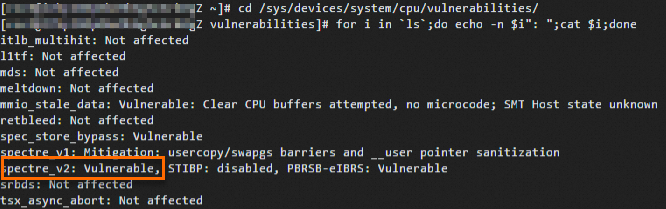
sudo rebootCheck the vulnerability status file and confirm that the mitigation is disabled.
cd /sys/devices/system/cpu/vulnerabilities/
for i in `ls`;do echo -n $i": ";cat $i;done
The output
spectre_v2: Vulnerable, shown below, confirms that thespectre_v2mitigation is disabled.