ossutil は、Object Storage Service (OSS) のオブジェクトを管理するためのコマンドラインツールです。Windows、Linux、macOS 各環境で、オブジェクトのアップロード、ダウンロード、コピー、削除などの操作が可能です。
新規プロジェクトでは、ossutil 2.0 のインストールおよび利用を推奨します。ossutil 2.0 では、初期構成に AccessKey ID、AccessKey Secret、リージョン ID のみが必要です。また、バッチ操作向けに豊富なフィルター機能が追加され、JSON/YAML/XML 形式での出力に対応し、機密性の高いパラメーターを環境変数経由で渡すことが可能です。詳細については、「ossutil 2.0 のインストール」をご参照ください。既存のスクリプトで ossutil 1.x のコマンドに依存している場合は、本ガイドに従って進めてください。
はじめに:ご利用のオペレーティングシステムに対応したパッケージをダウンロードし、エンドポイントおよび AccessKey ペアを用いて ossutil をインストールおよび構成した後、インストールを検証します。
ossutil のダウンロード
最新バージョンは 1.7.19 です。ご利用のオペレーティングシステムおよび CPU アーキテクチャに合致するパッケージをダウンロードしてください。ダウンロードの検証には、ファイルの SHA-256 チェックサムを下記表の値と照合します。
| プラットフォーム | ダウンロード | SHA-256 チェックサム |
|---|---|---|
| Linux x86 32 ビット | ossutil-v1.7.19-linux-386.zip | f8a4a7e1df8529b06a3f3cca194a1c99163cb3b8ab3b5d64228c207c3ae63b86 |
| Linux x86 64 ビット | ossutil-v1.7.19-linux-amd64.zip | dcc512e4a893e16bbee63bc769339d8e56b21744fd83c8212a9d8baf28767343 |
| Linux ARM 32 ビット | ossutil-v1.7.19-linux-arm.zip | ffe8b479e5fd3c0e146a14cd32e8ef5736d23f6c8de157944288ee09db2d7b1d |
| Linux ARM 64 ビット | ossutil-v1.7.19-linux-arm64.zip | f612c2a88d4d28363e254168d521fac5df632f2547ba84eaebacf6497dc04d57 |
| macOS 64 ビット | ossutil-v1.7.19-mac-amd64.zip | 9cf82a53fe24d8b5cc3dfb441787e0ea19c24dd7a1246653d5f1a28b7923d6fe |
| macOS ARM 64 ビット | ossutil-v1.7.19-mac-arm64.zip | 10ece4d328c5d2440833adc5f4167168e9b2a4c5d364f673b0c45bcc4fd02ec5 |
| Windows x86 32 ビット | ossutil-v1.7.19-windows-386.zip | 772469ef02b91e893f7211acf732c2c07cd93214552ed7cf84157d3d9b9fb799 |
| Windows x86 64 ビット | ossutil-v1.7.19-windows-amd64.zip | 8e9176aedc87d230ccd97dc7236b16564f2a068609ed301acdc73dc27faf7e77 |
以前のバージョンおよびリリースノートについては、ossutil GitHub リリースページをご参照ください。
ossutil のインストールおよび構成
Linux
以下のコマンドを実行して、ossutil をダウンロードおよびインストールします。
インストーラーでは、
unzipや7zなどの展開ツールが必要です。ossutil はデフォルトで/usr/bin/にインストールされます。sudo -v ; curl https://gosspublic.alicdn.com/ossutil/install.sh | sudo bash構成コマンドを実行します。
ossutil configプロンプトが表示されたら、構成ファイルのパスを入力するか、デフォルト (
/home/user/.ossutilconfig) を使用する場合は Enter キーを押します。NAME: ossutil - OSS オブジェクトを管理するためのツール USAGE: ossutil [グローバルオプション] コマンド [コマンドオプション] [引数...] VERSION: v1.7.19 ...構成ファイルをカスタムパス(例:
/home/config)に保存した場合は、すべての ossutil コマンドに-cオプションを追加します。ossutil ls oss://examplebucket -c /home/config表示言語を選択します。
CHを入力すると中国語、ENを入力すると英語で表示されます。デフォルトは、ご利用のオペレーティングシステムの言語設定です。プロンプトが表示されたら、エンドポイント、AccessKey ID、AccessKey Secret を入力します。セキュリティトークンサービス (STS) から一時的な認証情報を使用する場合は、
stsTokenの値も入力します。ROS を使用した迅速なセットアップ RAM ユーザーに対して OSS 全アクセス権限を持つ AccessKey ペアを迅速に作成するには、Resource Orchestration Service (ROS) ウィザード を使用します。セキュリティ確認 セクションで、Alibaba Cloud ROS が RAM リソースを作成することを確認します を選択し、作成 をクリックします。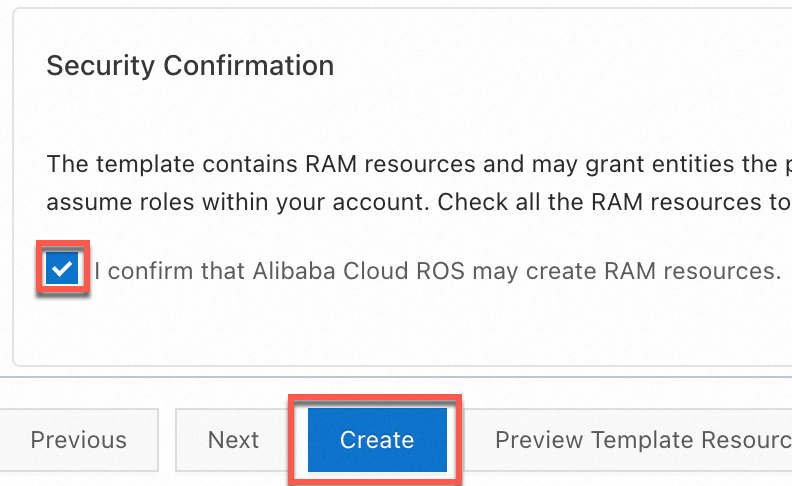 スタックの作成が完了したら、出力 タブから AccessKey ペアをコピーします。
 重要
重要2025 年 3 月 20 日以降、中国本土リージョンのバケットに対するデータ API オペレーションでは、新規 OSS ユーザーが カスタムドメイン名 (CNAME) を使用することが必須となります。デフォルトのパブリックエンドポイントは、これらのオペレーションに対して制限されます。影響を受けるオペレーションの完全なリストについては、ポリシー変更に関するお知らせ をご参照ください。HTTPS で OSS にアクセスする場合は、有効な SSL 証明書をカスタムドメインにバインド してください。
パラメーター 必須 説明 endpointはい バケットのリージョンに対応するエンドポイントです。たとえば、シンガポールのパブリックエンドポイントは https://oss-ap-southeast-1.aliyuncs.comシンガポール です。同一リージョン内の別の Alibaba Cloud サービスから OSS にアクセスする場合は、内部エンドポイントhttps://oss-ap-southeast-1-internal.aliyuncs.comを使用します。全リージョンおよびエンドポイントの一覧については、「リージョンおよびエンドポイント」をご参照ください。accessKeyIDはい RAM ユーザーの AccessKey ID です。AccessKey ペアの作成手順については、「RAM ユーザー向け AccessKey ペアの作成」をご参照ください。 accessKeySecretはい RAM ユーザーの AccessKey Secret です。 stsTokenいいえ STS から一時的な認証情報を使用する場合のみ必要です。それ以外の場合は空欄のままにしてください。STS トークンの生成手順については、「AssumeRole」をご参照ください。
Windows
上記の表から Windows 用パッケージをダウンロードします。
パッケージを展開し、
ossutil.batを実行します。構成コマンドを実行します。
ossutil configプロンプトが表示されたら、構成ファイルのパスを入力するか、デフォルト (
C:\Users\user\.ossutilconfig) を使用する場合は Enter キーを押します。設定ファイル名を入力してください(パスを含めることもできます。デフォルトは C:\Users\user\.ossutilconfig です。Enter キーを押すとデフォルトのファイルが使用されます)。 このオプションで他のファイルを指定した場合、他のコマンドを使用する際に --config-file オプションでそのファイルを明示的に指定する必要があります。構成ファイルをカスタムパス(例:
c:\ossutil\config)に保存した場合は、すべての ossutil コマンドに-cオプションを追加します。ossutil ls oss://examplebucket -c c:\ossutil\config表示言語を選択します。
ENを入力すると英語で表示されます。デフォルトは、ご利用のオペレーティングシステムの言語設定です。エンドポイント、AccessKey ID、AccessKey Secret、および任意で
stsTokenを入力します。パラメーターの詳細については、上記の Linux セクションのパラメーターテーブルをご参照ください。
macOS
以下のコマンドを実行して、ossutil をダウンロードおよびインストールします。
ossutil はデフォルトで
/usr/local/binにインストールされます。ossutil構成コマンドを実行します。
ossutil configプロンプトが表示されたら、構成ファイルのパスを入力するか、デフォルト (
/Users/user/.ossutilconfig) を使用する場合は Enter キーを押します。設定ファイル名を入力してください(パスを含めることもできます。デフォルトは /Users/user/.ossutilconfig です。Enter キーを押すとデフォルトのファイルが使用されます)。 このオプションで他のファイルを指定した場合、他のコマンドを使用する際に --config-file オプションでそのファイルを明示的に指定する必要があります。構成ファイルをカスタムパス(例:
/home/config)に保存した場合は、すべての ossutil コマンドに-cオプションを追加します。ossutil ls oss://examplebucket -c /home/config表示言語を選択します。
CHを入力すると中国語、ENを入力すると英語で表示されます。デフォルトは、ご利用のオペレーティングシステムの言語設定です。エンドポイント、AccessKey ID、AccessKey Secret、および任意で
stsTokenを入力します。パラメーターの詳細については、上記の Linux セクションのパラメーターテーブルをご参照ください。
インストールの検証
引数なしで ossutil を実行します。
ossutil正常にインストールされている場合、ossutil のヘルプ出力が表示されます。
NAME:
   ossutil - OSS のオブジェクトを管理するためのツール

USAGE:
   ossutil [グローバルオプション] コマンド [コマンドオプション] [引数...]

VERSION:
   v1.7.19
...
次のステップ
インストール後に、ossutil を使用してオブジェクトを管理できます。
オブジェクトのアップロード —
ossutil cpオブジェクトのダウンロード —
ossutil cpオブジェクトのコピー —
ossutil cpオブジェクトの削除 —
ossutil rm