By Sisi
Object Storage Service (OSS) has become an important storage solution in big data scenarios due to its support for massive unstructured data storage, the pay-as-you-go billing method, and convenient cross-platform access features based on the HTTP protocol. In the Kubernetes containerized services, improving the access performance of OSS data can effectively save computing resources and improve business efficiency. Improving the data read rate of a large number of files proves particularly important for AI training dataset management, quantitative backtesting, time series log analysis, and other scenarios.
Alibaba Cloud Container Service for Kubernetes (ACK) supports StrmVol volumes. Based on underlying virtual block devices and the file system in kernel mode, such as ext4 and EROFS (Extended Read-Only File System), this significantly reduces the access latency of massive small files. This topic describes the implementation principles and scenarios of the StrmVol storage solution and how to use the StrmVol volume in an image training dataset read scenario.
In the Kubernetes environment, application containers typically access OSS data through standard volume mechanisms. This process depends on the Container Storage Interface (CSI) driver. Currently, the mainstream implementation is to mount OSS data through the FUSE (Filesystem in Userspace) client.
FUSE allows users to implement file system logic in the user space, and map OSS metadata and data to the local file system interface (POSIX) through the interaction between the kernel mode and the user mode. The CSI driver uses the FUSE client to mount an OSS path as a local directory in a container, allowing applications to access data by using standard file operations, such as open() and read().
For scenarios where large files are read and written sequentially, the FUSE client can significantly improve performance through technologies like read-ahead and caching, such as video streaming and big data file processing. However, performance bottlenecks still exist in small file scenarios due to the following reasons:
• Frequent kernel-user mode switching: Each file operation (such as open() and close()) requires multiple context switching between the user-mode FUSE process and the kernel-mode process, resulting in additional overhead.
• Metadata management pressure: OSS metadata (such as file lists and attributes) must be queried through HTTP or REST APIs. Metadata requests for massive small files significantly increase network latency and bandwidth usage.
To address the performance limitations of FUSE in scenarios involving massive small files, StrmVol volumes introduce a solution based on virtual block devices and kernel-mode file systems (like EROFS). This solution eliminates the performance loss at the FUSE intermediate layer and allows you to directly go to the storage driver layer to accelerate data access. This is ideal if you want to quickly traverse millions of small files, such as for AI training datasets loading and time series log analysis.
• Rapid index construction: accelerates the initialization process by synchronizing only metadata.
In the initialization phase, only the object metadata (such as the file name, path, and size) under the mount target of the OSS bucket is pulled and the index is created. The extended information (such as custom metadata and tags) of the object is not included. This significantly shortens the index creation time and accelerates deployment.
• Memory prefetch optimization: improves data access efficiency through concurrent reads.
The virtual block device presets memory space as a temporary storage medium and concurrently prefetches data blocks that may be subsequently accessed according to the constructed indexes. This mechanism reduces I/O stall time, especially reducing read latency in scenarios with large numbers of small files.
• Kernel-mode file system acceleration: avoids kernel-user mode switching to improve the read performance of containerized services.
Containerized services directly read data from the memory through the kernel-mode file system, eliminating context overheads caused by frequent switching between the user mode and the kernel mode. The default EROFS file system further improves storage space utilization and data read performance through compression and efficient access mechanisms.
• Data is stored in OSS buckets and does not need to be updated during business running.
• Your business is not sensitive to the extended information of the file system.
• Read-only scenarios, especially those that involve numerous small files or random reads.
This example uses Argo Workflow to simulate a distributed image dataset loading scenario.
The dataset is based on ImageNet data. Assume that it is stored in the oss://imagenet/data/ path and contains four subdirectories (such as oss://imagenet/data/n01491361/). Each directory stores 10,480 images, about 1.2 GB in size.
StrmVol volumes require a separate CSI driver (strmvol-csi-driver), which is available in the ACK application market. After the CSI driver is deployed, it becomes independent of the csi-provisioner and csi-plugin components in the ACK cluster.

The PVC and PV definitions of StrmVol volumes follow a similar configuration pattern to the current ACK OSS volumes. The following section describes the YAML file of the volume used in this test.
apiVersion: v1
kind: PersistentVolume
metadata:
  name: pv-strmvol
spec:
  capacity:
  # The OSS mount target can store up to 16 TiB of data.
    storage: 20Gi
  # Only the ReadOnlyMany access mode is supported.
  accessModes:
    - ReadOnlyMany
  persistentVolumeReclaimPolicy: Retain
  csi:
    driver: strmvol.csi.alibabacloud.com
    volumeHandle: pv-strmvol
    nodeStageSecretRef:
      name: strmvol-secret
      namespace: default
    volumeAttributes:
      bucket: imagenet
      path: /data
      url: oss-cn-hangzhou-internal.aliyuncs.com
      directMode: "false"
      resourceLimit: "4c8g"
---
kind: PersistentVolumeClaim
apiVersion: v1
metadata:
  name: pvc-strmvol
  namespace: default
spec:
  accessModes:
    - ReadOnlyMany
  resources:
    requests:
      storage: 20Gi
  volumeName: pv-strmvol
Among them, the more important PV configuration parameters are directMode and resourceLimit.
• directMode: Specifies whether to enable the direct mode. When it is enabled, disable data prefetching and local data caching. This mode is suitable for random reading of small files, such as random batch reading of training datasets. This example uses a simple sequential read, so the direct mode is disabled.
• resourceLimit: Specifies the maximum resource limit after a virtual block device is mounted. "4c8g" indicates that the device can occupy up to 4 vCPUs and 8 GiB memory of the node.
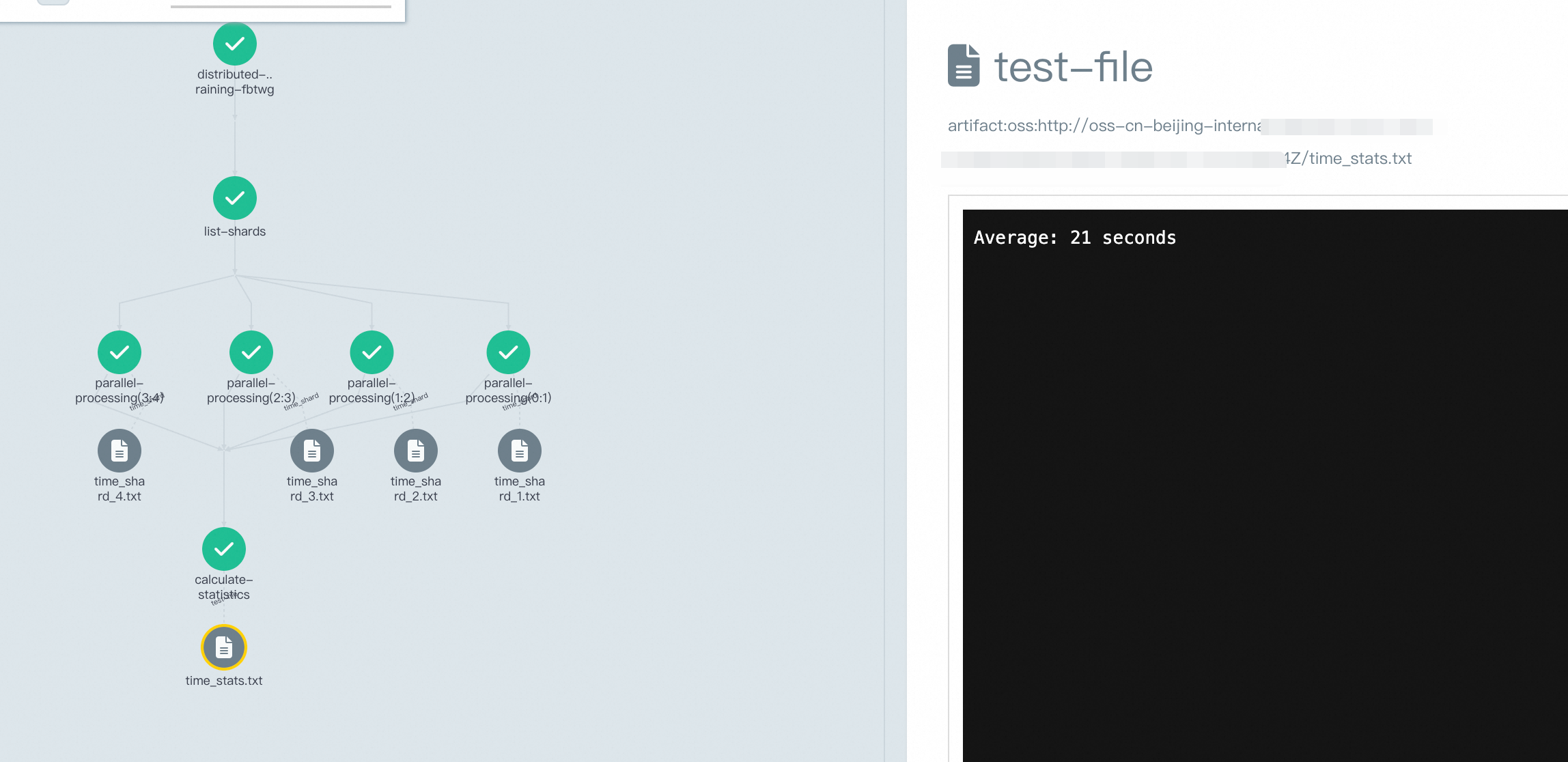
The workflow is divided into three phases:
1) list-shards phase: A Python script enumerates the four directories under the mount path to generate a path set.
2) parallel-processing phase: Four subtasks are launched concurrently. Each task reads 4 threads in parallel (simulating loading) on all images in the corresponding directory through the parallel -j4 command.
3) calculate-averages phase: Summarize the duration of each task, and calculate and output the average processing time.
You can quickly install Argo Workflows in the ACK cluster. After the workflow is installed, you can use Argo CLI or kubectl to quickly commit the workflow.
apiVersion: argoproj.io/v1alpha1
kind: Workflow
metadata:
  generateName: distributed-imagenet-training-
spec:
  entrypoint: main
  affinity:
    nodeAffinity:
      requiredDuringSchedulingIgnoredDuringExecution:
        nodeSelectorTerms:
          - matchExpressions:
              - key: "node-type"
                operator: In
                values:
                  - "argo"
  volumes:
  - name: pvc-volume
    persistentVolumeClaim:
      claimName: pvc-strmvol
  templates:
  - name: main
    steps:
    - - name: list-shards
        template: list-imagenet-shards
    - - name: parallel-processing
        template: process-shard
        arguments:
          parameters:
            - name: paths
              value: "{{item}}"
        withParam: "{{steps.list-shards.outputs.result}}"
    - - name: calculate-statistics
        template: calculate-averages
  - name: list-imagenet-shards
    script:
      image: mirrors-ssl.aliyuncs.com/python:latest
      command: [python]
      source: |
        import subprocess
        import json
        output = subprocess.check_output("ls /mnt/data", shell=True, text=True)
        files = [f for f in output.split('\n') if f]
        print(json.dumps(files, indent=2))
      volumeMounts:
        - name: pvc-volume
          mountPath: /mnt/data
  - name: process-shard
    inputs:
      parameters:
      - name: paths
    container:
      image: alibaba-cloud-linux-3-registry.cn-hangzhou.cr.aliyuncs.com/alinux3/alinux3:latest
      command: [/bin/bash, -c]
      args:
      - |
        yum install -y parallel
        SHARD_JSON="/mnt/data/{{inputs.parameters.paths}}"
        SHARD_NUM="{{inputs.parameters.paths}}"
        START_TIME=$(date +%s)
        echo "Processing shard $SHARD_JSON"
        find "$SHARD_JSON" -maxdepth 1 -name "*.JPEG" -print0 | parallel -0 -j4 'cp {} /dev/null'
        END_TIME=$(date +%s)
        ELAPSED=$((END_TIME - START_TIME))
        mkdir -p /tmp/output
        echo $ELAPSED > /tmp/output/time_shard_${SHARD_NUM}.txt
      resources:
        requests:
          memory: "4Gi"
          cpu: "1000m"
        limits:
          memory: "4Gi"
          cpu: "2000m"
      volumeMounts:
        - name: pvc-volume
          mountPath: /mnt/data
    outputs:
      artifacts:
        - name: time_shard
          path: /tmp/output/time_shard_{{inputs.parameters.paths}}.txt
          oss:
            key: results/results-{{workflow.creationTimestamp}}/time_shard_{{inputs.parameters.paths}}.txt
          archive:
            none: {}
  - name: calculate-averages
    inputs:
      artifacts:
        - name: results
          path: /tmp/output
          oss:
            key: "results/results-{{workflow.creationTimestamp}}"
    container:
      image: registry-vpc.cn-beijing.aliyuncs.com/acs/busybox:1.33.1
      command: [sh, -c]
      args:
      - |
        echo "Start merging results..."
        TOTAL_TIME=0
        SHARD_COUNT=0
        echo "Statistics of processing time for each shard:"
        for time_file in /tmp/output/time_shard_*.txt; do
          TIME=$(cat $time_file)
          SHARD_ID=${time_file##*_}
          SHARD_ID=${SHARD_ID%.txt}
          echo "Shard ${SHARD_ID}: ${TIME} 秒"
          TOTAL_TIME=$((TOTAL_TIME + TIME))
          SHARD_COUNT=$((SHARD_COUNT + 1))
        done
        if [ $SHARD_COUNT -gt 0 ]; then
          AVERAGE=$((TOTAL_TIME / SHARD_COUNT))
          echo "--------------------------------"
          echo "Total number of shards: $SHARD_COUNT"
          echo "Total processing time: $TOTAL_TIME seconds"
          echo "Average processing time: $AVERAGE seconds/shards
          echo "Average: $AVERAGE seconds" > /tmp/output/time_stats.txt
        else
          echo "Error: No shard time data found"
          exit 1
        fi
    outputs:
      artifacts:
        - name: test-file
          path: /tmp/output/time_stats.txt
          oss:
            key: results/results-{{workflow.creationTimestamp}}/time_stats.txt
          archive:
            none: {}
The execution results of the workflow are shown in the figure. The average time taken to list all images and read their data is 21 seconds.
Start merging results...
Statistics of processing time for each shard:
Shard 1: 21 seconds
Shard 2: 21 seconds
Shard 3: 22 seconds
Shard 4: 21 seconds
--------------------------------
Total number of shards: 4
Total processing time: 85 seconds
Average processing time: 21 seconds/shardAlibaba Cloud will also provide an open source solution for this technology based on the containerd/overlaybd project. Combined with OCI image volume, a read-only data volume can be mounted to a container. For more information, see Sharing of KubeCon Europe 2025-related issues.
Core competencies:
Supported scenarios:
For more information about how to use StrmVol volumes and more stress testing data, see Use strmvol volumes to optimize the read performance of small OSS files.
ACK AI Profiling: An Analysis of the Problem from Black Box to Transparency

229 posts | 34 followers
FollowAlibaba Developer - February 1, 2021
ApsaraDB - February 4, 2026
Alibaba Container Service - July 16, 2019
Alibaba Developer - July 8, 2021
Nick Patrocky - January 30, 2024
Alibaba Container Service - April 20, 2020
229 posts | 34 followers
Follow OSS(Object Storage Service)
An encrypted and secure cloud storage service which stores, processes and accesses massive amounts of data from anywhere in the world
Learn More Container Service for Kubernetes
Alibaba Cloud Container Service for Kubernetes is a fully managed cloud container management service that supports native Kubernetes and integrates with other Alibaba Cloud products.
Learn More
Container Compute Service (ACS)
A cloud computing service that provides container compute resources that comply with the container specifications of Kubernetes
Learn More Hybrid Cloud Distributed Storage
Provides scalable, distributed, and high-performance block storage and object storage services in a software-defined manner.
Learn MoreMore Posts by Alibaba Container Service

