By Qianxing
Image optimization is crucial to the performance of e-commerce web pages. The number and bytes of images loaded on a typical e-commerce web page cannot be underestimated.
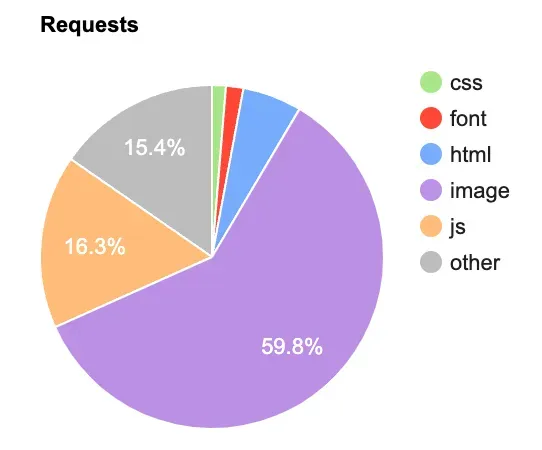
The idea of image optimization is very clear with three common directions:
• Advance the loading time of the first screen images
• Reduce the size of loaded images
• Reduce the number of loaded images
With the development of image compression and browser rendering technology, many outdated image performance optimization techniques have been eliminated and many simple and reliable image optimization methods have been introduced.
Generally, the images used in the first screen determine the LCP index of the page. The loading priority of the first screen images is crucial and loading the images as early as possible is the primary issue in image performance optimization.
In the scenario where most users visit the page for the first time, the network connection establishment time is a crucial factor that is overlooked by most people. Perhaps our performance optimization fails at the starting line. The content introduced in this part is not only effective for image loading but also similar for all static resources and even HTML and asynchronous interfaces.
The importance of CDN does not need to be repeated. Caching content to edge servers closer to users can significantly improve network connection establishment efficiency. More importantly, the use of CDN reduces the data transfer distance between users and servers, thus greatly improving resource download speed.
By default, HTML supports two connection pre-establishment mechanisms:
• dns-prefetch: It is used to resolve DNS queries of external domain names in advance. When the browser knows that it may request resources from a specific external domain name in the future, using dns-prefetch can reduce the time waiting for DNS queries;
• preconnect: It tells the browser to perform DNS queries in advance, establishes a TCP connection to the resource server in advance, and performs a TLS handshake if HTTPS is used. This means that when the browser requests the resource, it already has an open connection and can start data transfer immediately;
<head>
  <link rel="dns-prefetch" href="https://examplecdn.com">
  <link rel="preconnect" href="https://examplecdn.com">
</head> Under the HTTP/1.1 protocol, since browsers usually limit the number of parallel connections per domain name (most browsers are limited to about six), distributing images across multiple domain names used to be a common optimization method to break through the concurrency limit for a single domain name. However, it also means that for each new domain name, browsers must perform additional DNS queries and may need to establish new TCP connections, which may add some delay.
HTTP/2 supports multiplexing, which means that multiple requests can be made simultaneously on a single TCP connection. It reduces the need for multiple domain names. Therefore, in the HTTP/2 environment, converging image domain names can optimize image loading for the following reasons:
• Reduced DNS Queries: Reducing the number of domain names can reduce that of DNS queries because the browser needs to resolve IP addresses for each new domain name.
• Reduced Connection Establishment: Multiplexing makes it possible to send requests in parallel on one connection, so reducing the domain name can reduce the number of connection establishments and the corresponding delay.
• Improved TLS Efficiency: For HTTPS connections, converging domain names means that the connection can be reused on fewer TLS handshakes. The TLS handshake is a necessary step to create a secure connection, which accounts for a significant share of the overall connection time.
• Improved Cache Efficiency: Using fewer domain names can improve cache efficiency because browsers may maintain separate cache records for each domain name.
HTTP/3 is the next generation of the HTTP protocol, based on the QUIC(Quick UDP Internet Connections) protocol. QUIC is a transport layer protocol developed by Google and subsequently standardized by IETF. HTTP/3 optimizes network connection establishment, and the main issues related to connection establishment and transfer performance are:
• Reduced Connection Establishment Time: HTTP/2 is based on TCP and TLS and requires multiple round-trip times (RTT) to complete the handshake. HTTP/3 uses the QUIC protocol, which combines encryption and transfer into a single process. It allows connection establishment to be completed in one RTT and, in the best case, resumes sessions at zero RTT.
• Non-blocking Multiplexing: Although HTTP/2 supports multiplexing, head-of-line (HOL) blocking issues at the TCP layer still exist. HTTP/3 improves the multiplexing capability through QUIC. In QUIC, since it is based on datagram UDP, independent streams can continue to transfer when other streams lose packets, thus solving the head-of-line blocking issues of TCP.
• Fast Packet Loss Recovery and Congestion Control: QUIC implements a faster packet loss recovery mechanism. TCP needs to wait for some time to confirm packet loss, while QUIC can use a more refined confirmation mechanism to quickly respond to packet loss and adjust the congestion control strategy accordingly.
• Connection Migration: QUIC supports connection migration, which allows clients to maintain their existing connection states when the network environment changes, such as switching from Wi-Fi to mobile networks. In HTTP/2, this situation usually results in dropped connections and connection re-establishment.
Many pages introduce SSR technology for performance optimization. In this way, after an HTML request is initiated, page components are rendered on the server and returned to the client after completion. Without streaming rendering, a white screen will appear for a long time when the page waits for the server to fetch the data and render.
Streaming rendering introduces the chunked feature of Transfer-Encoding through HTTP 1.1. It allows multiple responses in an HTTP request connection. In SSR scenarios, the server can split at least two chunks when responding to an HTML page request.
• Header Static Content: Page CSS, JavaScript, font files, and so on.
• Subsequent dynamic rendering content.
<!DOCTYPE html>
<html lang="en">
<head>
  <meta charset="UTF-8">
  <meta name="viewport" content="width=device-width, initial-scale=1.0">
  <title> Streaming rendering optimizes page performance</title>

  <link rel="preload" href="preload" href="Page LCP image address" as="image" />

  <link rel='dns-prefetch' href='https://s.alicdn.com'>
  <link rel='preconnect' href='https://i.alicdn.com'>

  <link rel="stylesheet" href="Page style address"></script>
</head>
<body>
<!--Skeleton diagram-->

<!--Streaming rendering of subsequent content-->

</body>
</html>
In the first returned content of streaming rendering, you can use preload to load the deterministic image of the first screen in advance. This improves the loading speed of the page image. Streaming rendering can not only optimize image loading but also make full use of server computing time. Pages can optimize page performance by means such as establishing connections to some domain names in advance, loading page CSS and JavaScript in advance, and loading skeleton diagrams.
If the CDN manufacturer supports edge computing, the static part of the page can be stored in CDN, and be returned when the user requests it. At the same time, CDN requests the subsequent dynamic content of the page from the origin to further improve the web page performance.
The loading order of resources in web development has a significant impact on page performance. Browsers typically determine the priority of resource loading based on the type of resources, their position in the HTML document, and some internal algorithms. However, the default priorities of the browser may not always align with the intent of developers or the goal of optimizing page performance.
The fetch-priority is proposed to solve this problem. By explicitly setting the fetch-priority property of resources, developers can instruct the browser to load resources in a particular priority order. Generally, the loading priority of images is relatively high, but for more precise control, it can be adjusted by fetch-priority.
<img src="important-image.png" fetch-priority="high" alt="Important Image">
<img src="less-important-image.png" fetch-priority="low" alt="Less Important Image">
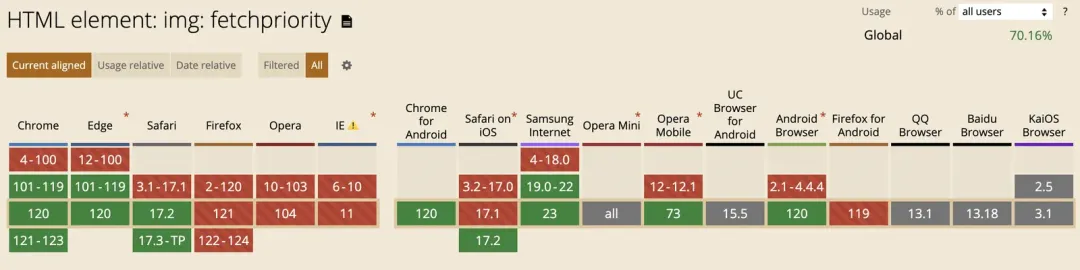
The fetch-priority property can be set to different priority values, that is, high, low, and auto (default). It can be applied to various resources, such as <img>, <link>, <script>, and other elements. Currently, Chrome, Safari, and Edge all support it.
On the premise of ensuring that the definition meets the requirements, reducing the number of image bytes can improve the image loading performance.
The size of the image can be expressed as the number of horizontal pixels×the number of vertical pixels, and the total number of pixels of the image (the resolution) is the product of the number of horizontal pixels and the number of vertical pixels. For example, a 1920×1080 image contains 2,073,600 pixels, commonly referred to as two megapixels. Several key factors determine the number of image bytes.
• Resolution: That is, pixels, which indicates how many pixels the image has in width and height respectively. 16×16 indicates that the image has 256 pixels in total.
• Color Depth: The number of colors each pixel can display. Common color depths include 8-bit (256 colors), 16-bit (65,536 colors), and 24-bit (about 16.77 million colors, also known as true color). The higher the color depth, the more bits are needed for each pixel.
• Image Formats and Compression Algorithms: Image formats determine how images are stored and compressed. Common formats include JPEG (lossy compression), PNG (lossless compression), GIF (lossless compression, but limited to 256 colors), BMP (usually no compression), and WEBP (supporting lossy and lossless compression). Different compression algorithms lead to different file sizes.
• File Header Information and Metadata: An image file usually includes a file header, which contains basic information such as the file type, size, color depth, and compression type. Metadata includes shooting information (such as ISO, shutter speed, and aperture), copyright information, edit history, and ICC profiles.
The image format and resolution can significantly affect the number of image bytes.
Based on the display scenario, adjusting the size, resolution, and quality of the image can change the number of image bytes. The most common methods are:
• Cropping the Image: Discarding the parts of the image that will not be displayed makes the size smaller without sacrificing image quality.
• Adjusting the Resolution of the Image: Similar to changing 800x800 to 400x400, the image will be resampled, some pixels will be removed, and multiple independent pixels will be merged into a new pixel.
• Reducing Image Quality: When the image quality is reduced, the compression algorithm is more aggressive in reducing the amount of data in the image, including reducing the number of colors, merging similar colors, or blurring details. When less data is stored, the file size is significantly reduced.
Designers and developers can use tools to adjust images, but the cost is slightly higher. A simpler approach is to allow the origin or CDN to process images based on the image URL parameters. Alibaba Cloud now possesses full image processing capabilities.
• Scaling Images: https://example.com/image01.png?image_process=resize,fw_200,fh_200
• Cropping Images: https://example.com/image01.png?image_process=crop,mid,w_400,h_200
• Transforming Quality: https://example.com/image01.png?image_process=quality,Q_90
With image cropping and scaling, images can be loaded responsively when necessary:
@media  screen and (min-width: 1200px) {
  img {
    background-image: url('a.png?image_process=resize,fw_200,fh_200.jpg');
  }
}
@media  screen and (min-width: 1400px) {
  img {
    background-image: url('a.png?image_process=resize,fw_250,fh_250.jpg');
  }
}
The HTML5 picture tag can also be used:
<picture>
  <source srcset="a.png?image_process=resize,fw_200,fh_200.jpg" media="(min-width: 1200px)" />
  <source srcset="a.png?image_process=resize,fw_250,fh_250.jpg" media="(min-width: 1400px)" />
  <img src="a.png?image_process=resize,fw_100,fh_100.jpg" />
</picture>
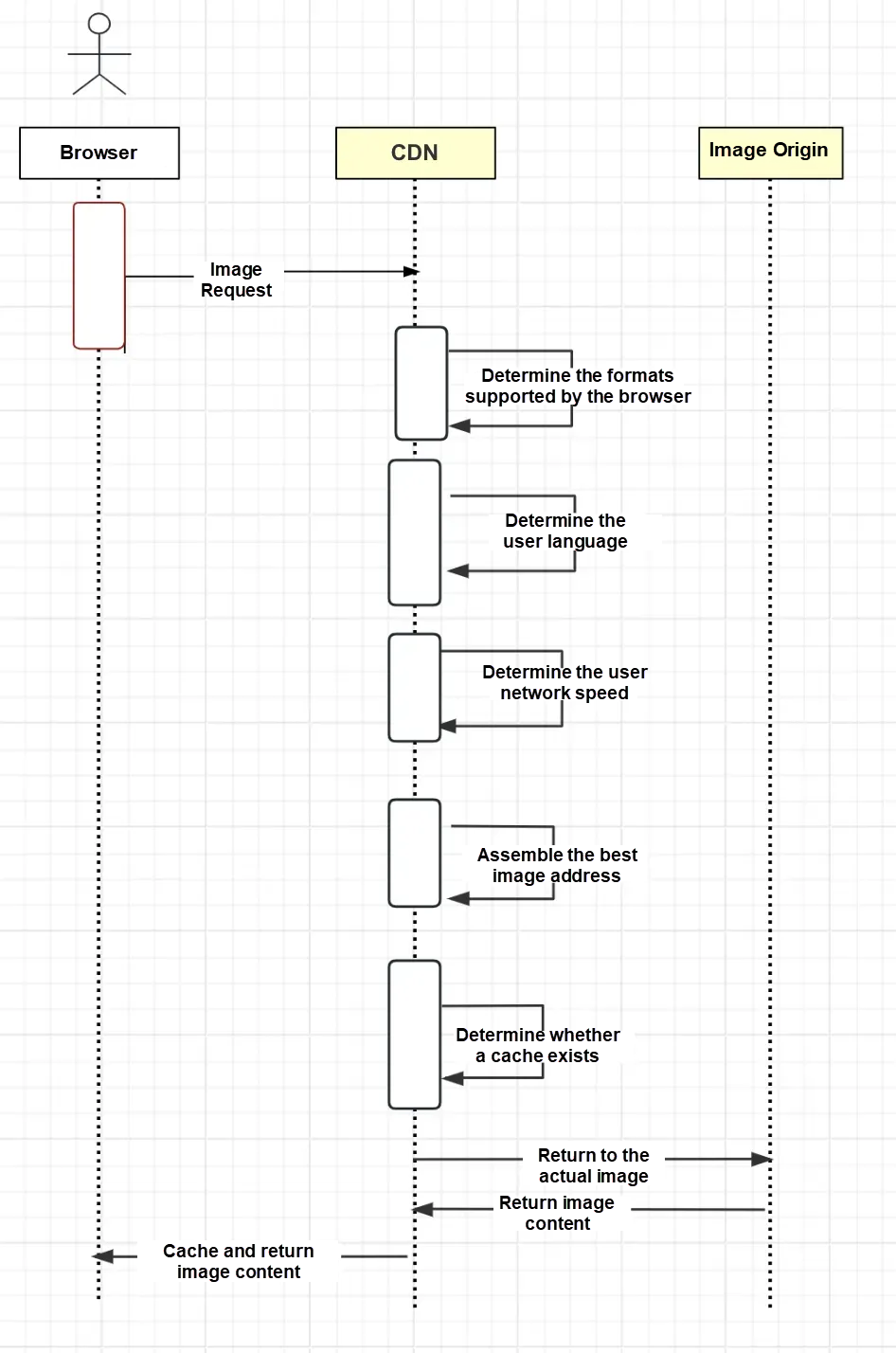
Even every time the user loads the page, the network speed is graded based on the user performance, and recorded in the cookie of the image domain name. The next time the user initiates an image request, CDN can determine the image quality returned to the user based on the network speed information that stored in the cookie.
Most Web developers are familiar with the WebP format, but probably haven't started using the AVIF format yet. AVIF is a new image format based on AV1 video encoding for storing images or image sequences compressed by AV1 as HEIF file format. Compared with JPEG and WEBP, it has a higher compression rate and better image details, saving about 50% of the size compared with JPEG and about 20% compared with WebP.
Comparing AVIF vs WebP file sizes at the same DSSIM
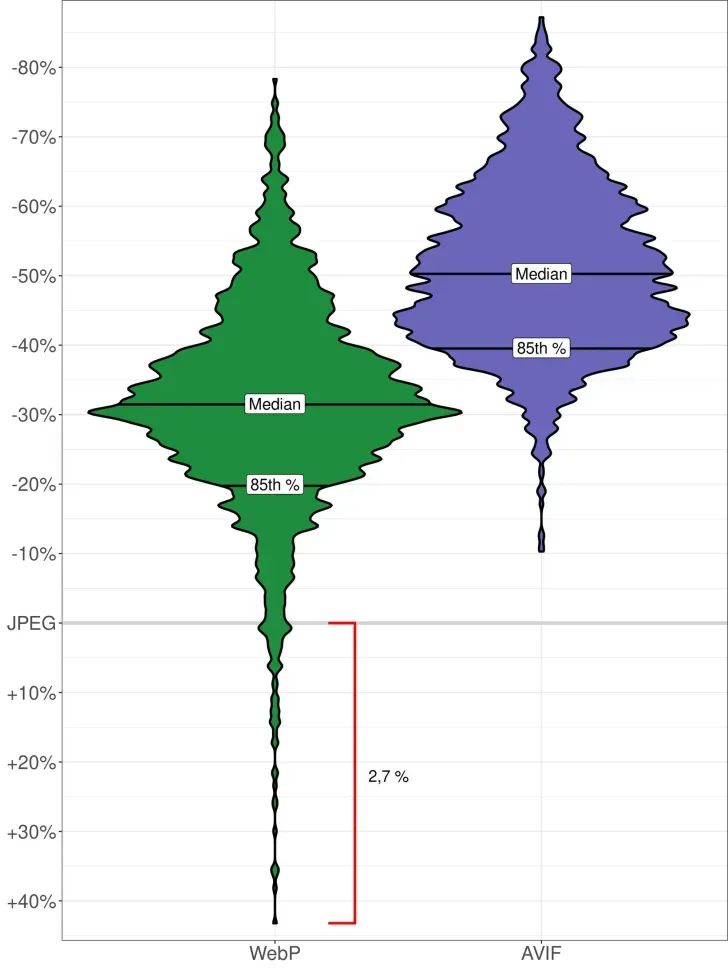
Overall, taking JPEG as the base point, AVIF is leading across the board, even under boundary conditions. WebP may exceed JEPG under boundary conditions.
| Type | 50th quantile compression ratio | 85th quantile compression ratio |
| WebP | -30% | -20% |
| AVIF | -50% | -40% |
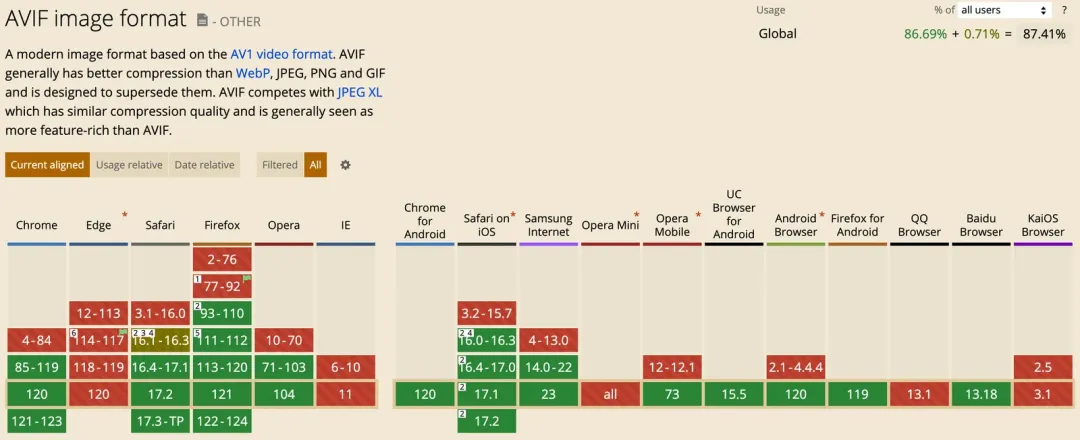
It is well-supported by mainstream browsers and the only downside is that Edge does not support it yet.
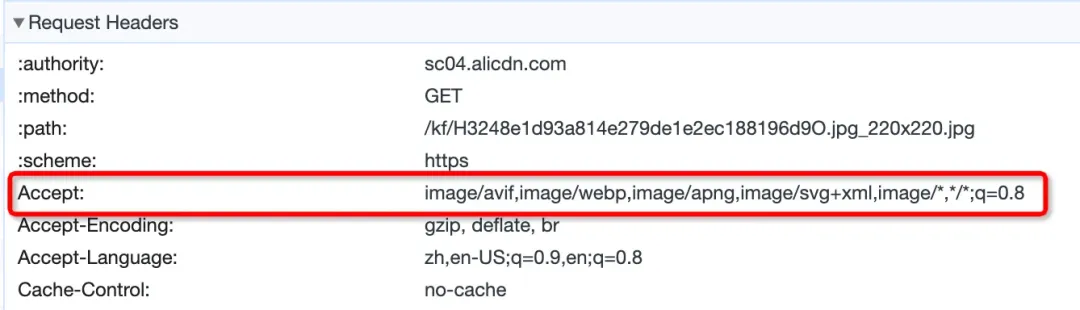
The browser declares the supported image format in the Accept header information when requesting an image. This can be used to identify the image in CDN and return the image content in different formats by using the same image address.
Avoid loading 1px transparent images on the frontend to determine whether the browser supports a specific image format, and then modify the image URL to obtain the image in the corresponding format. This approach has two drawbacks:
• Initiating an image request depends on the asynchronous process of frontend format determination, so the request timing is delayed.
• Using images with a new format including later adjustments, requires modifying the frontend code.
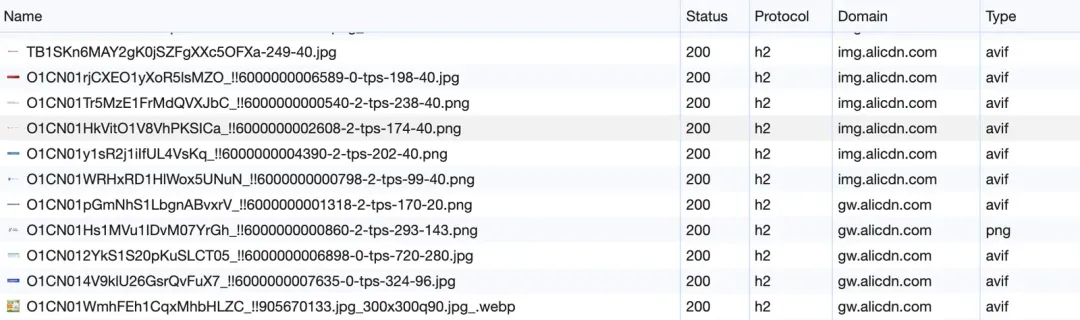
In the Chrome Dev Tools network panel, you can see that websites such as Taobao and JD have begun to use AVIF format images.
Progressive loading of images is a technique that progressively displays images during web browsing. A low-quality version of the image can be seen first before it is fully downloaded and then the image will gradually become clearer until it is fully loaded. There are generally two approaches:
• Use Image Formats that Support Progressive Loading: PJPEG or progressive WebP both naturally support progressive loading.
• Use a small image as a placeholder and replace it with a large image.
The progressive loading effect of the image is similar to an enhanced version of the skeleton diagram, but there are several problems with progressive loading.
• User Experience: Although progressive images allow users to see the content faster, blurred images may also make users feel confused. Different users have different feelings about blurred images. If the images take a long time to load, users may even regard them as web page failures.
• Performance Overhead: Two progressive loading solutions, limiting image formats or loading multiple images, increase the image size and incur overhead such as file processing and encoding complexity. In particular, when using small images as placeholders, the frontend replacement solution may also lead to the deterioration of LCP indicators;
CSS sprites merge multiple small images into one large image. Using the CSS background positioning property, you can display only the corresponding part of the merged image instead of a separate image file. Reducing the number of HTTP requests is a common method to improve page loading speed in the HTTP/1.1 era.
However, the situation changes in HTTP/2. HTTP/2 introduces features such as multiplexing and header compression, which significantly improves the performance of sending multiple requests at the same time. Multiplexing allows multiple requests to be transferred in parallel over a single TCP connection, reducing the delay incurred by establishing multiple connections. Therefore, the performance advantage of CSS sprites in HTTP/2 is not as obvious as that in HTTP/1.1, and may even be counterproductive. The reasons are:
• Cache Efficiency: If an image in the sprite diagram changes, even if other images do not change, the entire sprite diagram needs to be downloaded and cached again, resulting in cache failure;
• Excessive Download: When the page only needs a few images in the sprite diagram, it is still necessary to download the entire merged image, which may cause unnecessary data transfer;
• Rendering Performance: Large sprite diagrams may affect the rendering performance of the browser, especially on mobile devices, because more CPU and memory are required to handle decoding and background positioning of large images;
At the same time, CSS sprites require additional maintenance work. Whenever the image changes, the entire sprite diagram needs to be regenerated and the CSS positioning needs to be updated, which makes it more complicated to manage. In the era of HTTP/2, CSS sprites may no longer be the best solution for performance optimization, and icon fonts, base64, or SVG images may be better choices.
In scenarios with a large number of images, non-first-screen images are lazily loaded, generally through JavaScript. Now most mainstream browsers through load="lazy" naturally support lazy loading of images and the method is also very simple.
<img src="image-to-lazy-load.jpg" loading="lazy">This property has three possible values:
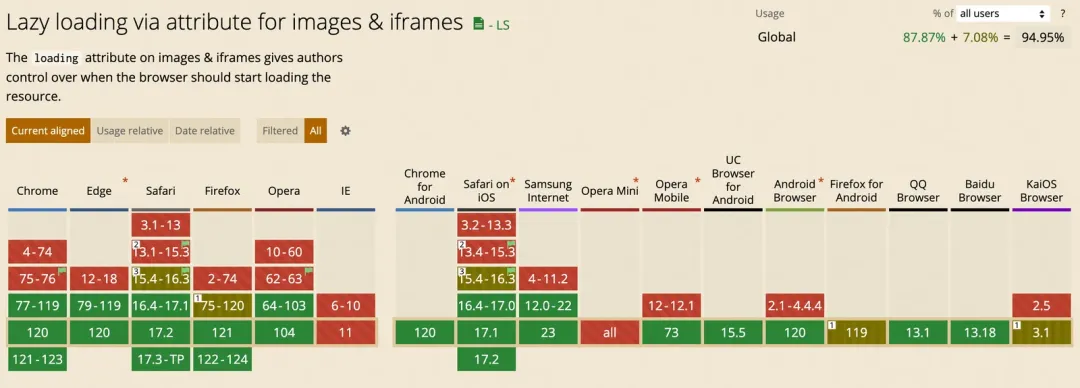
When this property is set for an image, the browser determines when to load the image based on its heuristic algorithm. These algorithms take into account multiple factors, such as the distance the image is about to enter the viewport or the current network conditions of the user. In general, the heuristic algorithm works as follows:
• Viewport Proximity: The browser monitors page scrolling to check the distance of the lazy-loaded image from the viewport. When the image is about to appear in the viewport, the browser starts loading the image. There is no uniform standard for the distance threshold for starting to load images, and different browsers may have different implementations.
• Network Conditions: Some browsers may determine whether to load images in advance based on the user network conditions, such as whether they are using data traffic or Wi-Fi.
• CPU and Memory Usage: If the device of the user has a high CPU or memory usage rate, the browser may delay loading images until resource usage decreases.
• Battery Status: For mobile devices, the browser may load resources more actively when the battery is full.
Although developers cannot precisely control the timing of image loading, the native support of the browser considers more than just the scroll position, which is relatively more reasonable. By the way, using JavaScript lazy loading itself also has a performance overhead, which can affect the FPS of the page.
content-visibility is a CSS property that allows the browser to skip rendering work for elements that are not on the screen until the user scrolls to their position. By skipping the rendering of invisible content, content-visibility can significantly reduce the initial loading time of the page and reduce memory usage, thereby improving the user experience. With the contain-intrinsic-size property, you can occupy the container before rendering.
<style>
  .image-gallery {
    content-visibility: auto;
    contain-intrinsic-size: 1000px 500px; /* Set a suitable placeholder size*/
  }
</style>

<div class="image-gallery">
<img src="image1.jpg" alt="Description1">
<img src="image2.jpg" alt="Description2">
<!-- More images -->
</div>
The browser compatibility of content-visibility is not very optimistic and needs to be judged by developers when they use it.

Decoding images and videos is a compute-intensive operation that may consume a large amount of CPU resources, especially for media files with high resolution or complex encoding formats. If the main thread is blocked by the decoding operation of images or videos, users may experience a stutter or delay when they scroll the page or try to interact.
Adding decoding="async" to non-first-screen images or videos allows the browser to process images and decode videos in the backend without blocking the main thread and continue to process and render the rest of the page. This can help improve page loading performance, reduce user-perceived delays, and provide a smoother user experience.
<img src="image.jpg" decoding="async">
Disclaimer: The views expressed herein are for reference only and don't necessarily represent the official views of Alibaba Cloud.
Alibaba Cloud Unveils Open-Source AI Reasoning Model QwQ and New Image Editing Tool

1,540 posts | 516 followers
FollowKalpesh Parmar - May 22, 2026
5544031433091282 - October 9, 2023
Alibaba F(x) Team - February 23, 2021
Kalpesh Parmar - May 21, 2026
OpenAnolis - June 15, 2022
Alibaba Cloud Serverless - May 26, 2021
1,540 posts | 516 followers
Follow HTTPDNS
HTTPDNS is a domain name resolution service for mobile clients. It features anti-hijacking, high accuracy, and low latency.
Learn More Elastic High Performance Computing
A HPCaaS cloud platform providing an all-in-one high-performance public computing service
Learn More Cloud Parallel File Storage
The fully-managed scalable parallel file system can meet your requirements on high-performance computing.
Learn More Remote Rendering Solution
Connect your on-premises render farm to the cloud with Alibaba Cloud Elastic High Performance Computing (E-HPC) power and continue business success in a post-pandemic world
Learn MoreMore Posts by Alibaba Cloud Community

