This blog will guide you how to use Wan to generate your own creative videos. Welcome to try out.
🧙🏻 Wan Prompts Recipe
Prompts are used to describe the content and motion within a video, serving as a key factor in controlling the visuals and effects. The more complete, precise, and detailed the prompt, the higher the quality of the generated video, and the closer it aligns with your expectations. AI Video Creation Guide
To help you get started quickly, we've provided four Prompt Recipe tailored to different usage needs:
Basic Formula For new users trying AI video for the first time or seeking creative inspiration : Simple, open-ended prompts can generate more imaginative videos
Prompt = Subject + Scene + Motion
-
Subject: The main focus of the video, which can be a person, animal, plant, object, or an imagined entity that may not physically exist.
-
Scene: The environment where the subject is situated, including background and foreground. It can be a real physical space or an imagined fictional setting.
-
Motion: This includes both the subject's specific movements and the general motion within the scene. It can range from stillness, subtle movements, and partial motions to large-scale or overall dynamic action.
Advanced Formula For users with some experience in AI video creation : Adding richer, more detailed descriptions to the basic formula enhances video quality, vividness, and storytelling.
Prompt = Subject (Subject Description) + Scene (Scene Description) + Motion (Motion Description) +Aesthetic Contro + Stylization
-
Subject Description: Details about the subject’s appearance, described using adjectives or short phrases. For example: "A black-haired Miao girl wearing ethnic minority clothing" or "A flying fairy from another world, dressed in tattered yet elegant attire, with a pair of strange wings made of rubble fragments."
-
Scene Description: Details about the environment where the subject is located, described using adjectives or short phrases.
-
Motion Description: Describes the characteristics of movement, including amplitude, speed, and effects of the motion. Examples: "Violently swaying," "Slowly moving," or "Shattering glass."
-
Aesthetic Control: Includes elements like Light Source, Lighting Environment, Shot Size (Framing), Camera Angle, Lens, and Camera Movement. For common cinematic terms, please refer to the Prompt Dictionary below.
-
Stylization: Describes the visual style of the scene, such as "Cyberpunk," "Line-drawing illustration," or "Post-apocalyptic style." See the Prompt Bank below for common styling examples.
Image-to-Video Formula the source image already establishes the subject, scene, and style. Therefore, your prompt should focus on describing the desired motion and camera movement.
Prompt = Motion Description + Camera Movement
-
Motion Description: Describe the motion of elements in your image (e.g., people, animals), such as "running" or "waving hello." You can use adverbs like "quickly" or "slowly" to control the pace and intensity of the action.
-
Camera Movement: If you have specific requirements for camera motion, you can control it using prompts like "dolly in" or "pan left." If you wish for the camera to remain still, you can emphasize this with the prompt "static shot" or "fixed shot."
Sound formula Based on the native audio capabilities of the Wan 2.5 model, it adds descriptions of voices, sound effects, and background music to enhance sound control.
Suitable for the Wan2.5
Prompt = Subject + Scene + Motion + Sound description (Voice/Soun effects/Background music)
-
Sound description: A sound description details the audio elements in a video and how they change over time. It guides the sound content and ambience so they align precisely with the visual narrative, mainly including voice, sound effects, and BGM.
-
Voice = “the character’s spoken lines” + emotion + intonation + speech rate + timbre + accent
Example: A man is talking about his insomnia. He says, “love is not geting but giving.” The tone is relaxed, the pace is moderate, the voice is bright and clear, in American English.
-
Sound effects = sound source object + action + ambient sound
Example: A piece of glass falls from the table onto a wooden floor, making a “shatter” sound, in a quiet indoor environment.
-
Background music = Background music/BGM + style
Example: On a rainy night, in a gloomy, narrow corridor with a window at the end, suspense-style background music plays.
Reference to video Wan 2.6 can generate videos based on the main character in a reference input, taking into account appearance, motion, and voice. The character can be a person, cartoon, pet, or prop. Up to 2 characters can be included per video.
Suitable for the Wan2.6
Prompt = @Starring Role + Action + Dialogue + Scene
-
@Starring Role: By referencing the Starring Role video using @, up to 2 Starring Role videos can be used simultaneously. Each Starring Role can be cited multiple times throughout the prompt to precisely control their behavior.
-
Action: Describes the movement or state of the Starring Role or other elements, including being stationary, subtle movement, dynamic movement, as well as local or overall motion.
-
Dialogue: The spoken content of the starring role(s), supporting either solo lines or multi-role conversations.
-
Scene: The environment where the Starring Role is located, including both background and foreground elements. The scene can be either a real physical space or an imagined, fictional setting.
-
Example: This is a playful fairytale scene. @A is hopping and playing on the grass, @B is playing the piano under an apple tree nearby, and an apple falls onto @B's head. @A cheerfully points at @B and says, "You're going to become a scientist!"
Reference video A features a rabbit, and reference video B features a dog.
Multi-shot formula Supports generating coherent narrative videos with multiple shots, allowing precise control over shot structure, camera positions, and timing through prompts. Key details such as subjects, scenes, and atmosphere remain consistent across shots. You can also enable the "Smart Multi-Shot" feature to create multi-shot videos from simple prompts.
Suitable for the Wan2.6
Prompt = Overall Description + Shot Number + Timestamp + Subject Behavior
-
Overall Description: Provides a brief overview of the entire video, including the story theme, narrative style, main emotions, or core events, helping the system understand the overall direction of the narrative.
-
Shot Number: Assigns a number to each shot, distinguishing different scenes or segments of the video and helping to clearly organize the video structure.
-
Timestamp: Specifies the time range for each shot within the video to ensure the shot content aligns with the timeline, improving generation accuracy.
-
Subject Behavior: Describes in detail the specific actions, speech, expressions, and postures of the main characters or objects in each shot.
-
Example: This story is told from a third-person perspective and presents a short play about giving up and regaining hope.Shot 1 [0-3s]: The main character sits alone in the corner of the playground, looking down at a letter in their hands. Then, they quietly sigh, their eyes reflecting confusion and sadness.Shot 2 [4-6s]: Hard cut transition, fixed camera, close-up on the main character’s eyes, glistening with tears, displaying feelings of loss and helplessness.Shot 3 [7-10s]: Hard cut transition, scene shifts to a simple classroom. The second main character stands with a gentle yet determined gaze, dressed plainly and smiling warmly, walking toward the first main character.
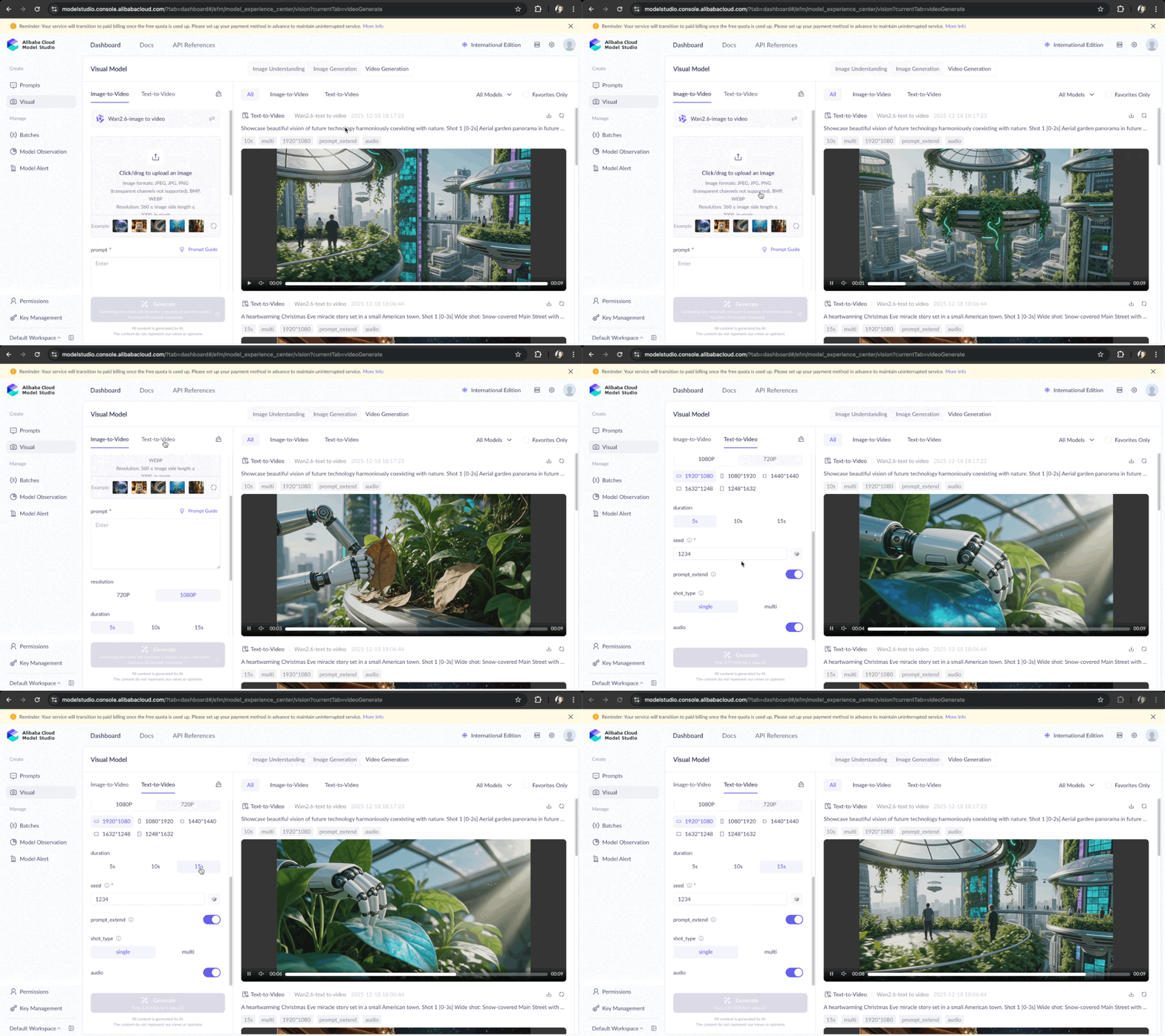
🕹 Try it Now on Model Studio (Generate up to 50s 1080p Videos for Free!!!)
Alibaba Cloud Model Studio Wan2.6 Playground


 Alibaba Cloud Model Studio
 QwenWork
 Qwen
Qwen


5430667978747041 January 9, 2026 at 5:17 pm
Ufaryan tech envío un archivo adjunto