By Zhihe from Model Studio
Model Studio AI Coding Plan now availble for OpenClaw (Moltbot/Clawdbot) and can be used to offset usage of the Qwen3-Max-Thinking trillion-parameter reasoning large model (model name: qwen3-max-2026-01-23)
Start for as low as $5. 👉🏻 Subscribe Now
OpenClaw (Moltbot/Clawdbot) is a personal AI assistant you run on your own devices.
● It answers you on the channels you already use (WhatsApp, Telegram, Slack, Discord, Google Chat, Signal, iMessage, Microsoft Teams, WebChat), plus extension channels like BlueBubbles, Matrix, Zalo, and Zalo Personal.
● It can speak and listen on macOS/iOS/Android, and can render a live Canvas you control.
The Gateway is just the control plane — the product is the assistant. If you want a personal, single-user assistant that feels local, fast, and always-on, this is it.
Clawdbot was officially renamed to Moltbot on January 27, 2026.
Moltbot was officially renamed to OpenClaw on January 30 ,2026.
After this date, users who install using
https://molt.bot/install.shand encounter errors like "zsh: command not found" may need to replace the original "clawdbot" commands in this tutorial with "moltbot".
Verify your Node.js version. Moltbot requires Node >=22. If you're not running version 22 or higher, upgrade Node first (you can use nvm, fnm, or brew).
node -vAccording to Moltbot's installation guide, you can choose different installation methods.
For macOS/Linux users, we recommend the official one-line CLI installation:
curl -fsSL https://molt.bot/install.sh | bashWindows (PowerShell):
iwr -useb https://molt.bot/install.ps1 | iexAlternatively, you can install globally via npm or pnpm:
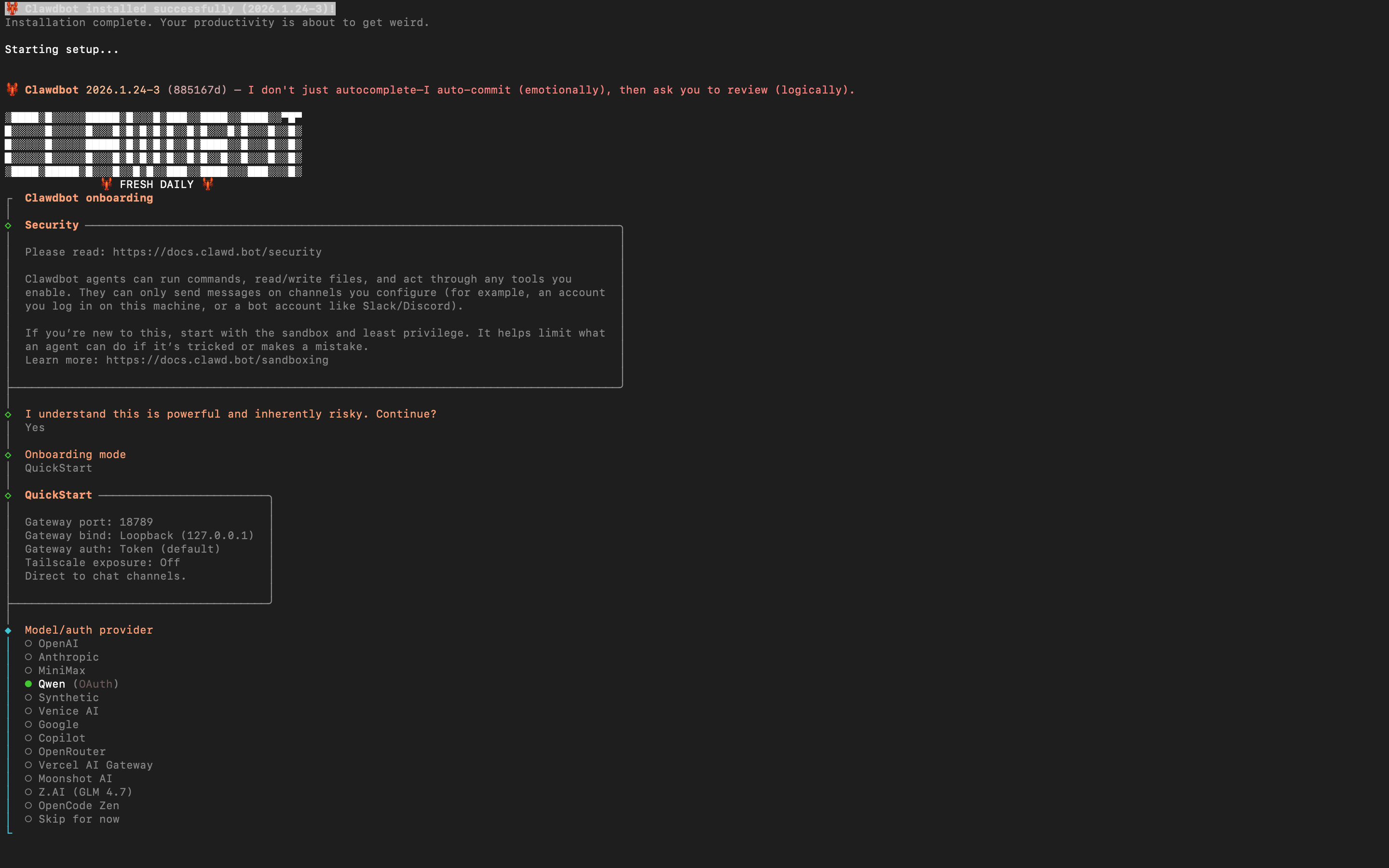
npm install -g moltbot@latestpnpm add -g moltbot@latestAfter the script completes, you'll see the clawdbot onboarding instructions, indicating a successful installation 👇🏻
| Reference Configuration | Your Selection |
|---|---|
| I understand this is powerful and inherently risky. Continue? | Select "Yes" |
| Onboarding mode | Select "QuickStart" |
| Model/auth provider | Select "Skip for now" (can be configured later) The model provider Qwen (OAuth) in the installation wizard refers to Qwen Chat login. After registration and login, you can access the OAuth flow for Qwen Coder and Qwen Vision models at the free tier (2,000 requests per day, subject to Qwen rate limits). |
| Filter models by provider | Select "All providers" |
| Default model | Use default configuration |
| Select channel (QuickStart) | Select "Skip for now" (can be configured later) |
| Configure skills now? (recommended) | Select "No" (can be configured later) |
Moltbot supports using models.providers (or models.json) to add custom model providers or OpenAI/Anthropic-compatible proxy services.
Model Studio's model API supports OpenAI-compatible interfaces. If you are using AI coding plan:
Model Base URL:
https://coding-intl.dashscope.aliyuncs.com/v1
https://coding-intl.dashscope.aliyuncs.com/apps/anthropic
e.g.qwen3-max-2026-01-23, etc.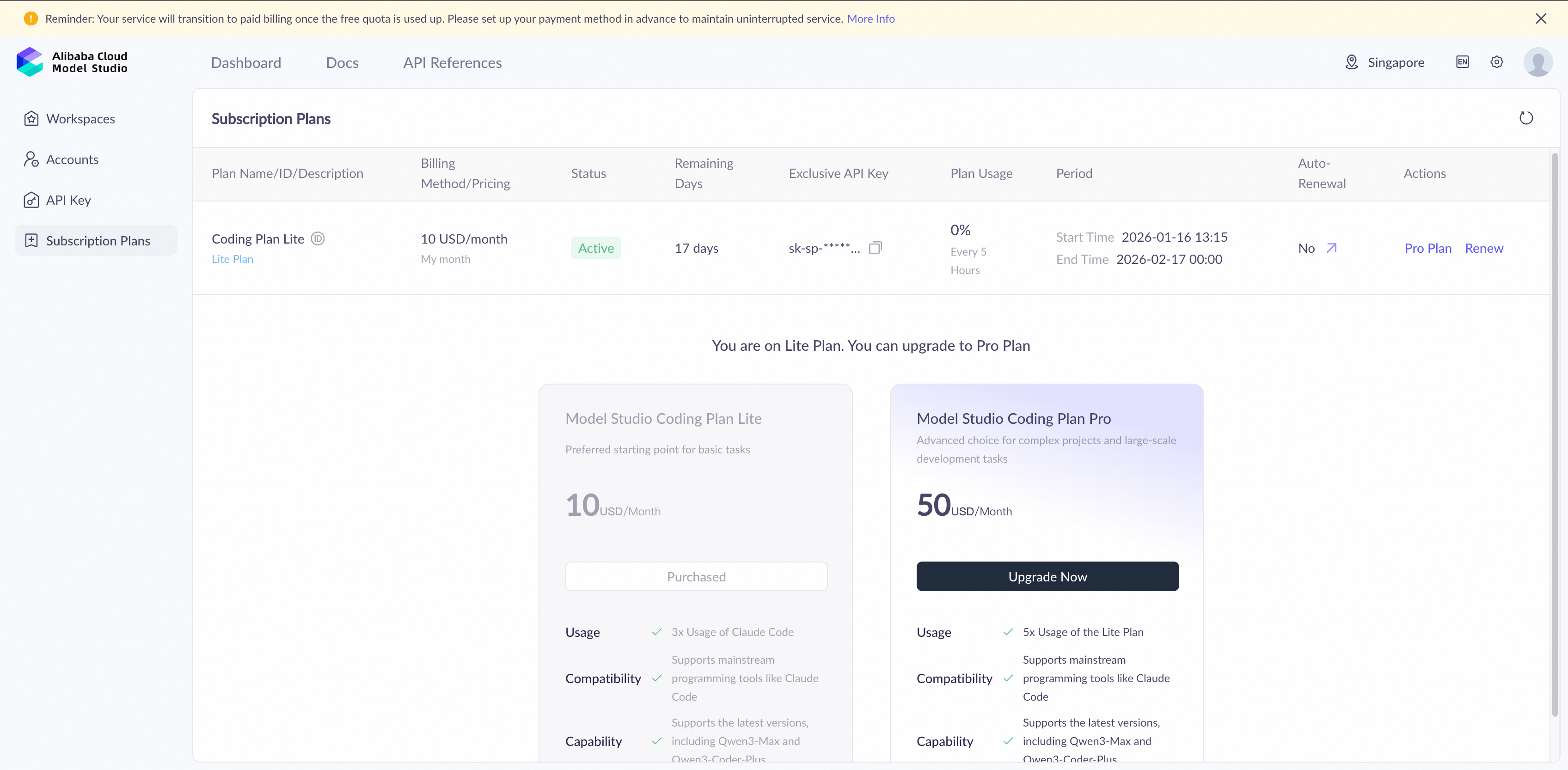
Or you can choose other models, you just need to log in to the Model Studio Console and prepare:
https://dashscope-intl.aliyuncs.com/compatible-mode/v1
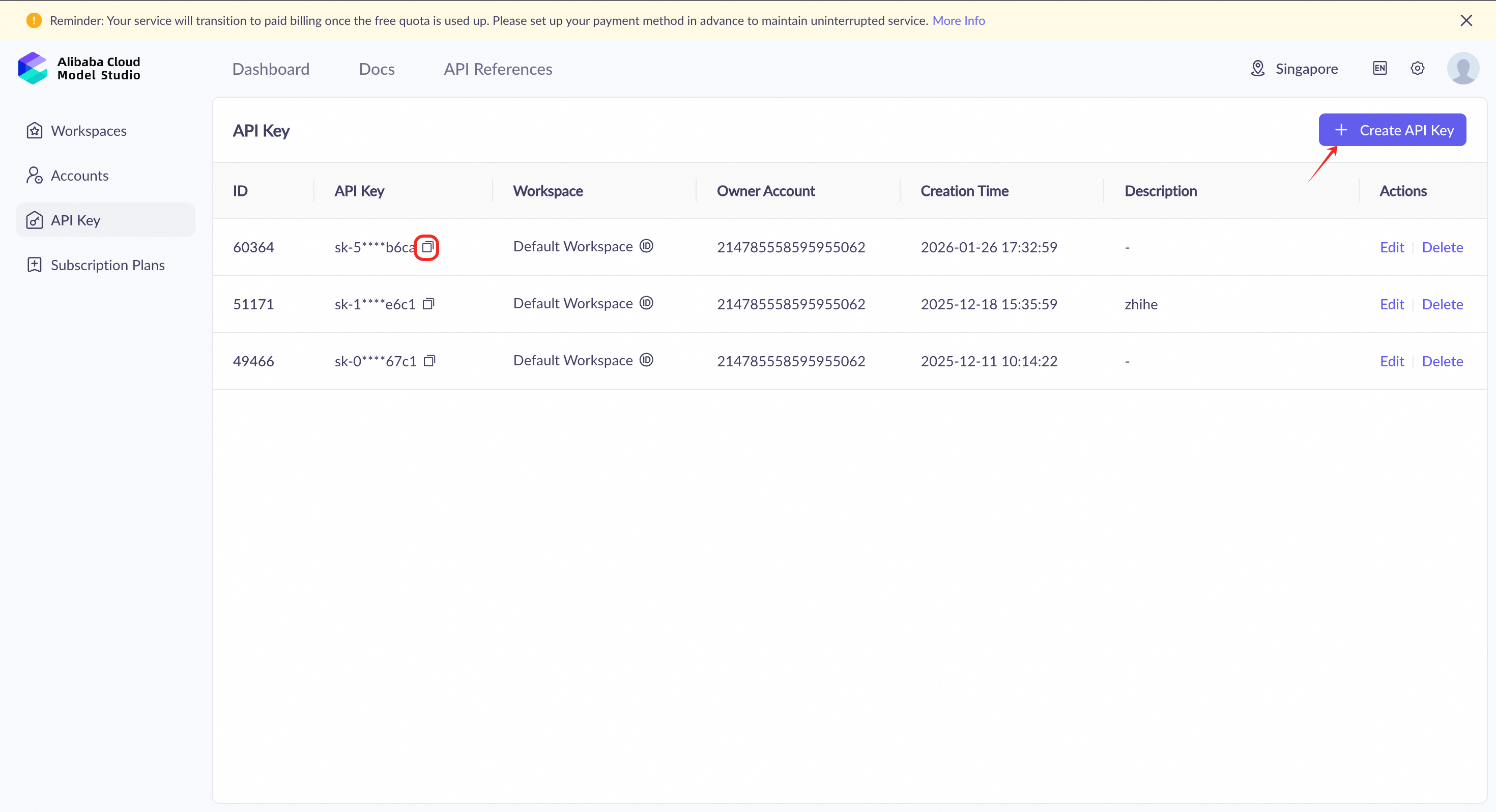
qwen-plus, qwen3-max, etc.Log in to the Model Studio Console, navigate to the right top corner setting page, then go to API Key, click Create API Key, and copy it.
When you use the model service in Alibaba Cloud Model Studio, you must select a region and deployment mode. These choices affect the service's response speed, cost, available models, and default rate limits. Region Selection
● Region: Determines the endpoint (base URL) of your model service and where static data, such as prompts and model outputs, is stored.
● Deployment mode: Determines the region where model inference is performed.
We recommend configuring the API key as an environment variable to avoid explicitly exposing it in code and reduce the risk of leakage.
a. Execute the following command in your terminal to check your default shell type:
echo $SHELLb. Based on your default shell type, choose either zsh or bash:
| zsh | bash | |
| 1 | Execute the following command to append the environment variable to your ~/.zshrc file:# Replace YOUR_DASHSCOPE_API_KEY with your actual Alibaba Cloud Model Studio API Keyecho "export DASHSCOPE_API_KEY='YOUR_DASHSCOPE_API_KEY'" >> ~/.zshrc
|
Execute the following command to append the environment variable to your ~/.bash_profile file:# Replace YOUR_DASHSCOPE_API_KEY with your actual Alibaba Cloud Model Studio API Keyecho "export DASHSCOPE_API_KEY='YOUR_DASHSCOPE_API_KEY'" >> ~/.bash_profile
|
| 2 | Execute the following command to apply the changes:source ~/.zshrc
|
Execute the following command to apply the changes:source ~/.bash_profile
|
| 3 | Open a new terminal window and run the following command to verify the environment variable:echo $DASHSCOPE_API_KEY
|
Open a new terminal window and run the following command to verify the environment variable:echo $DASHSCOPE_API_KEY
|
Note: Moltbot configuration is strictly validated. Incorrect or extra fields may cause the Gateway to fail to start. If you encounter errors, run
moltbot doctor(orclawdbot doctor) to check the error messages.
Moltbot uses the provider/model format for model references. We need to add model information to the configuration in a way that Moltbot can parse. You can choose either the Web UI method or manually edit the configuration file.
# For installations before January 27, 2026 (clawdbot)
clawdbot dashboard

# For installations after January 27, 2026 (moltbot)
moltbot dashboard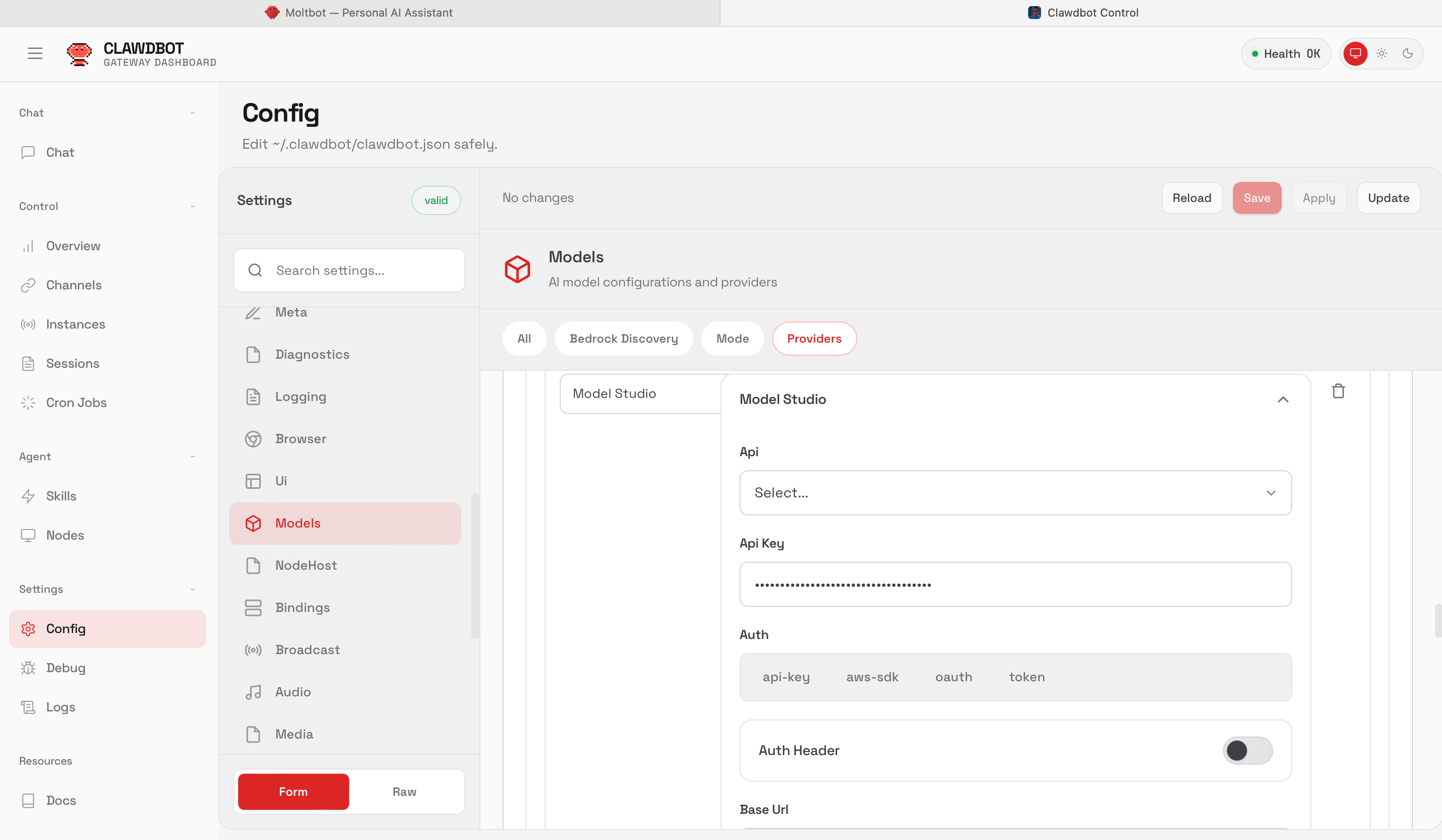
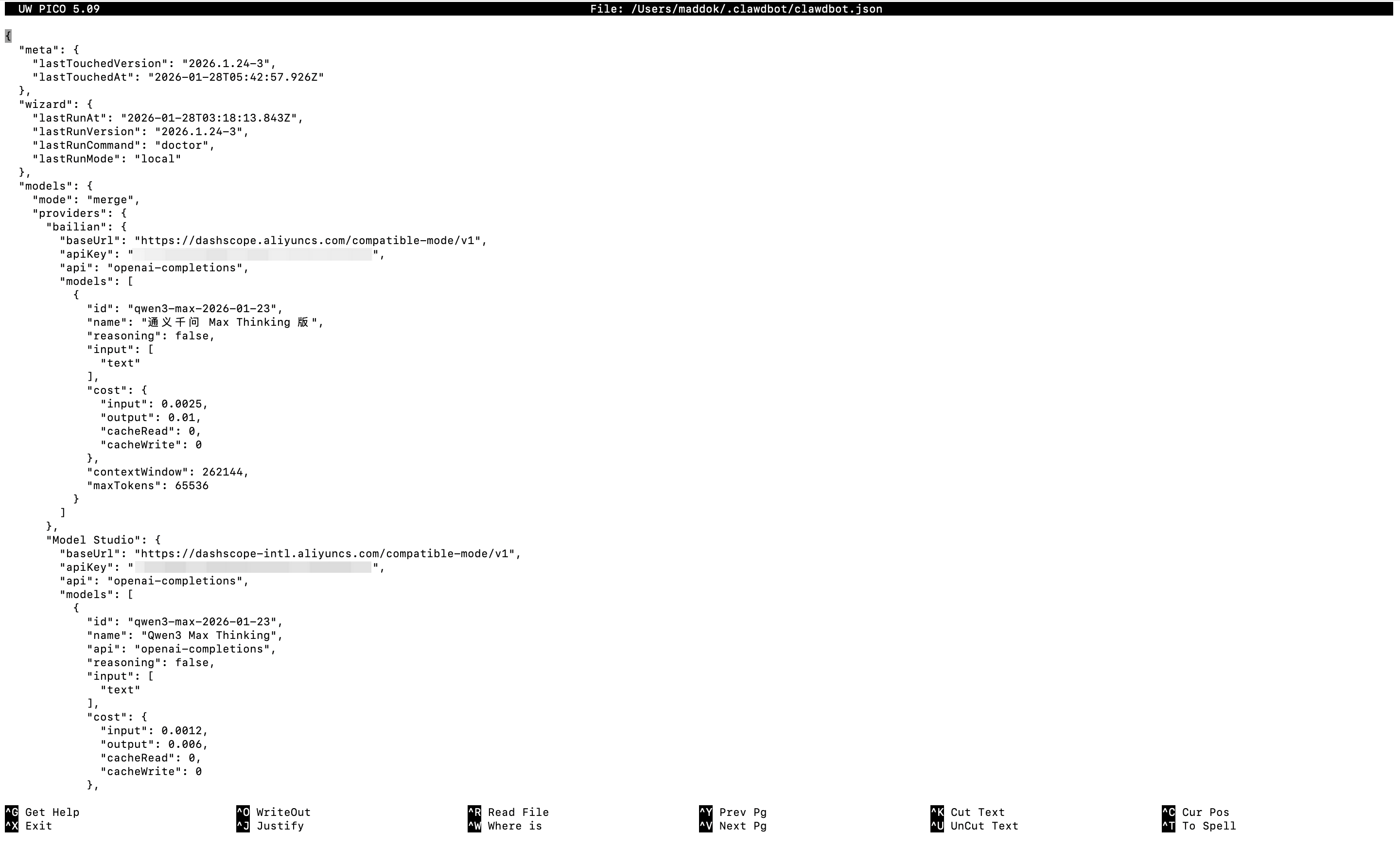
Alternatively, manually edit the configuration file at ~/.moltbot/moltbot.json (or ~/.clawdbot/clawdbot.json for older installations). Here's an example configuration for Model Studio's newly released qwen3-max-2026-01-23 model (released on January 26, 2026):
{
  agents: {
    defaults: {
      model: { primary: "modelstudio/qwen3-max-2026-01-23" },
      models: {
        "modelstudio/qwen3-max-2026-01-23": { alias: "Qwen Max Thinking" }
      }
    }
  },
  models: {
    mode: "merge",
    providers: {
      modelstudio: {
        baseUrl: "https://dashscope-intl.aliyuncs.com/compatible-mode/v1",
        apiKey: "${DASHSCOPE_API_KEY}",
        api: "openai-completions",
        models: [
          {
            id: "qwen3-max-2026-01-23",
            name: "Qwen3 Max Thinking",
            reasoning: false,
            input: ["text"],
            cost: { input: 0.0012, output: 0.006, cacheRead: 0, cacheWrite: 0 },
            contextWindow: 262144,
            maxTokens: 32768
          }
        ]
      }
    }
  }
}
If you're using nano to edit, execute the following command to open the configuration file and paste the content:
# For installations before January 27, 2026 (clawdbot)
nano ~/.clawdbot/clawdbot.json

# For installations after January 27, 2026 (moltbot)
nano ~/.moltbot/moltbot.json
After pasting the configuration, in the nano editor, press Ctrl + X, then Y, and finally Enter to save and close the file.
Of course, if your use case is simple and doesn't involve complex agent tool calls, you can also use qwen-plus model:
{
  agents: {
    defaults: {
      model: { primary: "modelstudio/qwen-plus" },
      models: {
        "modelstudio/qwen-plus": { alias: "Qwen Plus" }
      }
    }
  },
  models: {
    mode: "merge",
    providers: {
      bailian: {
        baseUrl: "https://dashscope-intl.aliyuncs.com/compatible-mode/v1",
        apiKey: "${DASHSCOPE_API_KEY}",
        api: "openai-completions",
        models: [
          {
            id: "qwen-plus",
            name: "Qwen Plus",
            reasoning: false,
            input: ["text"],
            cost: { input: 0.0004, output: 0.0012, cacheRead: 0, cacheWrite: 0 },
            contextWindow: 262144,
            maxTokens: 32000
          }
        ]
      }
    }
  }
}Run the following commands in your terminal to ensure the configuration takes effect:
# Method 1: Stop and start the service
clawdbot gateway stop
# Wait 2-3 seconds, then start the service
clawdbot gateway start

# Method 2: Use the restart command directly
clawdbot gateway restart
You can also use the following command to check if the model you just configured is recognized by Clawdbot:
clawdbot models listYou can also perform a real connectivity test (this will send actual requests and may incur costs):
clawdbot models status --probe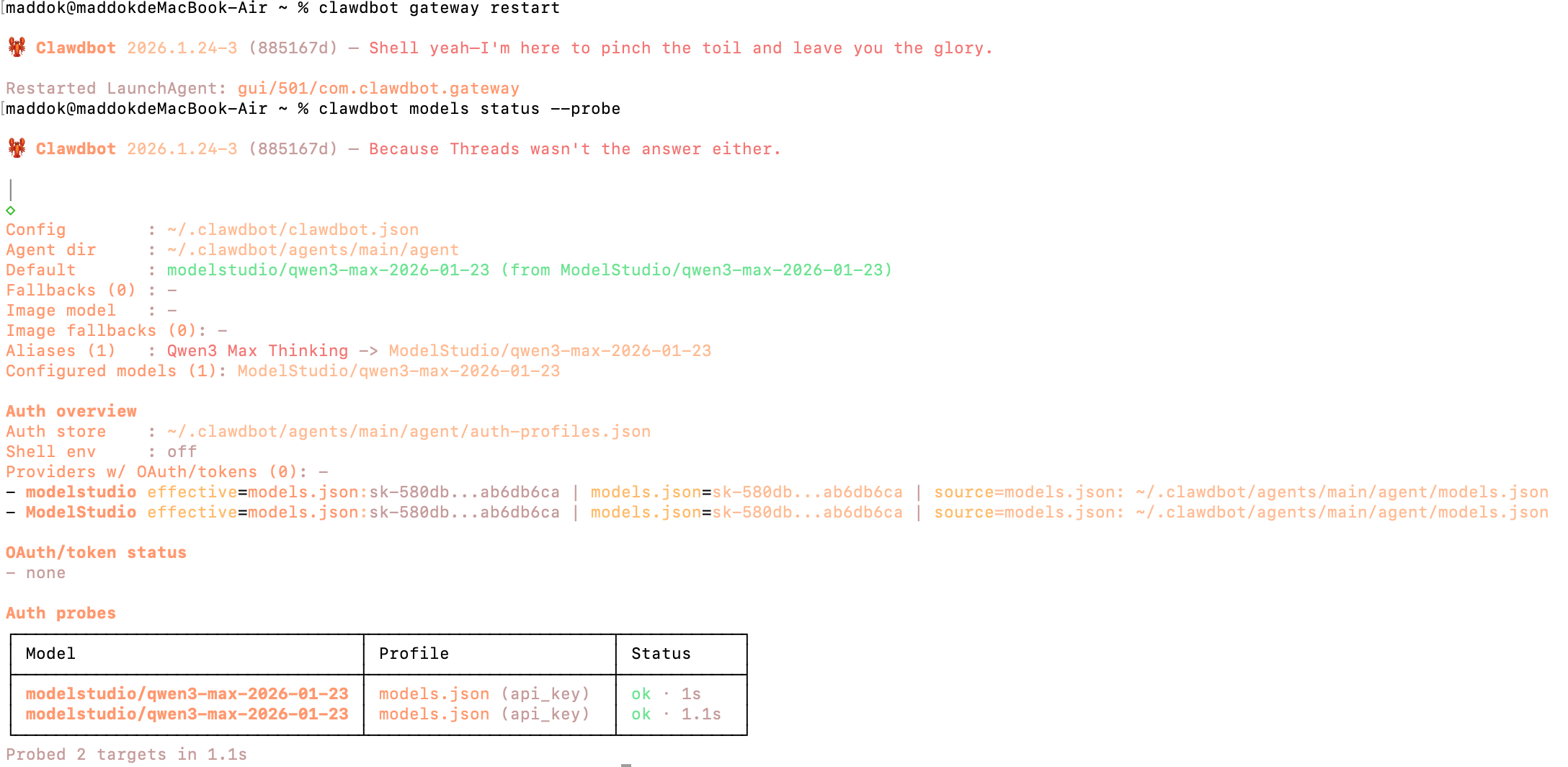
If you want to verify the model's response before connecting to chat applications like Discord or Telegram, you can directly launch the WebUI interface to start chatting👇🏻
# For installations before January 27, 2026 (clawdbot)
clawdbot dashboard

# For installations after January 27, 2026 (moltbot)
moltbot dashboard
Or run an agent conversation in CLI:
clawdbot agent --agent main --message "Introduce Qwen3 Max capabilities"Or you could try open source chat ui, such as:
https://github.com/agentscope-ai/agentscope-spark-design/tree/main/packages/clawd-chat-ui
Alibaba Cloud Model Studio provides model services in the Singapore, Virginia, and Beijing regions. Each region has a different API key. Accessing the service from a nearby region reduces network latency. For more information, see Select a deployment mode.
| Region Name | Region ID | Static data storage location |
|---|---|---|
| Singapore | ap-southeast-1 | Singapore |
| US (Virginia) | us-east-1 | Virginia |
| China (Beijing) | cn-beijing | Beijing |
When you call a model using an API or SDK, use the model service endpoint that corresponds to the region, see Qwen API Reference.
| Model Name | Suitable Scenario | Pricing |
| qwen3-max-2026-01-23 | The best-performing model in the Qwen series, suitable for handling complex, multi-step tasks. qwen3-max-2026-01-23 supports calling built-in tools to achieve higher accuracy when solving complex problems. | 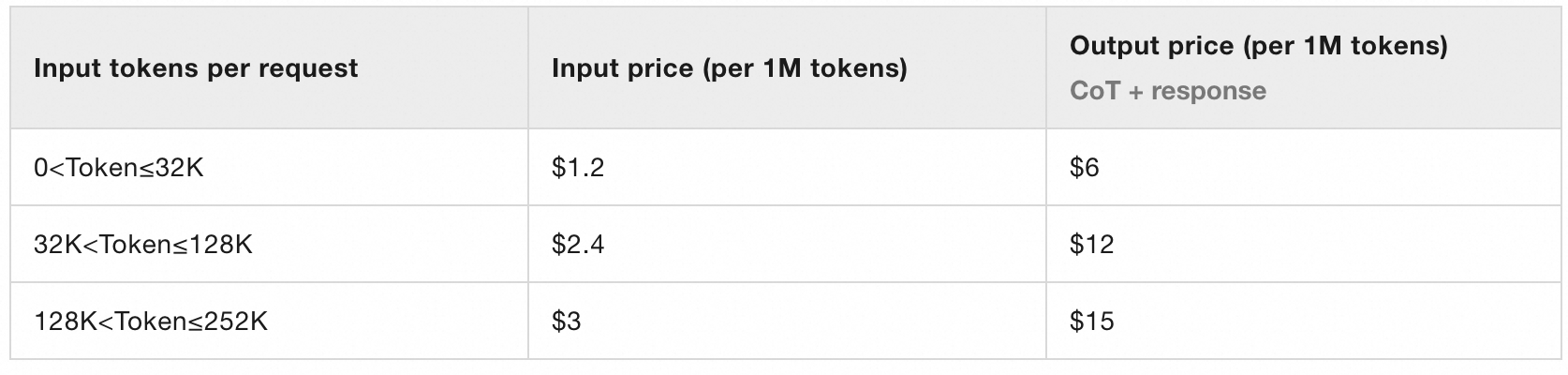 |
| qwen-plus | Balances performance, speed, and cost, making it the recommended choice for most scenarios. | 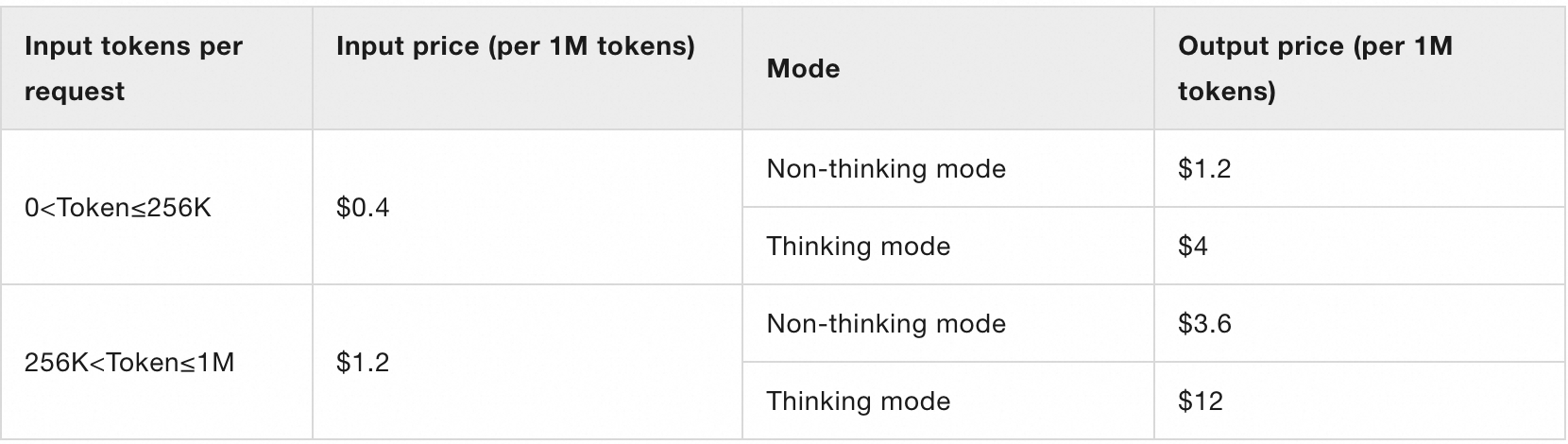 |
OpenClaw Launches on Alibaba Cloud Simple Application Server
Alibaba Cloud to Debut AI-powered Pin Trading Experience in Olympic Village at Milano Cortina 2026

1,532 posts | 515 followers
FollowAlibaba Cloud Community - April 24, 2026
Alibaba Cloud Community - April 17, 2026
Alibaba Cloud Community - April 2, 2026
CloudSecurity - January 30, 2026
JwdShah - March 27, 2026
Regional Content Hub - June 5, 2026
1,532 posts | 515 followers
Follow QwenWork
QwenWork is dedicated to helping employees strengthen their professional competitiveness in the AI era and to enabling enterprises to improve organizational effectiveness.
Learn More Token Plan
Build more, spend less. One plan, every modality.
Learn More
Alibaba Cloud Model Studio
A one-stop generative AI platform to build intelligent applications that understand your business, based on Qwen model series such as Qwen-Max and other popular models
Learn More Qwen
Qwen
Full-range, open-source, multimodal, and multi-functional
Learn MoreMore Posts by Alibaba Cloud Community

