Every system will stop working at some point. Something like a power outage can shut down a data hall. A bad update can mess up a database. The whole region can go down. Someone can accidentally delete important information. Disaster recovery is about planning what to do. It is about getting the application up and running again. It is also about how much data and time it will take to recover.
This article will examine the ways people recover from disasters. It will talk about the two numbers that people think about when making decisions. It will also discuss ways that data is copied and kept safe. It will look at the habits that plan work when things go wrong.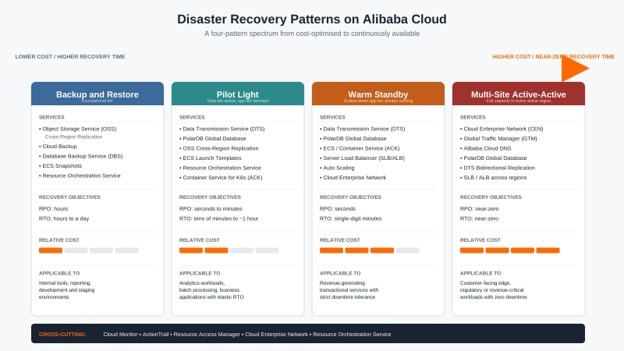
Recovery Point Objective (RPO) is how much data you can afford to lose, and this is measured in time. For example, if you have a five-minute Recovery Point Objective (RPO), then the recovery process must take you to a state that is no more than five minutes old. This is really about how you make a copy of your data and store it somewhere safe.
Recovery Time Objective (RTO) is how long you can be down before the recovery process has to be finished. This is about how you can get your infrastructure and data back up and running.
These two numbers do not change together. If you make a backup every night, then you have a 24-hour Recovery Point Objective (RPO). If it takes six hours to restore the data, then your Recovery Time Objective (RTO) is six hours. You can also make copies of your data at all times, which gives you a Recovery Point Objective (RPO). You may still need an hour to get a standby system ready and move traffic to it, which gives you a loose Recovery Time Objective (RTO).
Both of these numbers come from a Business Impact Analysis. For each workload, you need to figure out how much it costs if you are down for an hour and if you lose an hour of data. Then you set targets that the business is willing to pay to meet. You need to do this for each workload because different things need levels of protection. For example, a payments ledger and an internal wiki do not need the level of protection. One more thing to keep in mind is that the cost goes up quickly as you try to get closer to zero downtime and zero data loss. If you cut your recovery target in half, it will not cut the cost in half.
Figure 1 (to be produced): a Recovery Point Objective (RPO) and Recovery Time Objective (RTO) timeline that shows when the disaster happens, the point where you can recover your data, which is the Recovery Point Objective (RPO). The moment when your service is back up and running is the Recovery Time Objective (RTO)
DR patterns, sit on a spectrum. One end has storage and slow recovery. The other end has a live system and almost no recovery time.
There are four DR patterns. They cover everything in practice. Real systems usually mix them across tiers.
• Restore: This pattern involves copying data to a safe storage location on a schedule. When something breaks, you build infrastructure and restore the data.
The Recovery Point Objective (RPO) is the interval between backups, which can be hours a day. The Recovery Time Objective (RTO) is an hour. This is the option because you mainly pay for storage.
It is good for tools, reporting, and development/test environments.
A common mistake is not testing the process. If you don't test it, a backup is a guess, not a safety net.
• Pilot Light: In this pattern, a small core, the data layer runs all the time in the recovery region. It stays current through replication.
The app and compute tiers are switched off until you need them.
The RPO is minutes. The RTO is tens of minutes to an hour. The cost is low to moderate.
This pattern is good for workloads that need more data than nightly backups but can wait for a fleet to boot.
DR patterns sit on a spectrum. One end has storage and slow recovery. The other end has a live system and almost no recovery time.
There are four DR patterns. They cover everything in practice. Real systems usually mix them across tiers.
• Restore: This pattern involves copying data to a safe storage location on a schedule. When something breaks, you build infrastructure and restore the data.
The Recovery Point Objective (RPO) is the interval between backups, which can be hours a day. The Recovery Time Objective (RTO) is an hour. This is the option because you mainly pay for storage.
It is good for tools, reporting, and development/test environments.
A common mistake is not testing the process. If you don't test it, a backup is a guess, not a safety net.
• Pilot Light: In this pattern, a small core runs all the time in the recovery region. It stays current through replication.
The app and compute tiers are switched off until you need them.
The RPO is minutes. The RTO is tens of minutes to an hour. The cost is low to moderate.
This pattern is good for workloads that need more data than nightly backups but can wait for a fleet to boot.
Synchronous replication writes to your location and to your replica location before it marks the write as complete. This means that you will never lose any data that has been acknowledged, and your Recovery Point Objective is effectively zero. However, this method can be slow because it must travel to both locations, so it works well when your locations are close to each other, like in the region or nearby zones. It does not work well when your locations are far apart, like on different continents.
Asynchronous replication is another method that says the write is complete as soon as it is done on your primary location, and then it sends the data to your replica location a little later. This method is faster because it does not have to wait for the data to reach the location, so it works well even when your locations are far apart. But the downside is that there is a delay, and this delay is your Recovery Point Objective. It is the amount of data you would lose if your primary location suddenly disappeared.
Snapshots and log shipping are a method that sits between these two approaches. It takes a snapshot of your data at a point in time, and then it sends the changes that have been made sense then to your replica location. This way, you can recover your data to a point in time. Most backup and restore systems and pilot light setups use this method.
A good way to set up layers is to use replication within a region across different zones for high availability. This way, if one zone fails, you won't lose any data. For disaster recovery, you can use replication across regions. This helps you survive even if the whole region fails.
On Alibaba Cloud, you can see this in features like ECS disk snapshots and custom images. They also offer object storage with region replication and managed database cross-region replication.
Cloud Backups documentation on -region disaster recovery explains that most systems use two phases. First, there's a replication. Then there's a real-time replication of new data.
*Figure 3 (to be produced): replication within a region with zero data loss next to asynchronous replication, across regions, where data loss is limited by the replication lag.
A good plan should cover the trip, not just going out. When something goes wrong, you need to move the traffic to a system and get the backup system working. There are three things to think about: detection, which means checking if the system is down or just having a small problem, and it is best to do this from multiple places. Then there is promotion, which is when the backup system becomes the main one, and this should be automatic, not done by hand when people are stressed. The last thing is redirection, which means sending users to the system, and this can be done using the internet address system, but it can be slow, or a faster way is to use a special load balancer.
You have to be careful about something called split-brain, where both systems think they are the one, and they both accept changes, which can cause big problems because you end up with two different versions. To avoid this, you need to have a system that decides which one is the one, like a voting system or a way to block the other system from accepting changes.
The last step, failback, is often forgotten. This is when you switch back to the system once it is working again. You need to synchronize the data that changed while the backup system was being used and then switch back without causing another problem. You should practice this step as much as the first step because many teams do not realize they have a problem until it is too late, and they are trying to switch back during an emergency. Failback and failover are both important. You need to think about detection, promotion, and redirection for both.
Disclaimer: This article is for educational purposes and is neutral. Any references to specific Alibaba Cloud services are factual illustrations of how the patterns map to manage cloud primitives, not endorsements. Service capabilities and figures reflect documentation available at the time of writing and may change — consult the official documentation for current details.
Real-Time Fraud Detection Pipeline Architecture on Alibaba Cloud

127 posts | 2 followers
FollowKidd Ip - May 29, 2025
Kidd Ip - August 12, 2025
Alibaba Cloud Community - December 23, 2021
Alibaba Developer - December 16, 2021
Alibaba Clouder - August 10, 2020
Alibaba Tech - September 24, 2019
127 posts | 2 followers
Follow Hybrid Cloud Distributed Storage
Provides scalable, distributed, and high-performance block storage and object storage services in a software-defined manner.
Learn More OSS(Object Storage Service)
An encrypted and secure cloud storage service which stores, processes and accesses massive amounts of data from anywhere in the world
Learn More Storage Capacity Unit
Plan and optimize your storage budget with flexible storage services
Learn More Cloud Backup
Cloud Backup is an easy-to-use and cost-effective online data management service.
Learn MoreMore Posts by PM - C2C_Yuan

