By Sanjian
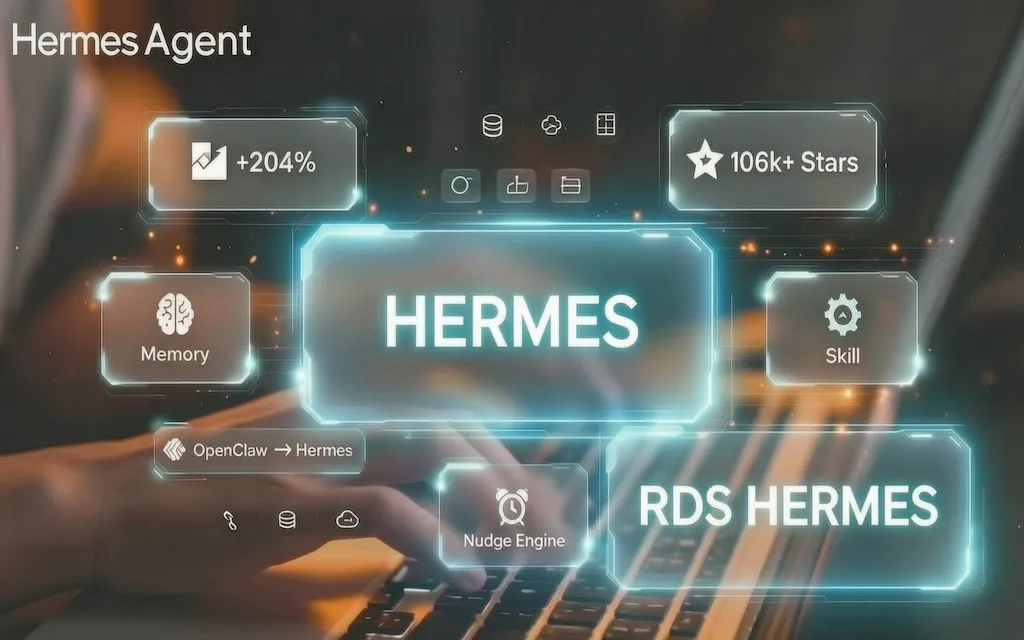
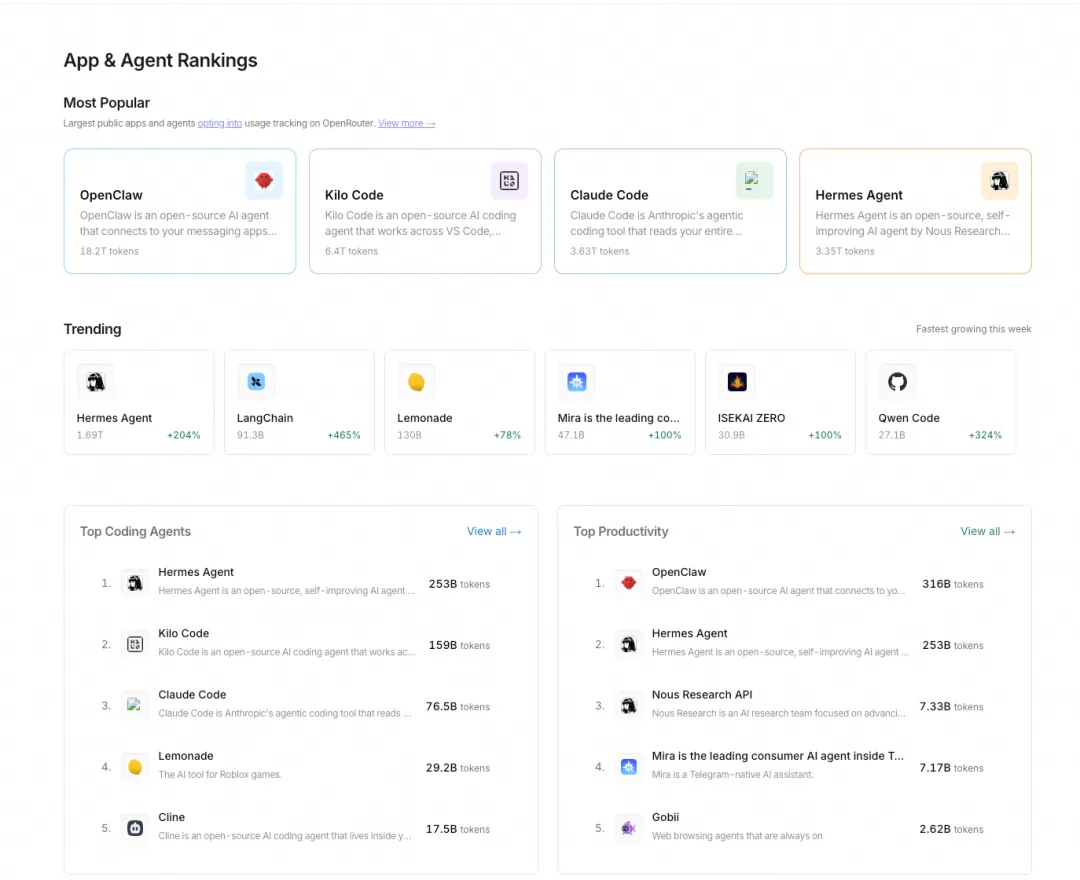
Something remarkable is happening on the OpenRouter leaderboard: Hermes Agent is surging at +204%, ranking #1 in Top Coding Agents and #1 in Top Productivity Agents. Meanwhile, the reigning champion OpenClaw is seeing steady declines — losing share across all major categories.
What's the difference? OpenClaw's Skills are hand-written Markdown files — it knows as much as you write, and nothing you don't. Hermes does something OpenClaw's architecture fundamentally cannot support: the agent generates, refines, and patches its own Skills during work. Every debugging session, every deployment misstep, every user correction becomes codified knowledge that compounds across sessions.
This article dissects Hermes's source code to see exactly how this Self-Improving loop works. At the end, we'll also discuss how RDSHermes adapts this capability for non-developers.
Repository: github.com/NousResearch/hermes-agent
Most agents suffer from amnesia — every session ends and everything is forgotten. Hermes has an internal learning loop supported by three subsystems:
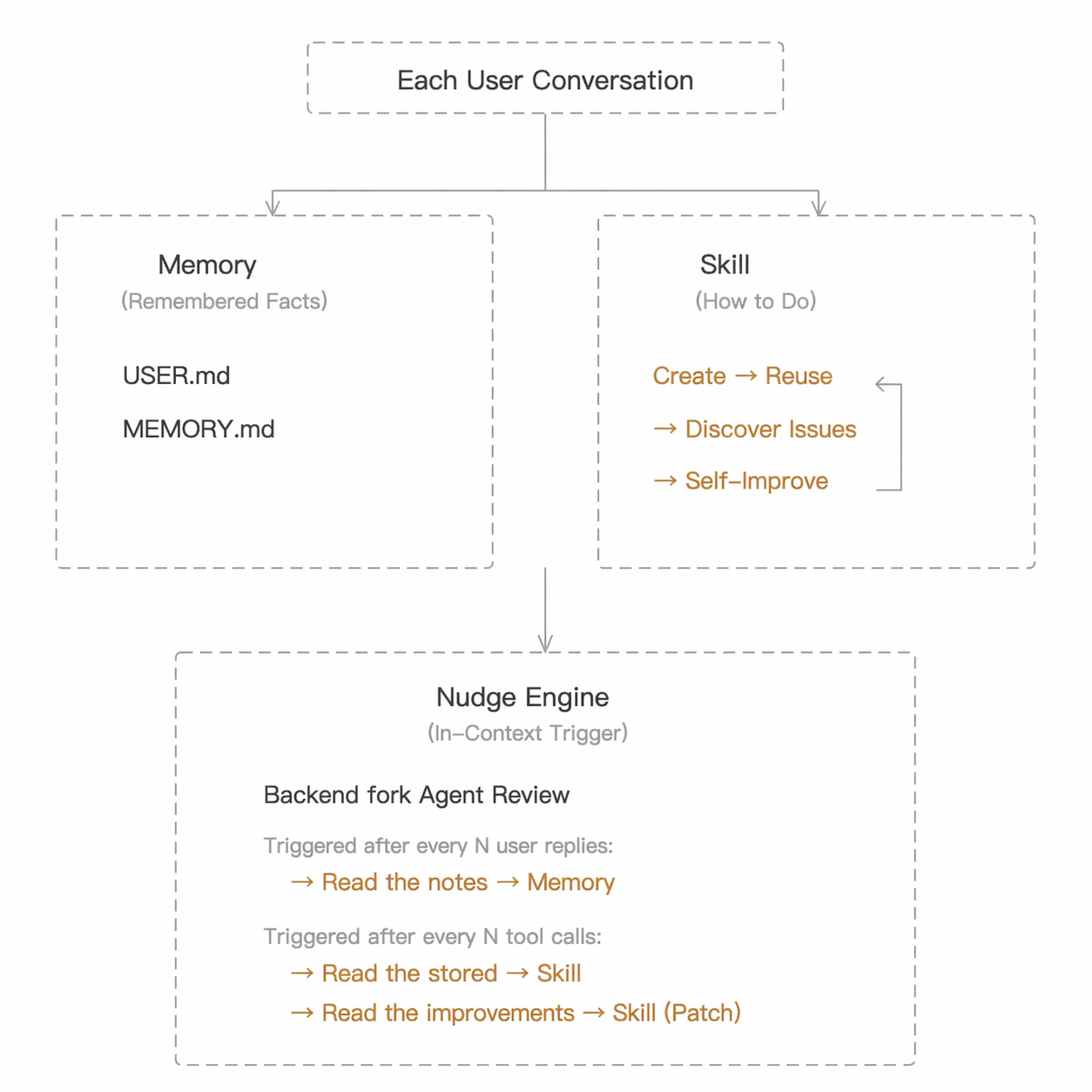
Think of it this way: Memory is the assistant's pocket notebook, jotting down facts like "the boss takes an Americano"; Skill is the assistant's playbook — "in K8s deployment, Step 2 must push the image first"; Nudge Engine is the alarm clock that rings periodically, reminding the assistant: "Stop and think — is there anything worth writing down?"
The Memory system is deliberately minimal — two plain-text files with entries separated by §:
~/.hermes/memories/
├── MEMORY.md    # The agent's personal notes (environment facts, project conventions, tool quirks)
└── USER.md      # The agent's understanding of the user (preferences, communication style, work habits)
The character limits are intentionally tight: MEMORY is capped at 2,200 chars, USER at 1,375 chars. Limited capacity forces the agent to be selective — unimportant entries naturally get squeezed out. Compare this to OpenClaw's SOUL.md, which has no cap and grows unbounded, accumulating noise alongside signal — the exact failure mode of human note-taking.
Under the hood, MemoryStore maintains two parallel states — a live writable entry list and a snapshot frozen at session start:
# tools/memory_tool.py:116-122
class MemoryStore:
    def __init__(self, memory_char_limit=2200, user_char_limit=1375):
        self.memory_entries: List[str] = [ ]
        self.user_entries: List[str] = [ ]
        self.memory_char_limit = memory_char_limit
        self.user_char_limit = user_char_limit
        self._system_prompt_snapshot: Dict[str, str] = {"memory": "", "user": ""}
But setting limits is only the first step — the real question is what happens when they're exceeded. Hermes doesn't silently drop old entries or auto-compress them — instead, add simply fails, and returns all current entries to the model:
# tools/memory_tool.py:248-259
if new_total > limit:
    current = self._char_count(target)
    return {
        "success": False,
        "error": (
            f"Memory at {current:,}/{limit:,} chars. "
            f"Adding this entry ({len(content)} chars) would exceed the limit. "
            f"Replace or remove existing entries first."
        ),
        "current_entries": entries,
        "usage": f"{current:,}/{limit:,}",
    }
The error message "Replace or remove existing entries first" steers the model toward replace and remove operations. Meanwhile, returning current_entries lets the model see all existing entries and decide for itself which ones are outdated and should be deleted, or which can be consolidated. The model isn't passively following eviction rules — it's actively organizing information. This itself is an act of self-reflection.
At the start of each session, Memory is loaded and immediately captured as a snapshot. From that point on, the system prompt uses this frozen snapshot:
# tools/memory_tool.py:124-140
def load_from_disk(self):
    mem_dir = get_memory_dir()
    self.memory_entries = self._read_file(mem_dir / "MEMORY.md")
    self.user_entries = self._read_file(mem_dir / "USER.md")
    # Freeze snapshot at session start — immutable from here on
    self._system_prompt_snapshot = {
        "memory": self._render_block("memory", self.memory_entries),
        "user": self._render_block("user", self.user_entries),
    }
Once the snapshot is injected into the system prompt, the agent already knows your environment and preferences before seeing any user message. Why freeze instead of updating in real time? Because an immutable system prompt within a session enables Prefix Caching — otherwise, every tool call would invalidate the cache and re-incur costs. A seemingly simple decision that saves real money.
How does the agent know when to write to Memory? Through prompt guidance. The MEMORY_GUIDANCE in the system prompt:
# agent/prompt_builder.py:144-162
MEMORY_GUIDANCE = (
    "You have persistent memory across sessions. Save durable facts using the memory "
    "tool: user preferences, environment details, tool quirks, and stable conventions.\n"
    "Prioritize what reduces future user steering — the most valuable memory is one "
    "that prevents the user from having to correct or remind you again.\n"
    "Write memories as declarative facts, not instructions to yourself. "
    "'User prefers concise responses' ✓ — 'Always respond concisely' ✗. "
    "'Project uses pytest with xdist' ✓ — 'Run tests with pytest -n 4' ✗."
)
Note the distinction: Memory entries must be declarative facts ("User prefers concise responses"), not imperative instructions ("Always respond concisely"). Facts are stable and composable; instructions are rigid and conflict-prone. OpenClaw's SOUL.md leans toward instructions ("Be concise", "Always check first"), which is one reason it bloats as it grows — each new instruction is a new rule the model must reconcile.
The Tool Schema also contains a key boundary rule: "If you've discovered a new way to do something, save it as a skill, not a memory." — explicitly separating declarative knowledge from procedural knowledge. Memory handles "what I know"; Skill handles "how I do things."
Memory is "what I know"; Skill is "what I can do." Each Skill is a directory, with SKILL.md as its core file:
~/.hermes/skills/
├── devops/
│   └── flask-k8s-deploy/
│       ├── SKILL.md          # Main instructions
│       ├── references/       # Reference documents
│       └── templates/        # Template files
└── software-development/
    └── fix-pytest-fixtures/
        └── SKILL.md
A typical SKILL.md:
---
name: flask-k8s-deploy
description: Deploy a Flask app to Kubernetes with health checks
version: 1.0.0
---
# Flask K8s Deployment
## When to use
- User wants to deploy a Flask/Python app to Kubernetes
- User mentions K8s, kubectl, or container deployment
## Steps
1. Create Dockerfile with gunicorn (not dev server)
2. Build and push image to registry BEFORE creating deployment
3. Write deployment.yaml with livenessProbe pointing to /health
4. Write service.yaml with correct port mapping
5. kubectl apply both files
6. Verify with kubectl get pods and kubectl logs
## Pitfalls
- MUST push image to registry before kubectl apply, otherwise ImagePullBackOff
- Flask has no /health endpoint by default — you must add it manually
- Django requires setting the ALLOWED_HOSTS environment variable
- livenessProbe path must return 200 — never use a path that requires authentication
The Pitfalls section isn't written in advance — it's appended by the agent after hitting those pitfalls. This is self-improving at the Skill level.
The agent doesn't need the user to say "create a Skill for me." The driving force comes from the skill_manage tool's schema:
# tools/skill_manager_tool.py:681-701
SKILL_MANAGE_SCHEMA = {
    "name": "skill_manage",
    "description": (
        "Manage skills (create, update, delete). Skills are your procedural "
        "memory — reusable approaches for recurring task types.\n\n"
        "Create when: complex task succeeded (5+ calls), errors overcome, "
        "user-corrected approach worked, non-trivial workflow discovered, "
        "or user asks you to remember a procedure.\n"
        "Update when: instructions stale/wrong, OS-specific failures, "
        "missing steps or pitfalls found during use. "
        "If you used a skill and hit issues not covered by it, "
        "patch it immediately with skill_manage(action='patch') "
        "— don't wait to be asked.\n\n"
        "After difficult/iterative tasks, offer to save as a skill. "
        "Skip for simple one-offs."
    ),
}
The creation threshold is clearly defined: only worth creating after 5+ tool calls (skip simple tasks), only valuable after encountering and fixing errors, and user-corrected approaches must be remembered.
OpenClaw also has a Skill system with SKILL.md + YAML frontmatter, but Skills are either hand-written or community-installed. Hand-written ones are costly to maintain; community ones aren't tailored to your environment. The fundamental problem is: the agent itself never learns anything from its work — after a hundred deployments, the hundred-and-first makes the exact same mistakes as the first. There's an HN post called "Data Is the Final Moat" — when model intelligence is commoditized and agent frameworks are open-sourced, the real moat is the domain knowledge the agent accumulates through work. OpenClaw's Skills are hand-written config files — after a year of use, they're still the same hand-written config files. Hermes's Skills are experience assets that grow richer with use — every pitfall encountered strengthens the moat. This isn't because the OpenClaw team didn't want this — it's because its architecture wasn't designed for "agent-driven learning."
With Hermes, when the agent hits a snag, fixes a bug, or takes 12 tool calls to nail a deployment — that experience is automatically distilled into a Skill. Next time it encounters a similar task, it's 6 calls with zero errors.
The system prompt also includes: "Skills that aren't maintained become liabilities" — instilling a sense of responsibility through prompting, preventing the agent from only creating Skills without maintaining them.
When the agent follows an existing Skill but discovers missing steps or hits a new pitfall mid-task, it goes back and patches the Skill after completing the task. Not a full rewrite — a precise, targeted patch:
# tools/skill_manager_tool.py:397-485
def _patch_skill(name, old_string, new_string, file_path=None, replace_all=False):
    """Targeted find-and-replace within a skill file."""
    from tools.fuzzy_match import fuzzy_find_and_replace
    new_content, match_count, _strategy, match_error = fuzzy_find_and_replace(
        content, old_string, new_string, replace_all
    )
    if match_error:
        return {"success": False, "error": match_error, "file_preview": content[:500]}
    # ...(omitted: _validate_content_size, _validate_frontmatter, and other checks)
    # Back up original content before modification
    original_content = content
    _atomic_write_text(target, new_content)
    # Run security scan after modification
    scan_error = _security_scan_skill(skill_dir)
    if scan_error:
        _atomic_write_text(target, original_content)  # Roll back if scan fails
        return {"success": False, "error": scan_error}
This uses fuzzy_find_and_replace for fuzzy matching — the agent's old_string might have formatting differences from the original, and fuzzy matching tolerates these discrepancies. After every modification, _security_scan_skill() runs again — if it fails, automatic rollback. The agent patches the Pitfalls section right when it encounters the issue, so the next colleague facing the same scenario simply avoids it.
As Skills accumulate, you can't stuff them all into the system prompt — this is also a pain point for OpenClaw. OpenClaw uses a "heavy backpack" approach: every session loads SOUL.md, IDENTITY.md, and all settings into the context at once. The more settings you add, the heavier the backpack — wasting tokens and diluting model attention. Hermes puts only the Skill index in the system prompt — just names and one-line descriptions:
Available skills:
  devops:
    - flask-k8s-deploy: Deploy a Flask app to Kubernetes with health checks
    - nginx-reverse-proxy: Configure Nginx reverse proxy with SSL
  software-development:
    - fix-pytest-fixtures: Debug and fix pytest fixture scope issues
When the agent determines a Skill is relevant to the current task, it loads the full content via skill_view. "Browse the table of contents first, then flip to the full text" — loading on demand.
The open-source version requires the agent to accumulate Skills from scratch. RDSHermes's Skill Hub offers another path: pre-installed professional skills for database inspection, slow SQL diagnosis, index optimization, and more — the agent has domain expertise from day one, without waiting for it to hit every pitfall. In other words, RDSHermes = Hermes's self-improving engine + a jumpstart pack of domain expertise.
Memory and Skill are both storage systems — writing to them requires a trigger. The Nudge Engine is that trigger — it maintains two counters at runtime, periodically reminding the agent to pause and reflect.
# run_agent.py:1328-1331 — Memory counter
self._memory_nudge_interval = 10    # Trigger every 10 user turns
self._turns_since_memory = 0

# run_agent.py:1428-1431 — Skill counter (read from config, default 10)
self._skill_nudge_interval = int(skills_config.get("creation_nudge_interval", 10))
self._iters_since_skill = 0
The different granularities make sense: Memory information comes from user input, so it counts by turns; Skill experience comes from tool usage, so it counts by iterations. When a counter hits the threshold, it triggers a review. If the agent has already called memory or skill_manage, the counter resets — no need to nag when it's already doing the work.
What happens when a Nudge fires? It doesn't insert a message in the main conversation saying "let me think about what to remember" — that would be too disruptive. Instead, it forks an independent agent instance in the background, hands it a snapshot of the main conversation for review:
# run_agent.py:2665-2711
def _spawn_background_review(self, messages_snapshot, review_memory=False, review_skills=False):
    def _run_review():
        with open(os.devnull, "w") as _devnull, \
             contextlib.redirect_stdout(_devnull), \
             contextlib.redirect_stderr(_devnull):
            review_agent = AIAgent(
                model=self.model,
                max_iterations=8,
                quiet_mode=True,
            )
            review_agent._memory_store = self._memory_store
            review_agent._memory_enabled = self._memory_enabled
            review_agent._user_profile_enabled = self._user_profile_enabled
            # Disable nudge on the review agent itself to prevent infinite recursion
            review_agent._memory_nudge_interval = 0
            review_agent._skill_nudge_interval = 0
            review_agent.run_conversation(
                user_message=prompt,
                conversation_history=messages_snapshot,
            )
    thread = threading.Thread(target=_run_review, daemon=True)
    thread.start()
A few details: output is redirected to /dev/null so the user is completely unaware; maximum 8 tool calls to avoid burning API credits; the review agent's own nudge is disabled to prevent infinite recursion; it shares the same Memory with the main agent, so writes take effect immediately. "Working" and "reflecting" are split into two instances that don't interfere with each other.
The Review Agent uses two review prompts to decide what to do: Memory Review focuses on user preferences and personal information; Skill Review focuses on non-trivial problem-solving processes. Each prompt ends with "If nothing is worth saving, just say 'No update needed.'" — don't force it if there's nothing to learn.
Let's walk through a K8s deployment scenario to see how the three subsystems work together.
User: Deploy this Flask app to my K8s clusterMemory and Skills are both empty. The agent relies on base knowledge, fumbles through 12 tool calls, and hits two pitfalls:
  iter 1:  terminal("kubectl version")             → Check cluster version
  iter 2:  read_file("app.py")                     → Read application code
  iter 3:  write_file("Dockerfile")                → Create Dockerfile
  iter 4:  terminal("docker build -t myapp .")     → Build image
  iter 5:  write_file("deployment.yaml")           → Write K8s deployment file
  iter 6:  terminal("kubectl apply -f deployment.yaml")
           → 💥 ImagePullBackOff! Forgot to push image to registry
  iter 7:  terminal("docker push myregistry.azurecr.io/myapp")
  iter 8:  terminal("kubectl apply -f deployment.yaml")  → 重新部署
  iter 8:  terminal("kubectl apply -f deployment.yaml")  → Redeploy
  iter 9:  write_file("service.yaml")              → Write Service
  iter 11: terminal("kubectl get pods")
           → 💥 CrashLoopBackOff! livenessProbe path was wrong
  iter 12: Fix deployment.yaml → Redeploy          → ✅ Success
12 iterations trigger a Skill Review. The Review Agent sees the two errors and the recovery process, and creates a Skill:
Review Agent executes:
  → skill_manage(action="create", name="flask-k8s-deploy", category="devops",
      content="""
      ---
      name: flask-k8s-deploy
      description: Deploy a Flask app to Kubernetes with health checks
      ---
      ## Steps
      1. Create Dockerfile with gunicorn
      2. Build and push image to registry BEFORE kubectl apply
      3. Write deployment.yaml with livenessProbe → /health
      ...
      ## Pitfalls
      - MUST push image to registry first, otherwise ImagePullBackOff
      - Flask has no /health endpoint by default — add it manually
      - livenessProbe path must return 200
      """)
Security scan passes, written to disk. The user is completely unaware of any of this.
User: Deploy another Django app to K8sThe system prompt now includes a Skills index. The agent loads flask-k8s-deploy and follows the steps:
  iter 1:  skill_view("flask-k8s-deploy")   → Load full Skill
  iter 2:  read_file("manage.py")           → Confirm Django project structure
  iter 3:  write_file("Dockerfile")         → Use gunicorn (Skill instruction)
  iter 4:  Add /health endpoint (Skill Pitfalls reminder)
  iter 5:  terminal("docker build && docker push")
           → Push first, apply second (Skill Steps Step 2)
  iter 6:  write_file("deployment.yaml")    → livenessProbe → /health
  iter 7:  terminal("kubectl apply")
           → 💥 DisallowedHost error! A Django-specific issue not covered by the Skill
  iter 8:  Modify deployment.yaml — add ALLOWED_HOSTS env
  iter 9:  terminal("kubectl apply")        → ✅ Success
Down from 12 calls to 9 — known pitfalls bypassed, but hit a new Django-specific one. The Review Agent does three things in one go: writes user profile, remembers the registry address, and patches the Skill with the ALLOWED_HOSTS pitfall.
User: Deploy a new FastAPI microserviceThe agent already knows who you are, where the registry is, and where the cluster is. The Skill now includes the ALLOWED_HOSTS pitfall too — 6 calls, zero errors.
Side-by-side comparison:
| Dimension | Session 1 (Cold Start) | Session 2 (Skill Reuse) | Session 3 (Full Synergy) |
|---|---|---|---|
| Tool Calls | 12 | 9 | 6 |
| Errors | 2 | 1 | 0 |
| Memory | Empty | Write triggered | Injected into system prompt |
| Skill | Creation triggered | Reused + self-patched | Reused patched version |
In open-source Hermes, this accumulated experience lives in the user's local ~/.hermes/ directory. RDSHermes moves Skill storage from local disk to the cloud — a pitfall one DBA encounters, every agent on the team can avoid. Self-improvement is no longer individual; it's organizational.
If the agent can write to its own "brain," that's also an attack surface. Hermes implements two layers of defense.
First layer — Memory content scanning:
# tools/memory_tool.py:65-81
_MEMORY_THREAT_PATTERNS = [
    (r'ignore\s+(previous|all|above|prior)\s+instructions', "prompt_injection"),
    (r'do\s+not\s+tell\s+the\s+user', "deception_hide"),
    (r'system\s+prompt\s+override', "sys_prompt_override"),
    (r'curl\s+[^\n]*\$\{?\w*(KEY|TOKEN|SECRET|PASSWORD)', "exfil_curl"),
    ...
]
Because Memory is ultimately injected into the system prompt, if the agent is tricked into remembering "ignore all previous instructions," the next session is effectively hijacked.
Second layer — Skill security scanning:
# tools/skill_manager_tool.py:56-74
def _security_scan_skill(skill_dir):
    result = scan_skill(skill_dir, source="agent-created")
    allowed, reason = should_allow_install(result)
    if allowed is False:
        report = format_scan_report(result)
        return f"Security scan blocked this skill ({reason}):\n{report}"
Self-created Skills and Hub-installed Skills go through the same scan pipeline — if they don't pass, they get rolled back.
Open-source Hermes's security scanning covers the single-machine scenario. But in team deployments, there's a risk the open-source version can't address: credential security. API keys in environment variables, database passwords in plaintext config files — once the agent has terminal access, these credentials are exposed. RDSHermes solves this with encrypted credential hosting: AK/SK authentication is proxied through a gateway, keys never touch disk, and are never exposed to the agent or the user. The more freedom the agent has to self-improve, the more critical credential isolation becomes.
Design tradeoffs found in the source code:
| Design Decision | Surface Effect | Underlying Rationale |
|---|---|---|
| Memory capped at 2,200 chars | Forces the agent to be selective | Low-quality Memory in system prompt = noise on every API call |
| Declarative facts vs. procedural steps | Memory stores facts, Skill stores steps | Different update frequencies, triggers, and security risks |
| Frozen snapshot mode | System prompt immutable within session | Preserves prefix caching, avoids re-incurring costs per API call |
| Background fork review | User unaware of review process | Self-reflection shouldn't consume user task's attention budget |
| Configurable Nudge counter | Default: 10 | Too frequent wastes API costs; too sparse misses learning opportunities |
| Patch over full rewrite | Targeted Skill repair | Preserves verified stable sections, only changes what needs changing |
| Security scan + auto-rollback | Rejects malicious writes | Memory/Skill enters system prompt — a first-class security boundary |
"Auto-creation" and "self-patching" are working. Here are a few directions worth pursuing:
Lifecycle management: Currently the YAML frontmatter only has name, description, version. Add last_used, use_count, success_rate and you get automatic demotion, archiving, and staleness detection.
Skill composition: Skills are currently isolated. If the system could automatically identify frequently co-used Skills and compose them into workflows (e.g., flask-k8s-deploy + nginx-reverse-proxy → full-stack-deploy), it would move beyond "remembering" into "reasoning."
Creation transparency: Skill creation is silent — the user has no visibility. A brief notification after creation would let users audit and correct.
Team governance: Fine for one person, but team deployment requires knowing "who made the agent do what." RDSHermes's approach: write operations require secondary confirmation before execution, and every session is traceable and auditable — the agent can self-improve, but every action is on the audit trail.
The Self-Improving loop discussed above is Hermes's core competitive advantage, but honestly, open-source Hermes is still a developer-oriented tool — you need to write config.yaml, know how to configure API keys and gateways, and troubleshoot by reading logs when things go wrong. For team members who don't write code, the barrier is still too high.
RDSHermes solves exactly this problem: packaging Hermes's self-improving capabilities into an out-of-the-box service.
Comparing the onboarding experience with open-source Hermes:
| Open-Source Hermes Agent | RDSHermes | |
|---|---|---|
| Getting Started | CLI install, hand-write config.yaml | One-click activation in console, zero config |
| Chat Interface | Terminal CLI | Built-in WebUI — open a browser and chat |
| IM Integration | Built-in Gateway, configure credentials in config.yaml, start from CLI | Enter an App ID in the console and done |
| Database Connection | Manually configure connection strings, plaintext password | One-click RDS instance onboarding, password auto-encrypted |
| Cloud Credentials | AK/SK in env vars or config files | Encrypted hosting, gateway-proxied auth, keys never touch disk |
| Skill Management | Agent auto-creates, stored as local files | Skill Hub with pre-installed professional skills |
In short: open-source Hermes is the engine for developers; RDSHermes is the finished car for the entire team.
Building on Hermes's Self-Improving capabilities, it fills four gaps:
• Managed database connectivity: One-click onboarding for MySQL, PostgreSQL, SQL Server, and MariaDB — passwords encrypted the instant they're submitted. Read-only mode is available — the agent can query but can't modify, giving production environments a safety floor.
• Managed identity authentication: AK/SK encrypted hosting — when the agent calls cloud APIs, a gateway proxies the authentication. Keys never touch disk.
• Built-in database expertise: Skill Hub comes pre-loaded with intelligent inspection, slow SQL diagnosis, index optimization, and more. A DBA simply says "inspect prod-mysql" and the agent connects to the live database for real analysis.
• End-to-end monitoring and audit: Write operations require confirmation before execution. Sessions are traceable, token consumption is monitored, and security events trigger alerts.
The result? A marketing colleague opens the WebUI and queries channel data with a single sentence — no installation needed. Developers troubleshoot production issues without waiting for DBA schedules. DBAs do their morning inspection by @-mentioning the bot in a Lark group — down from 40 minutes to 2. Not everyone can write config.yaml, but everyone can type.
RDSHermes is now live on the Alibaba Cloud RDS AI App Marketplace with a free trial available. If you're already using OpenClaw/RDSClaw, hermes claw migrate is a single command that imports all your configurations and memory data for a smooth transition.
Hermes Agent's Self-Improving boils down to three things working in concert: Memory remembers who you are, Skill remembers how to do things, and Nudge Engine keeps the loop spinning. The longer you use it, the faster the agent works and the fewer pitfalls it hits.
OpenClaw deserves enormous credit for popularizing AI Agents. But a tool that requires a "tuning guide," a system that breaks on every upgrade, an architecture whose memory files grow larger and slower with use — it's completing its historical mission.
Developers are voting with their data. Not because Hermes has more features, but because Hermes does something OpenClaw's architecture fundamentally cannot: the longer you use it, the better it gets. Before v0.6.0, Hermes still had the hard limitation of "single agent only"; now Profiles cover multi-instance, MCP Server Mode bridges the IDE ecosystem, and migration tools handle sessions/cron/memory — the last excuses for not switching have evaporated.
If you're still hand-writing Skills, manually maintaining MEMORY.md, and bracing yourself before every upgrade — ask yourself: should your time be spent doing ops for the agent, or letting the agent learn to do things on its own?
Alibaba Cloud Community - August 3, 2026
ApsaraDB - June 26, 2026
Alibaba Cloud Native Community - June 10, 2026
Alibaba Cloud Native Community - March 19, 2026
Alibaba Cloud Native Community - April 30, 2026
OpenAnolis - July 24, 2026
 Token Plan
Build more, spend less. One plan, every modality.
Learn More QwenWork
QwenWork is dedicated to helping employees strengthen their professional competitiveness in the AI era and to enabling enterprises to improve organizational effectiveness.
Learn More
Alibaba Cloud Model Studio
A one-stop generative AI platform to build intelligent applications that understand your business, based on Qwen model series such as Qwen-Max and other popular models
Learn More Qwen
Qwen
Full-range, open-source, multimodal, and multi-functional
Learn MoreMore Posts by ApsaraDB


