This article describes how to use MongoShake to synchronize data between two MongoDB replica set instances in real time.
Note: MongoShake is an open-source general-purpose Platform as a Service (PaaS) tool, which is written in the Go language by Alibaba Cloud. MongoShake reads the oplogs of a MongoDB database and replicates data based on the oplogs to meet specific requirements.
Required instances:
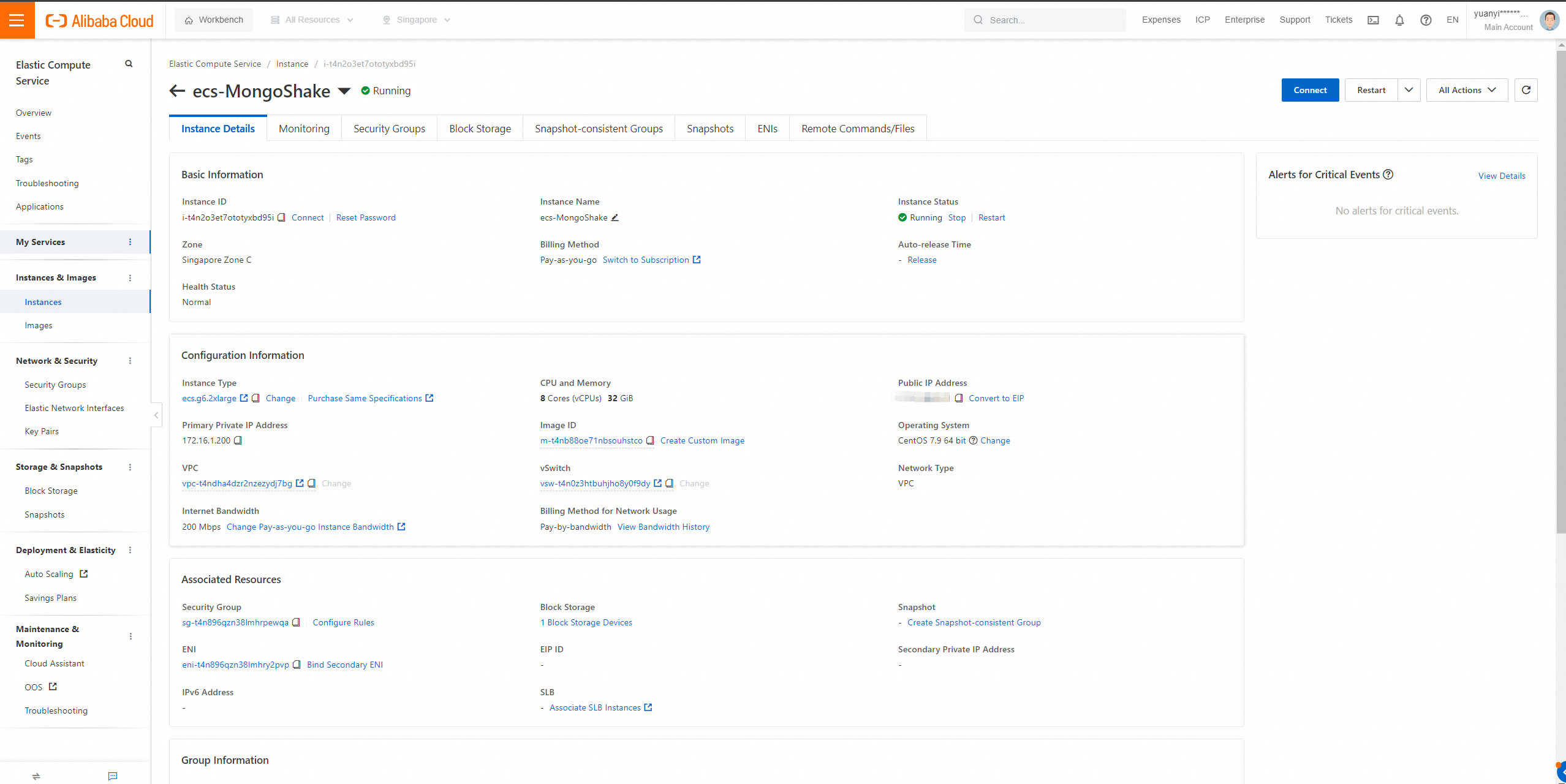
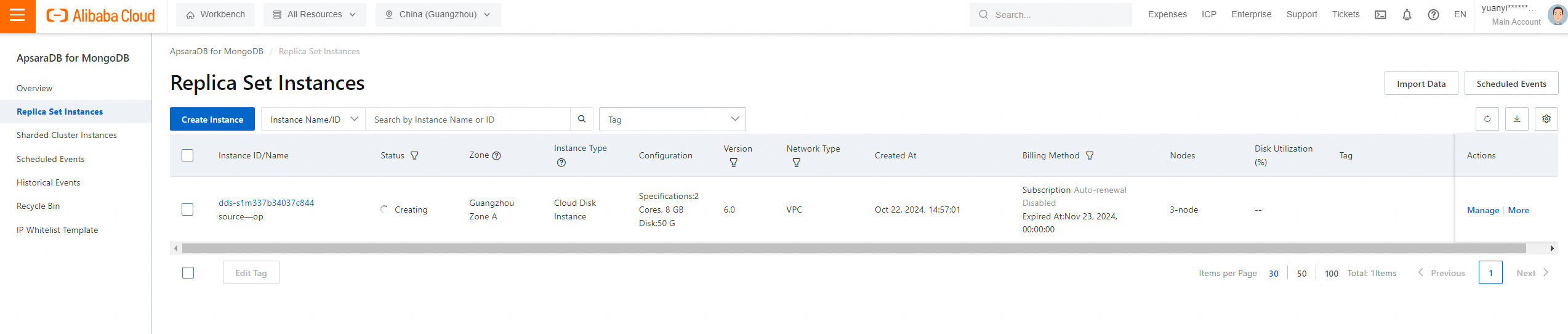
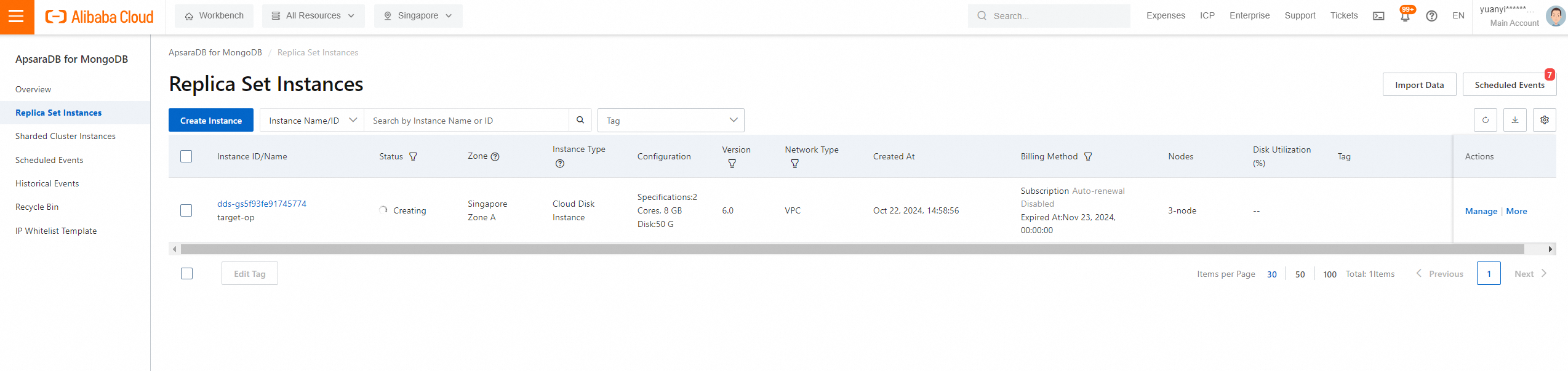
Snapshots of instance purchase:
● Source MongoDB instance region: Singapore Zone A
● Source MongoDB instance region: Guangzhou Zone A
● ECS instance region: Singapore Zone C
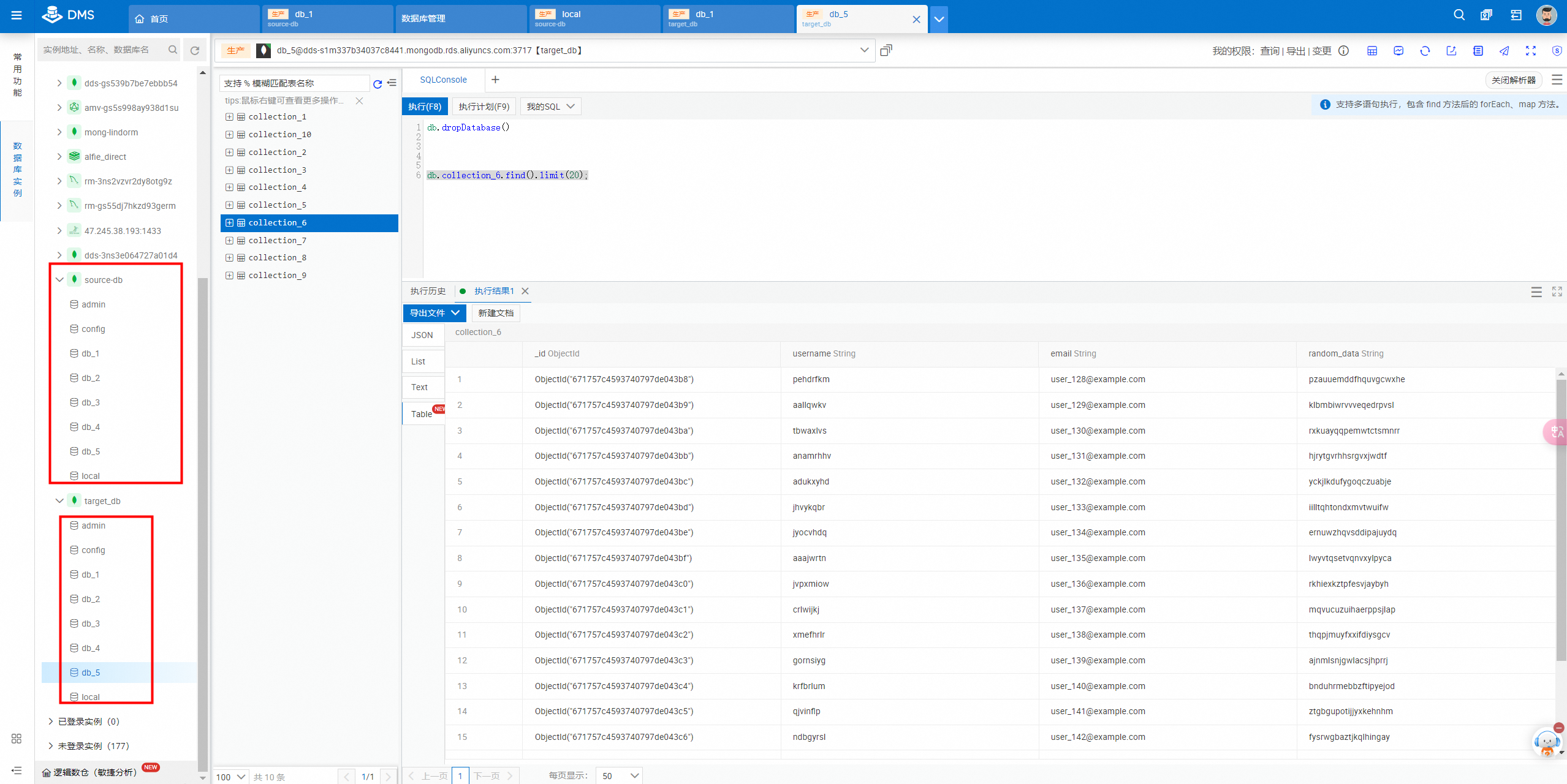
You cannot use MongoShake to synchronize data in the admin and local databases.
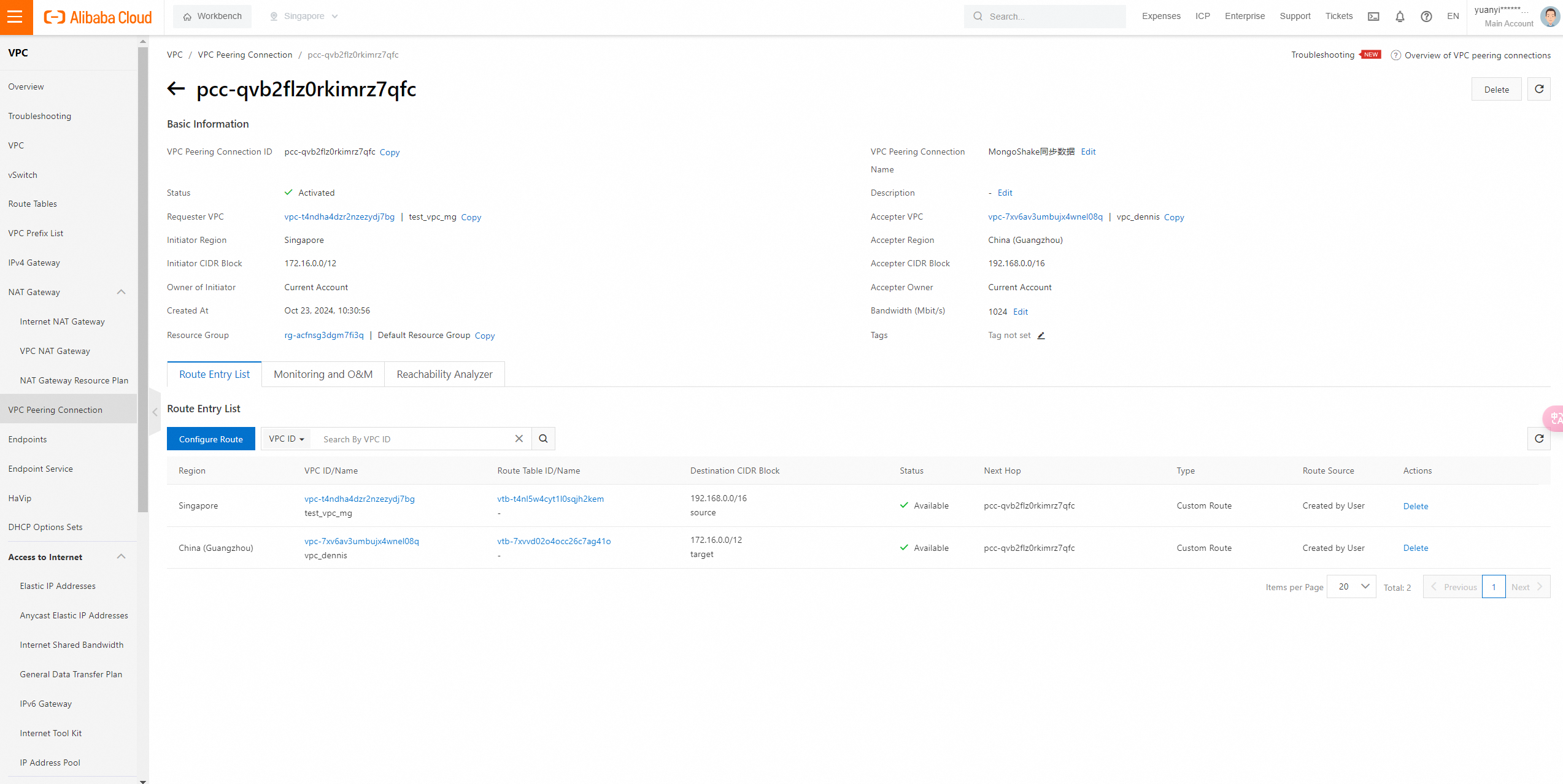
VPC peering connection guide: https://help.aliyun.com/zh/vpc/user-guide/create-and-manage-vpc-peering-connection
Source VPC: vpc-t4ndha4dzr2nzezydj7bg
Destination VPC: vpc-7xv6av3umbujx4wnel08q
Log on to the MongoDB instance in Guangzhou from the ECS instance in Singapore by using the internal VPC endpoint, and verify whether the logon is successful.
View the connection string of the primary node of ApsaraDB for MongoDB in Guangzhou: dds-s1m337b34037c8441.mongodb.rds.aliyuncs.com
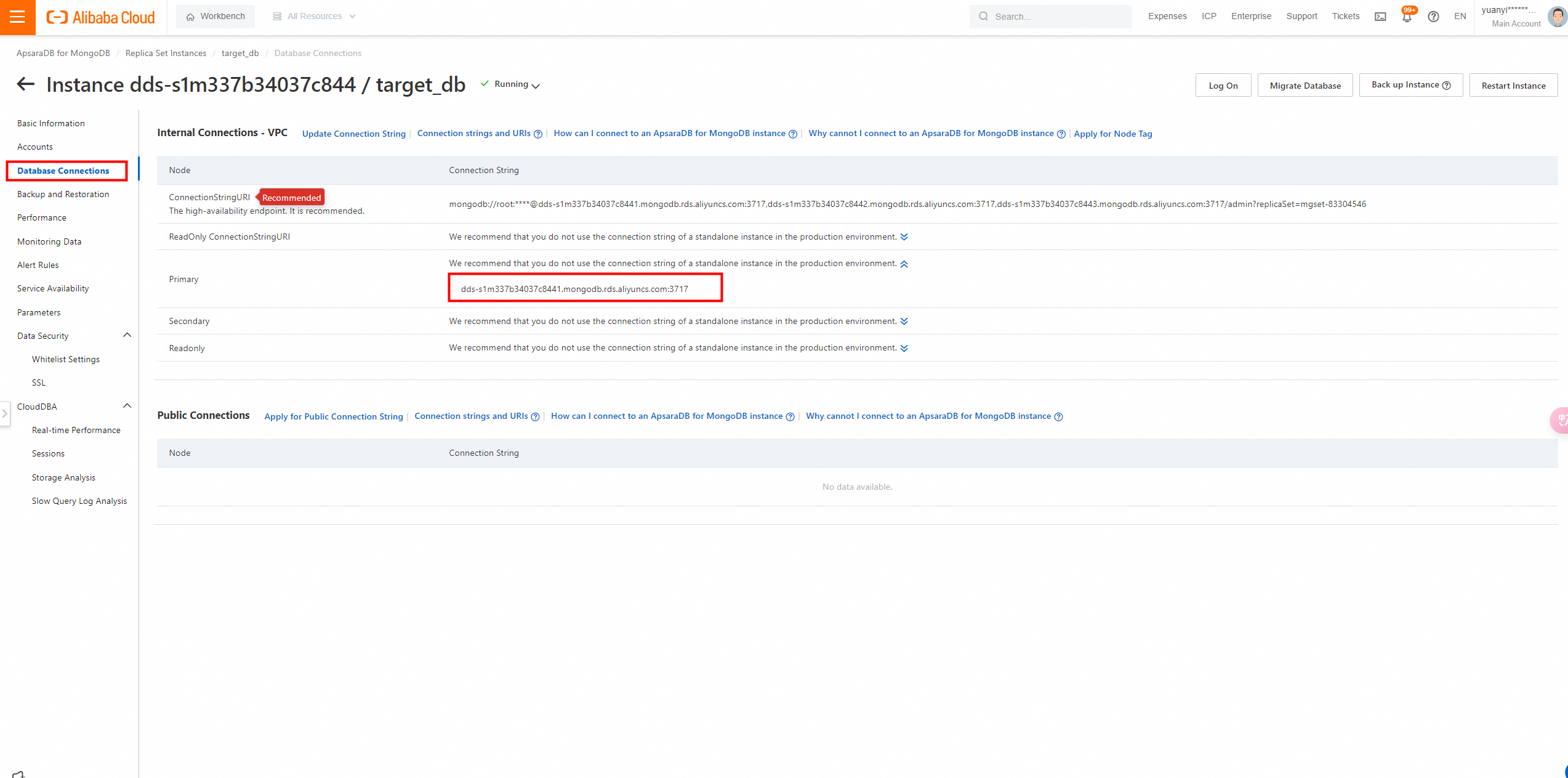
Use MongoShell to log on to the MongoDB instance in Guangzhou through the internal endpoint.
Logon command:
mongosh --host dds-s1m337b34037c8441.mongodb.rds.aliyuncs.com --port 3717 -u root -p --authenticationDatabase admin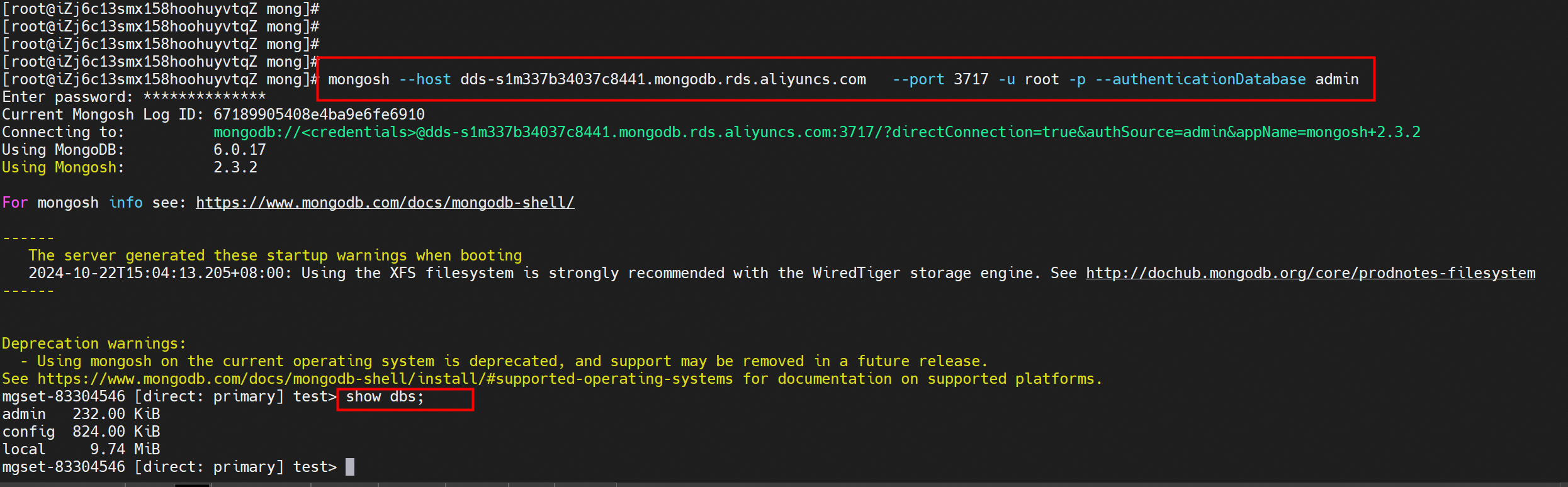
The successful logon indicates that the VPC peering connection between the destination and source ends is established.
Download link: https://github.com/alibaba/MongoShake/releases
1. Run the following command to download the MongoShake package and rename the package as mongoshake.tar.gz:
wget "https://github.com/alibaba/MongoShake/releases/download/release-v2.8.4-20230425/mongo-shake-v2.8.4.tgz" -O mongoshake.tar.gz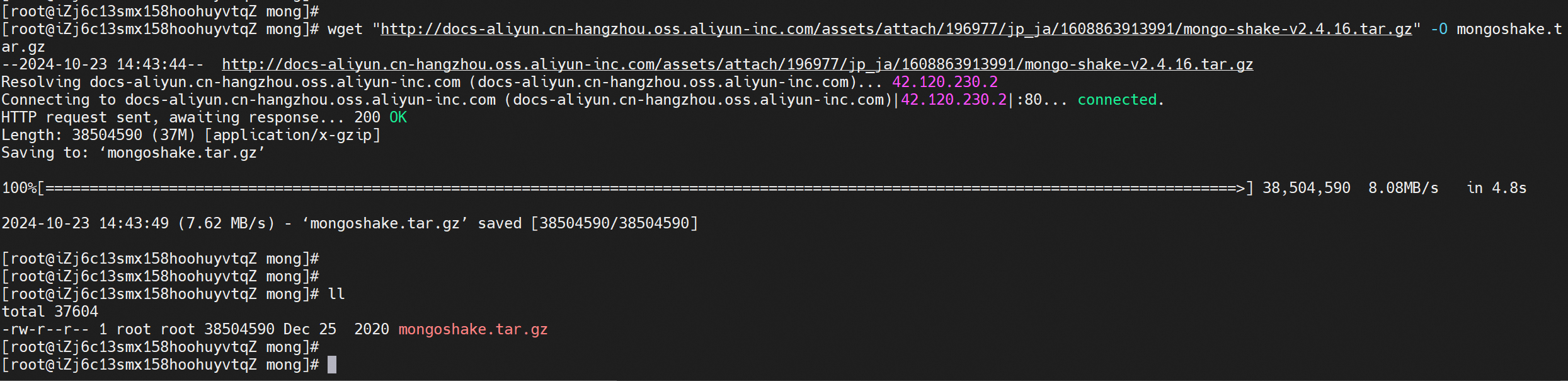
2. Decompress the MongoShake package to the current directory.

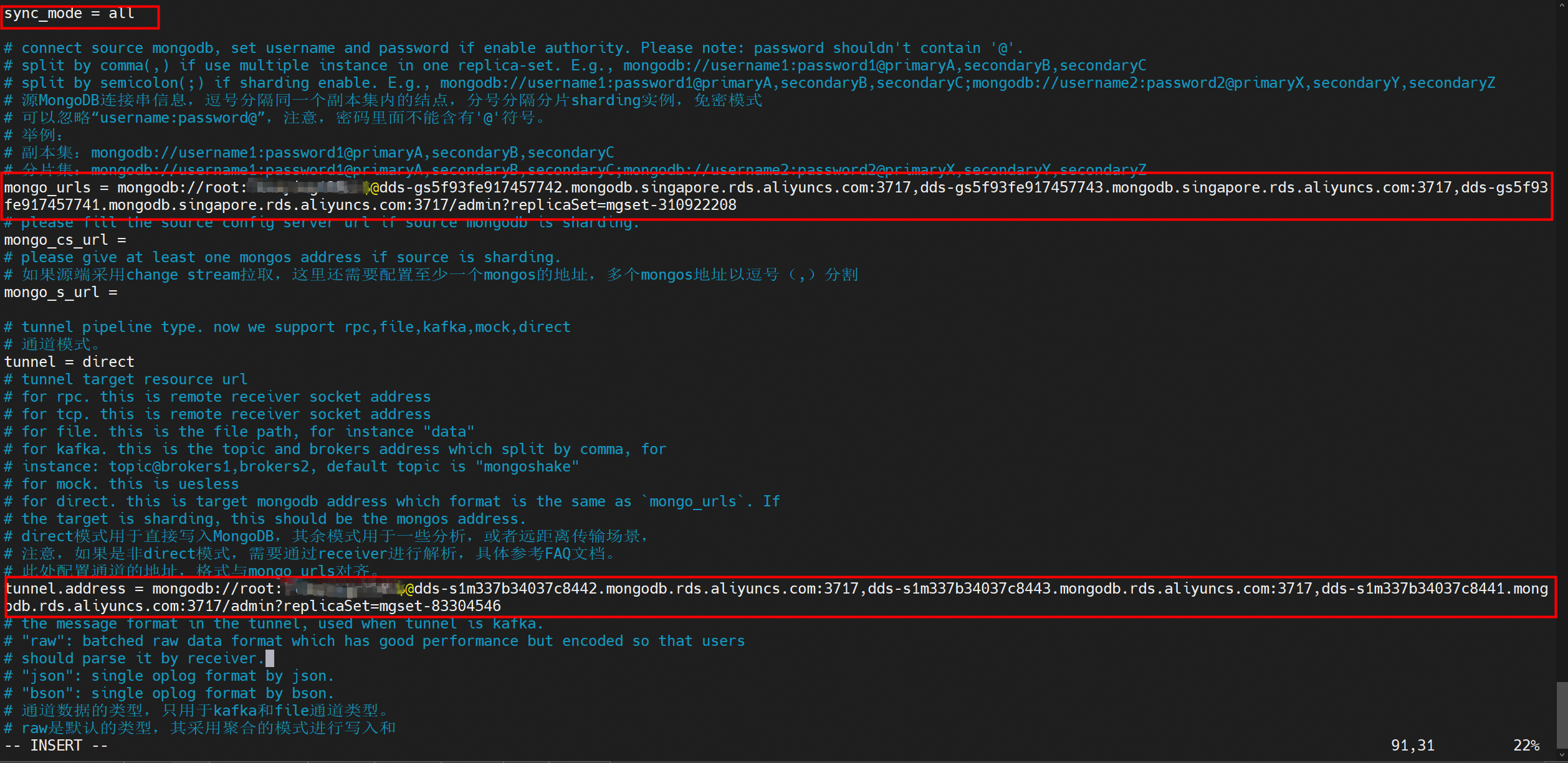
Run the vi collector.conf command to modify the collector.conf configuration file of MongoShake. The following table describes the parameters that you must configure to synchronize data between ApsaraDB for MongoDB instances.
| Parameter | Note | Example |
|---|---|---|
| mongo_urls | The connection string URI of the source ApsaraDB for MongoDB instance. The database account is test and the database is admin. | mongo_urls = mongodb://test:****@dds-bp19f409d7512****.mongodb.rds.aliyuncs.com:3717,dds-bp19f409d7512****.mongodb.rds.aliyuncs.com:3717 |
| tunnel.address | The connection string URI of the destination ApsaraDB for MongoDB instance. The database account is test and the database is admin. | tunnel.address = mongodb://test:****@dds-bp19f409d7512****.mongodb.rds.aliyuncs.com:3717,dds-bp19f409d7512****.mongodb.rds.aliyuncs.com:3717 |
| sync_mode | The data synchronization method. Valid values: • all: performs both full data synchronization and incremental data synchronization. • full: performs only full data synchronization. • incr: performs only incremental data synchronization. |
sync_mode = all |
1. Run the following command to start the data synchronization task and generate the log information:
./collector.linux -conf=collector.conf -verbose 1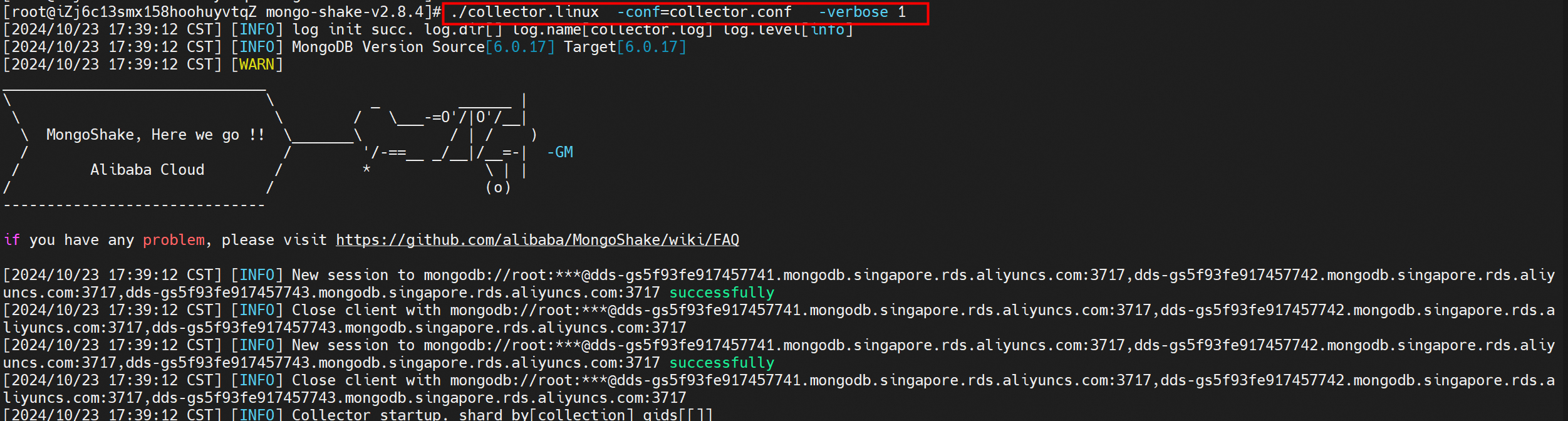
2. Check the log information. If the following log is displayed, it indicates that the full data synchronization is complete and the incremental data synchronization starts.
[09:38:57 CST 2019/06/20] [INFO](mongoshake/collector.(*ReplicationCoordinator).Run:80) finish full sync, start incr sync with timestamp: fullBeginTs[1560994443], fullFinishTs[1560994737]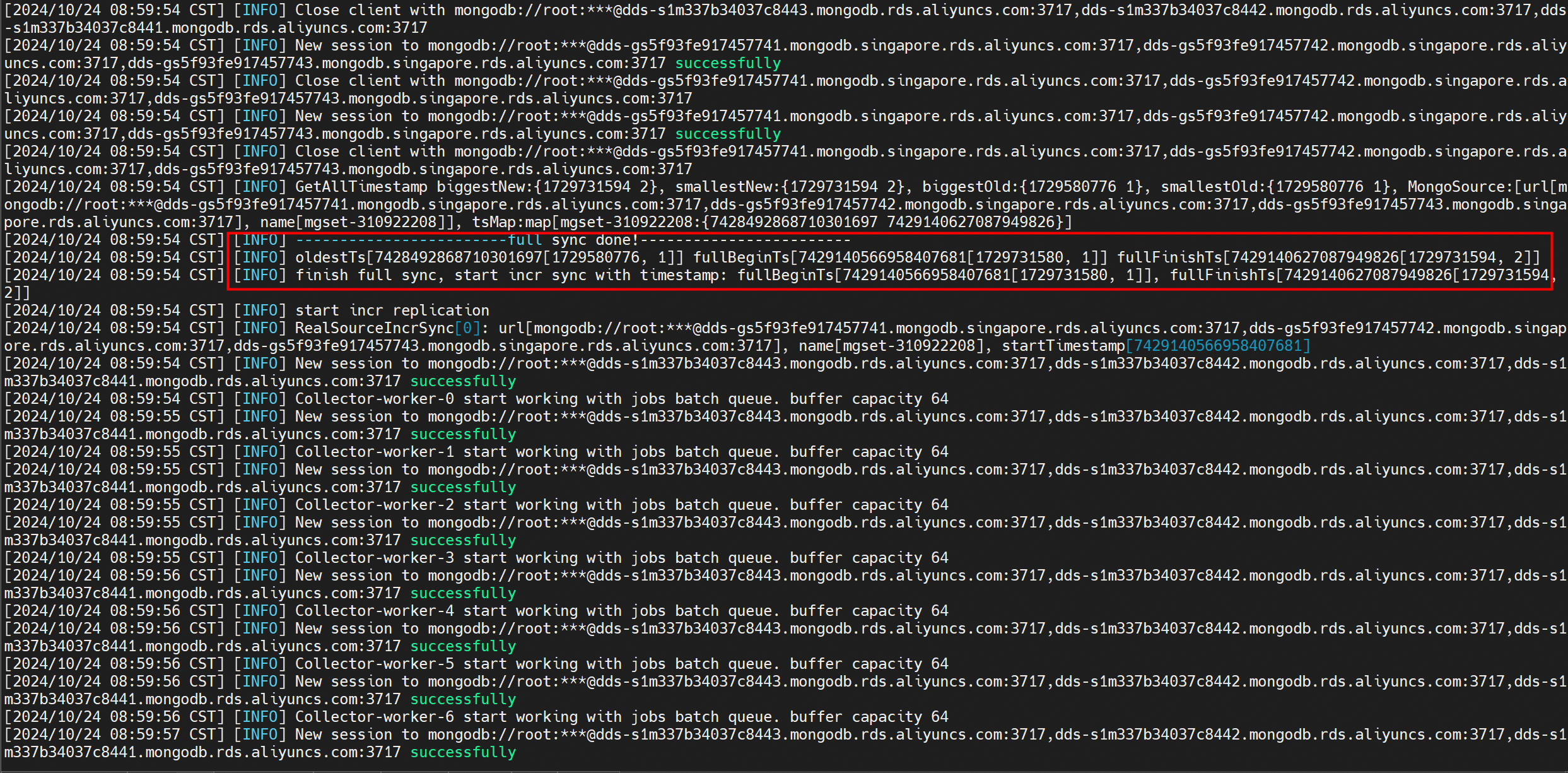
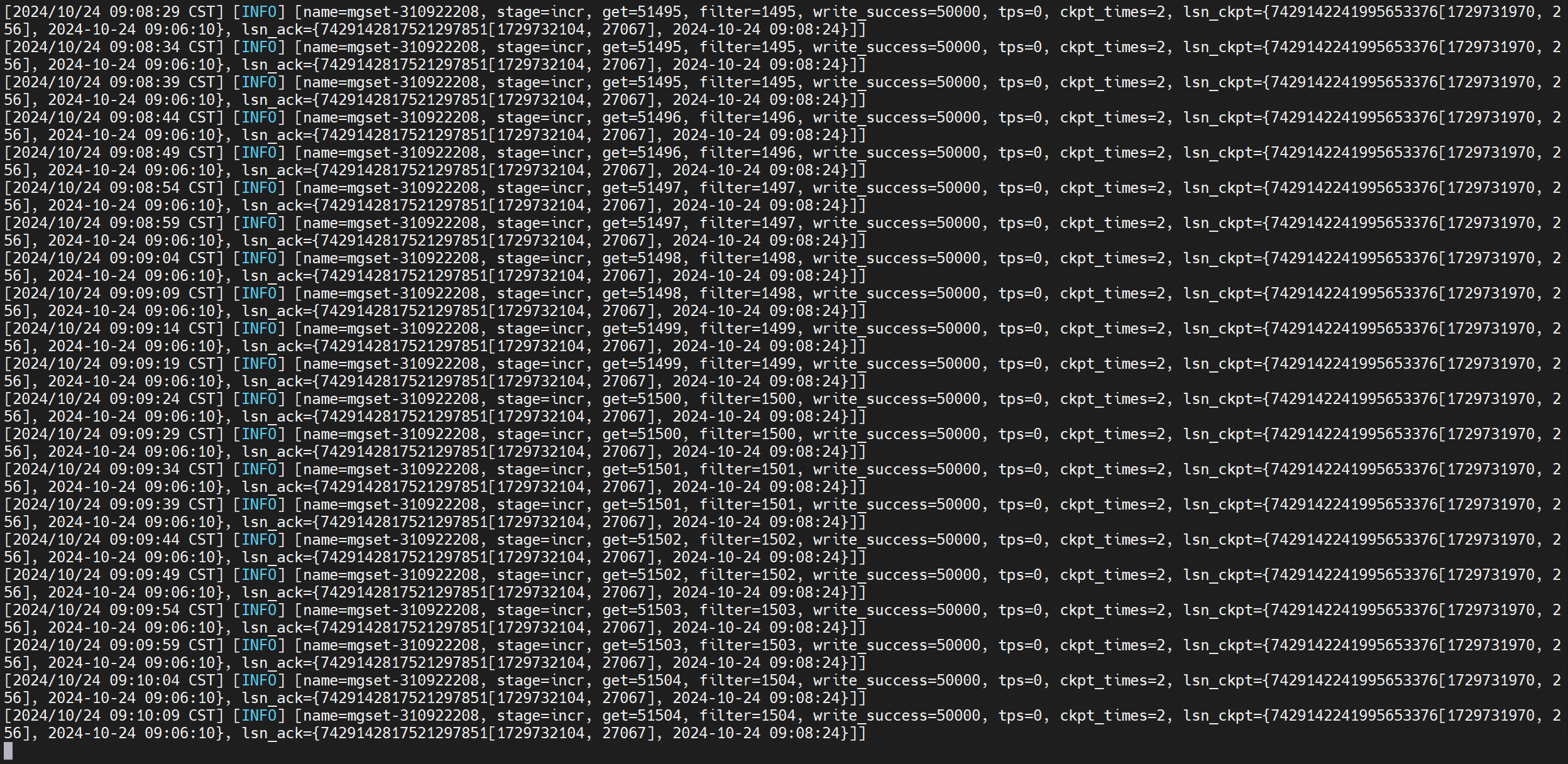
Snapshot of incremental synchronization:
Check the result of synchronized data.
Python script for creating test data
import pymongo
from pymongo.errors import ConnectionFailure
from pymongo.database import Database
from pymongo.collection import Collection
import threading
import random
import string
import time

# Generate a random string of the specified length.
def generate_random_string(length):
    letters = string.ascii_lowercase
    return ''.join(random.choice(letters) for _ in range(length))

# Create a database.
def create_database(db_name, client):
    try:
        db = client[db_name]
        print(f"Database '{db_name}' created.")
        return db
    except Exception as e:
        print(f"Error creating database '{db_name}': {e}")
        return None

# Create a collection.
def create_collections(db, num_collections):
    collections = []
    for i in range(num_collections):
        collection_name = f"collection_{i+1}"
        try:
            col = db[collection_name]
            print(f"Collection '{collection_name}' created.")
            collections.append(col)
        except Exception as e:
            print(f"Error creating collection '{collection_name}': {e}")
    return collections

# Insert data.
def insert_data(collection, num_docs):
    data = [{"username": generate_random_string(8),
             "email": f"user_{i}@example.com",
             "random_data": generate_random_string(20)} for i in range(num_docs)]
    try:
        collection.insert_many(data)
        print(f"{num_docs} documents inserted into collection.")
    except Exception as e:
        print(f"Error inserting documents: {e}")

# Thread worker function.
def thread_worker(db, collection, num_docs):
    insert_data(collection, num_docs)

if __name__ == "__main__":
    connection_uri = "mongodb://root:xxxxxxxx@dds-gs5f93fxxxxxxxxx-pub.mongodb.singapore.rds.aliyuncs.com:3717,dds-gs5f93fe917457741529-pub.mongodb.singapore.rds.aliyuncs.com:3717,dds-gs5f93fe917457742520-pub.mongodb.singapore.rds.aliyuncs.com:3717/admin?replicaSet=mgset-310922208"

    try:
        client = pymongo.MongoClient(connection_uri)
        print("Connected to MongoDB successfully!")
    except ConnectionFailure:
        print("Could not connect to MongoDB.")
        exit(1)

    databases = []
    for i in range(5,10):
        db_name = f"db_{i+1}"
        db = create_database(db_name, client)
        if db is not None:
            databases.append(db)

    threads = []
    for db in databases:
        collections = create_collections(db, 10)
        for collection in collections:
            t = threading.Thread(target=thread_worker, args=(db, collection, 1000))
            threads.append(t)
            t.start()

    # Wait for all threads to finish
    for t in threads:
        t.join()

    print("All data insertion completed.")
Python script to execute commands
pip install pymongo
python3.10 -m venv venv && source venv/bin/activate
python3.10 main.pyMigrate Data from a Self-managed SQL Server 2012 to an ApsaraDB RDS for SQL Server Instance
[Infographic] Highlights | Database New Features in June 2025
ApsaraDB - March 26, 2024
ApsaraDB - September 3, 2018
Michelle - July 10, 2018
ApsaraDB - September 8, 2021
Alibaba Clouder - July 30, 2019
ApsaraDB - June 29, 2021
 ApsaraDB for MongoDB
A secure, reliable, and elastically scalable cloud database service for automatic monitoring, backup, and recovery by time point
Learn More Time Series Database (TSDB)
TSDB is a stable, reliable, and cost-effective online high-performance time series database service.
Learn More Security Center
A unified security management system that identifies, analyzes, and notifies you of security threats in real time
Learn More
ApsaraDB for HBase
ApsaraDB for HBase is a NoSQL database engine that is highly optimized and 100% compatible with the community edition of HBase.
Learn MoreMore Posts by ApsaraDB


