By Sanni Kehinde, Alibaba Cloud Tech Share Author. Tech Share is Alibaba Cloud's incentive program to encourage the sharing of technical knowledge and best practices within the cloud community.
In this guide, I would be explaining how to build a basic bookstore RESTful API where a user can perform a basic CRUD (CREATE, READ, UPDATE AND DELETE) operation.
Below are the tools and technologies we would be using for building our RESTful API
This guide assumes the following
If you don't have it set up, read this tutorial to set up PostgreSQL on an Alibaba Cloud Elastic Compute Service (ECS) instance.
A RESTful API also referred to as RESTful web service and is based on representational state transfer(REST) technology, an architectural style and approach to communications often used in web services development. It's an application program interface (API) that uses HTTP requests such as GET, PUT, POST and DELETE methods on data.
While most API's claim to be RESTful, it's important to know that there are some conditions that determine if your API is RESTful which are listed below
- Client-Server-based
- Stateless operations
- RESTful resource caching
- Use of a uniform interface.
Check on this link for more explanation on RESTful API conditions.
   cd your-project-folder
   npm init -y
This would create a package.json file in our root directory.
run the command below to set up babel
    npm install babel-preset-env --save-dev
    npm install babel-cli --save
    npm install babel-core --save
run touch .babelrc to create a babel configuration file. and paste the code below
    {
      "presets": ["env"]
}With babel setup, we can now create our RESTful API using ES6. To create our express application, we need to install express alongside some dependencies
npm install express body-parser morganCreate a new file named app.js to setup express
touch app.jsand paste the code below
    import http from 'http';
    import express from 'express';
    import logger from 'morgan';
    import bodyParser from 'body-parser';

    const hostname = '127.0.0.1';
    const port = 3000;
    const app = express() // setup express application
    const server = http.createServer(app);

    app.use(logger('dev')); // log requests to the console

    // Parse incoming requests data
    app.use(bodyParser.json());
    app.use(bodyParser.urlencoded({ extended: false }));

    app.get('*', (req, res) => res.status(200).send({
      message: 'Welcome to the default API route',
    }));

    server.listen(port, hostname, () => {
      console.log(`Server running at http://${hostname}:${port}/`);
    });
We need to install nodemon to restart our server whenever we make changes to any of our file.
npm install --save-dev nodemonTo use nodemon, open the package.json file and update the scripts section to the code below
    ...
    "scripts": {
        "start": "nodemon --exec babel-node app.js",
    }
    ...
We are using nodemon to run the application and babel-node to transpile our application from ES6 to ES5 on the run.
Now we can run our application with npm start command.
With our application up and running, we need to install the sequelize library to connect to our postgreSQL database.
Install Sequelize, pg (for making the database connection) and pg-hstore (for serializing and deserializing JSON into the Postgres hstore key/value pair format):
npm install sequelize pg pg-hstoreWe need to install the sequelize CLI which enable us to run database migration easily from the terminal and bootstrap a new project.
npm install -g sequelize-cliNext, we are going to create a config file in our root directory for sequelize named .sequelizerc. Basically, In this file, we are telling sequelize where to find to it's required files.
touch .sequelizercand paste the code below
    const path = require('path');

    module.exports = {
        "config": path.resolve('./server/config', 'config.json'),
        "models-path": path.resolve('./server/models'),
        "seeders-path": path.resolve('./server/seeders'),
        "migrations-path": path.resolve('./server/migrations')
    };
This sequelize configuration file is explain below
To create the files specified in the .sequelizerc file, we are going to initialize sequelize by running sequelize init.
sequelize initAfter running sequelize init command, Here is the structure of the files generated
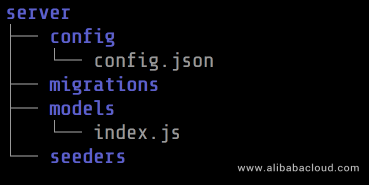
Let take a look at the index.js file generated in the server/models directory
   'use strict';

    var fs        = require('fs');
    var path      = require('path');
    var Sequelize = require('sequelize');
    var basename  = path.basename(__filename);
    var env       = process.env.NODE_ENV || 'development';
    var config    = require(__dirname + '/../config/config.json')[env];
    var db        = {};

    if (config.use_env_variable) {
      var sequelize = new Sequelize(process.env[config.use_env_variable], config);
    } else {
      var sequelize = new Sequelize(config.database, config.username, config.password, config);
    }

    fs
      .readdirSync(__dirname)
      .filter(file => {
        return (file.indexOf('.') !== 0) && (file !== basename) && (file.slice(-3) === '.js');
      })
      .forEach(file => {
        var model = sequelize['import'](path.join(__dirname, file));
        db[model.name] = model;
    });

    Object.keys(db).forEach(modelName => {
      if (db[modelName].associate) {
        db[modelName].associate(db);
      }
    });

    db.sequelize = sequelize;
    db.Sequelize = Sequelize;

    module.exports = db;
So in this file, we establish a connection to the database, grab all the model files from the current directory, add them to the db object, and apply any relations between each model (if any). This file uses development environment by default if NODE_ENV is not specified.
We need to create our bookstore database. Run the command below to create a new database
createdb bookstorecreatedb command would be available once you have postgreSQL installed on your machine.
For the config.json file in the server/config directory, edit the file to fit the code below
   {
    "development": {
        "username": "your_database_username",
        "password": "your_database_password",
        "database": "bookstore",
        "host": "127.0.0.1",
        "dialect": "postgres"
    },
    "test": {
        "username": "root",
        "password": null,
        "database": "database_test",
        "host": "127.0.0.1",
        "dialect": "postgres"
    },
    "production": {
        "username": "root",
        "password": null,
        "database": "database_production",
        "host": "127.0.0.1",
        "dialect": "postgres"
    }
   }
For the purpose of this tutorial, we are only going to be using the development environment.
Now, we are going to create the models for our bookstore application and define the associations. Below is the schema for our bookstore. A schema is just a blueprint of how our database is being structured.
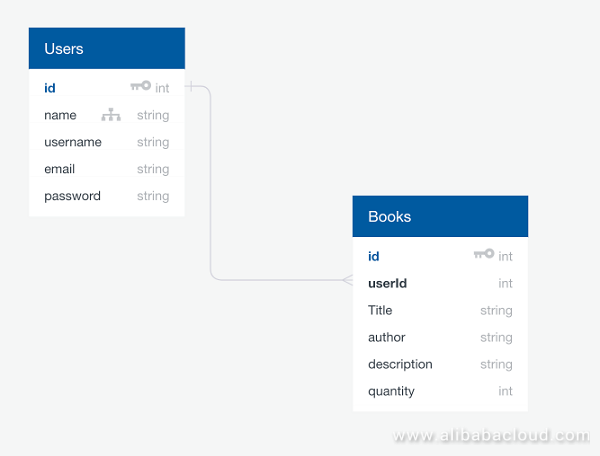
User model
To create our user model, run the command below
sequelize model:create --name User --attributes name:string,username:string,email:string,password:stringA new user migration file would be created in the server/migration directory as shown below
   'use strict';
    module.exports = {
        up: (queryInterface, Sequelize) => {
          return queryInterface.createTable('Users', {
            id: {
              allowNull: false,
              autoIncrement: true,
              primaryKey: true,
              type: Sequelize.INTEGER
            },
            name: {
              type: Sequelize.STRING
            },
            username: {
              type: Sequelize.STRING
            },
            email: {
              type: Sequelize.STRING
            },
            password: {
              type: Sequelize.STRING
            },
            createdAt: {
              allowNull: false,
              type: Sequelize.DATE
            },
            updatedAt: {
              allowNull: false,
              type: Sequelize.DATE
            }
          });
        },
        down: (queryInterface, Sequelize) => {
            return queryInterface.dropTable('Users');
        }
    };
When we run our migration, which we are going to do later in this section, the up function would be executed and creates the table and associated columns for us in our database. whenever we want to undo such changes the down function would be executed when we run the sequelize db:migrate:undo:all command.
Let take a lot at the user model file user.js generated in the server/models directory
    'use strict';
    module.exports = (sequelize, DataTypes) => {
      var User = sequelize.define('User', {
        name: DataTypes.STRING,
        username: DataTypes.STRING,
        email: DataTypes.STRING,
        password: DataTypes.STRING,
      }, {});
      User.associate = function(models) {
        // associations can be defined here
      };
      return User;
    };
We are going to refactor this file to use `ES6` and add some validation for our user models as shown below.export default (sequelize, DataTypes) => {
const User = sequelize.define('User', {
name: {
type: DataTypes.STRING,
allowNull: {
args: false,
msg: 'Please enter your name'
}
},
username: {
type: DataTypes.STRING,
allowNull: {
args: false,
msg: 'Please enter your username'
}
},
email: {
type: DataTypes.STRING,
allowNull: {
args: false,
msg: 'Please enter your email address'
},
unique: {
args: true,
msg: 'Email already exists'
},
validate: {
isEmail: {
args: true,
msg: 'Please enter a valid email address'
},
},
},
password: {
type: DataTypes.STRING,
allowNull: {
args: false,
msg: 'Please enter a password'
},
validate: {
isNotShort: (value) => {
if (value.length < 8) {
throw new Error('Password should be at least 8 characters');
}
},
},
}
}, {});
User.associate = (models) => {
// associations can be defined here
};
return User;
};We also need to update our user migration file to include the changes we made to our user model file.
Open the user migration file at server/migrations/<date>-create-user-.js and update it to read the code below
    module.exports = {
      up: (queryInterface, Sequelize) => {
        return queryInterface.createTable('Users', {
            id: {
              allowNull: false,
              autoIncrement: true,
              primaryKey: true,
              type: Sequelize.INTEGER
            },
            name: {
              allowNull: false,
              type: Sequelize.STRING
            },
            username: {
              allowNull: false,
              type: Sequelize.STRING
            },
            email: {
              allowNull: false,
              unique: true,
              type: Sequelize.STRING
            },
            password: {
              type: Sequelize.STRING
            },
            createdAt: {
              allowNull: false,
              type: Sequelize.DATE
            },
            updatedAt: {
              allowNull: false,
              type: Sequelize.DATE
            }
        });
      },
      down: queryInterface /* , Sequelize */ => queryInterface.dropTable('Users')
    };
Book model
To create our user model, run the command below
sequelize model:create --name Book --attributes title:string,author:string,description:string,quantity:integer,userId:integerA book model file book.js is generated in the server/model directory as shown below
    'use strict';
    module.exports = (sequelize, DataTypes) => {
      var Book = sequelize.define('Book', {
        title: DataTypes.STRING,
        author: DataTypes.STRING,
        description: DataTypes.STRING,
        quantity: DataTypes.INTEGER,
        userId: DataTypes.INTEGER
      }, {});
      Book.associate = function(models) {
        // associations can be defined here
      };
      return Book;
    };
We would also update this file to use ES6 and add some validations for our book model
    export default (sequelize, DataTypes) => {
      const Book = sequelize.define('Book', {
        title: {
          type: DataTypes.STRING,
          allowNull: {
            args: false,
            msg: 'Please enter the title for your book'
          }
        },
        author: {
          type: DataTypes.STRING,
          allowNull: {
            args: false,
            msg: 'Please enter an author'
          }
        },
        description: {
          type: DataTypes.STRING,
          allowNull: {
            args: false,
            msg: 'Pease input a description'
          }
        },
        quantity: {
          type: DataTypes.INTEGER,
          allowNull: {
            args: false,
            msg: 'Pease input a quantity'
          }
        },
        userId: {
          type: DataTypes.INTEGER,
          references: {
            model: 'User',
            key: 'id',
            as: 'userId',
          }
        }
      }, {});
      Book.associate = (models) => {
        // associations can be defined here
      };
      return Book;
    };
We are also going to update the books migration file at server/migrations/<date>-create-book-.js to include the changes made to the book model.
    module.exports = {
      up: (queryInterface, Sequelize) => {
        return queryInterface.createTable('Books', {
          id: {
            allowNull: false,
            autoIncrement: true,
            primaryKey: true,
            type: Sequelize.INTEGER
          },
          title: {
            allowNull: false,
            type: Sequelize.STRING
          },
          author: {
            allowNull: false,
            type: Sequelize.STRING
          },
          description: {
            allowNull: false,
            type: Sequelize.STRING
          },
          quantity: {
            allowNull: false,
            type: Sequelize.INTEGER
          },
          userId: {
            type: Sequelize.INTEGER,
            onDelete: 'CASCADE',
            references: {
              model: 'Users',
              key: 'id',
              as: 'userId',
            }
          },
          createdAt: {
            allowNull: false,
            type: Sequelize.DATE
          },
          updatedAt: {
            allowNull: false,
            type: Sequelize.DATE
          }
        });
      },
      down: queryInterface /* , Sequelize */ =>  queryInterface.dropTable('Books')
    };
Association
Now, we need to define the associations between our user and book model. As a user, I should be able to have as many books as possible while a book should belong to a particular user. So our user model is going to have a One-to-many relationship with the book model while our book model would have a many-to-one relationship with the user model. You can check on the Sequelize docs for more explanation on associations.
Edit the user.js file in the server/models directory to define the relationship between user and book as shown below
    ...
    User.associate = (models) => {
      // associations can be defined here
      User.hasMany(models.Book, {
        foreignKey: 'userId',
      });
    };
    return User;
    ...
Also, edit the `book.js` file in the `server/models` directory to define the relationship between `book` and `user` as shown below...
Book.associate = (models) => {
// associations can be defined here
Book.belongsTo(models.User, {
foreignKey: 'userId',
onDelete: 'CASCADE'
});
};
return User;
...The onDelete: CASCADE ensures whenever we delete a user, the books associated with such user should also be deleted.
With the models and migrations in place, we can create those changes to the database by running the command below
Sequelize db:migrateWith our models and database in place, we are ready to create our controllers. We would be creating a user and book controllers, The controllers would be responsible for the CRUD(CREATE, READ, UPDATE and DELETE) operations
For our user controller
controllers folder in the server directoryuser.js file in the server/controllers directory to define our user functionality which would also a user to create an account. import model from '../models';
const { User } = model;
class Users {
static signUp(req, res) {
const { name, username, email, password } = req.body
return User
.create({
name,
username,
email,
password
})
.then(userData => res.status(201).send({
success: true,
message: 'User successfully created',
userData
}))
}
}
export default Users;Basically, we are importing our models object and then use object destructuring to get our user model. In our Users class, we create a method called signUp which is responsible for creating our user.
routes folder in the server directoryindex.js file in the server/routes directory. This is where we are going to define our API endpoints. Paste the code below import Users from '../controllers/user';
export default (app) => {
app.get('/api', (req, res) => res.status(200).send({
message: 'Welcome to the BookStore API!',
}));
app.post('/api/users', Users.signUp); // API route for user to signup
};In this file, we are importing our Users class and defining two API endpoints.
/api endpoint has an HTTP Method of GET which can be translated as READ in the CRUD operation./api/users endpoint has an HTTP Method of POST which can be translated as CREATE in the CRUD operation. Whenever we hit this API endpoint, we are calling the signUp method from our Users class which is going to create a new user.app.js file and edit it to look like this import http from 'http'
import express from 'express'
import logger from 'morgan';
import bodyParser from 'body-parser';
import routes from './server/routes';
const hostname = '127.0.0.1';
const port = 3000;
const app = express()
const server = http.createServer(app);
app.use(logger('dev'));
app.use(bodyParser.json());
app.use(bodyParser.urlencoded({ extended: false }));
routes(app);
app.get('*', (req, res) => res.status(200).send({
message: 'Welcome to the .',
}));
server.listen(port, hostname, () => {
console.log(`Server running at http://${hostname}:${port}/`);
});Postman and create a new user as shown below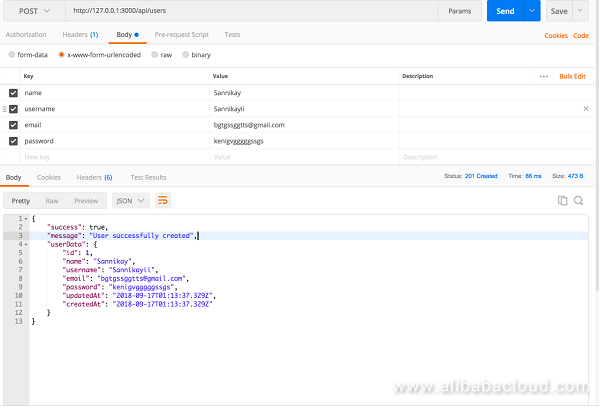
Note when building either a production or development ready API, you are to encrypt the password value using packages like bcrypt. You should see the user data you created just now in your database.
create a new file named book.js in the server/controllers directory and paste the code below
            import model from '../models';

            const { Book } = model;

            class Books {
              static create(req, res) {
                const { title, author, description, quantity } = req.body
                const { userId } = req.params
                return Book
                  .create({
                    title,
                    author,
                    description,
                    quantity,
                    userId
                  })
                  .then(book => res.status(201).send({
                    message: `Your book with the title ${title} has been created successfully `,
                    book
                  }))
                }
            }

export default Booksindex.js file in the server/routes directory and update the code to read this import Users from '../controllers/user';
import Books from '../controllers/book';
export default (app) => {
app.get('/api', (req, res) => res.status(200).send({
message: 'Welcome to the bookStore API!',
}));
app.post('/api/users', Users.signUp); // API route for user to signup
app.post('/api/users/:userId/books', Books.create); // API route for user to create a book
};Note that userId is the Id of user we created earlier
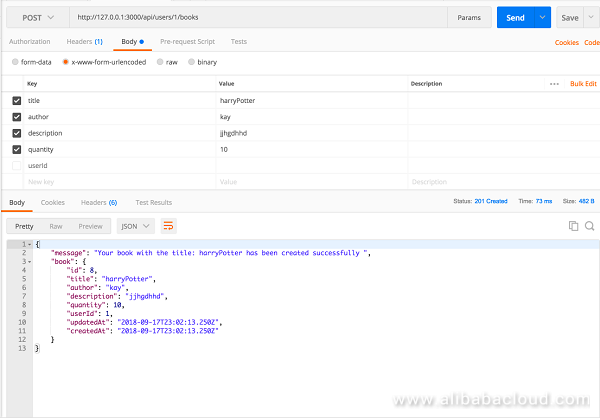
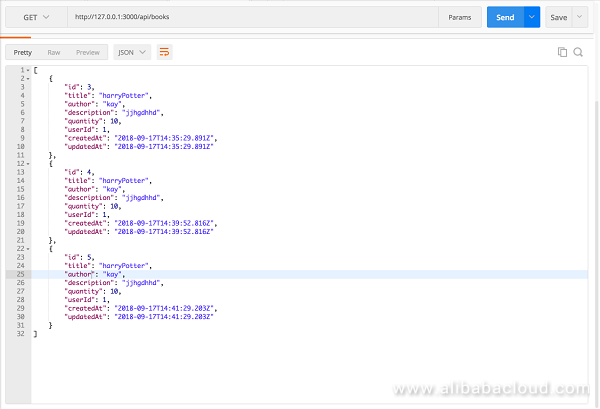
We would modify our book controller to enable us to get the list of all the books in our database
book.js in the server/controllers directory and update it to include this ...
static list(req, res) {
return Book
.findAll()
.then(books => res.status(200).send(books));
}
...index.js file in the server/routes directory to define our API for listing all books. ...
app.get('/api/books', Books.list); // API route for user to get all books in the database
...
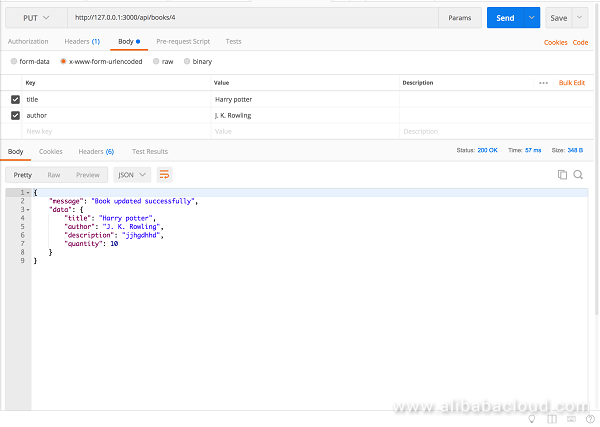
We would modify our book controller to allow us to modify a book data in our database
book.js in the server/controllers directory and update it to include this ...
static modify(req, res) {
const { title, author, description, quantity } = req.body
return Book
.findById(req.params.bookId)
.then((book) => {
book.update({
title: title || book.title,
author: author || book.author,
description: description || book.description,
quantity: quantity || book.quantity
})
.then((updatedBook) => {
res.status(200).send({
message: 'Book updated successfully',
data: {
title: title || updatedBook.title,
author: author || updatedBook.author,
description: description || updatedBook.description,
quantity: quantity || updatedBook.quantity
}
})
})
.catch(error => res.status(400).send(error));
})
.catch(error => res.status(400).send(error));
}
...index.js file in the server/routes directory to define our API endpoint for editing a books. ...
app.put('/api/books/:bookId', Books.modify); // API route for user to edit a book
...bookId is the id of the book to be edited
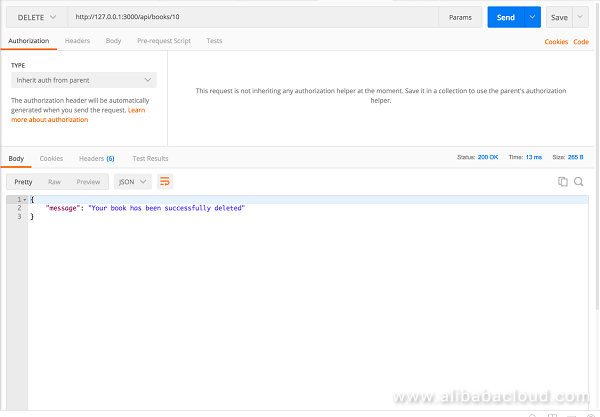
Finally, we are going to add a functionality to delete a book
book.js in the server/controllers directory and update it to include this ...
static delete(req, res) {
return Book
.findById(req.params.bookId)
.then(book => {
if(!book) {
return res.status(400).send({
message: 'Book Not Found',
});
}
return book
.destroy()
.then(() => res.status(200).send({
message: 'Book successfully deleted'
}))
.catch(error => res.status(400).send(error));
})
.catch(error => res.status(400).send(error))
}
...index.js file in the server/routes directory to define our API endpoint for editing a books. ...
app.delete('/api/books/:bookId', Books.delete); // API route for user to delete a book
...
For reference purposes, The complete code for this article can be found on this Github Repository
Finally, we have come to the end of this article. This article is just a basic of getting started with RESTful API. We were able to create a basic CRUD operation, but here are some few things you could try out on your own

2,593 posts | 795 followers
FollowHironobu Ohara - May 25, 2023
Alibaba Clouder - May 6, 2019
Alibaba Clouder - March 18, 2019
Alibaba Clouder - March 8, 2019
ApsaraDB - October 8, 2024
Louis Liu - August 27, 2019
2,593 posts | 795 followers
Follow ECS(Elastic Compute Service)
Elastic and secure virtual cloud servers to cater all your cloud hosting needs.
Learn More OSS(Object Storage Service)
An encrypted and secure cloud storage service which stores, processes and accesses massive amounts of data from anywhere in the world
Learn MoreLearn More
More Posts by Alibaba Clouder


Ravi Kumar Singh April 24, 2019 at 9:46 am
This is awesome example. Works really fine. Just some updates require that in the new versions of sequelize findById has been replaced by findByPk. Overall its a great article.