By Alibaba Cloud MaxCompute Team
This series details the migration journey of a leading Southeast Asian technology group from Google BigQuery to MaxCompute, highlighting key challenges and technical innovations. This fourth installment analyzes the complete process of upgrading enterprise-grade permission management and enhancing data security during the cross-border, heterogeneous data warehouse migration.
Note: The customer is a leading Southeast Asian technology group, referred to as GoTerra in this article.
With the rapid growth of Southeast Asia's digital economy, payments and e-commerce leader GoTerra has experienced a surge in data volume and complexity. To address evolving business needs and regulatory requirements, GoTerra decided to migrate its big data operations from Google BigQuery to Alibaba Cloud's MaxCompute. This migration represented not only a shift in technology platforms but also a comprehensive upgrade of data governance and security.
Recognizing the differences between BigQuery and MaxCompute, the MaxCompute metadata team developed a Google Cloud Platform (GCP)-compatible permission system and catalog management API, building upon existing atomic access control capabilities. This enabled GoTerra to seamlessly migrate metadata, role permissions, and other configurations.
This article highlights the enterprise-grade features that MaxCompute tailors for GoTerra in cross-domain access control and data security, including multi-level, cross-account access control and dynamic data masking based on policy tags. These features not only address GoTerra's migration challenges but also provide a more comprehensive data security solution for all MaxCompute users.
As a large Southeast Asian Internet conglomerate, GoTerra operates across multiple business domains with a complex organizational structure. This necessitates a unified platform capable of supporting diverse permission management and configuration requirements across different business units.
1. Permission architecture for a complex organization: As a large conglomerate, GoTerra has multiple independent or semi-independent business units. Within each unit, various roles and teams exist (e.g., data development, data science, data analysts, business users) with differing data access needs (e.g., read/write access for developers, read-only access to specific masked data for analysts).
2. Strict permission separation and principle of least privilege: Data security and compliance necessitate that each user or team has access only to the minimum dataset required for their work, preventing unauthorized access to other business units or sensitive data.
3. Flexible cross-account management: GoTerra utilizes multiple Alibaba Cloud accounts and requires secure data sharing and collaboration across these accounts.
GoTerra relies heavily on Google BigQuery's permission management model, therefore requiring any new enterprise-grade capabilities in MaxCompute to be compatible with BigQuery's permission features.
1. Tight identity and access management (IAM) integration: BigQuery API permissions, defined within IAM, can be bound to specific BigQuery resources (e.g., datasets, tables) for granular authorization and horizontal scalability.
2. Resource-level authorization: Permissions can be defined and inherited within Google Cloud's resource hierarchy (e.g., Organization -> Project -> Dataset -> Table). This allows for easily setting permissions at a project or dataset level, automatically applying them to all underlying tables.
3. Predefined and custom roles: BigQuery offers a rich set of predefined roles and supports user-defined custom roles for precise control over permitted actions.
4. Flexible member management: Roles can be assigned to various member types (e.g., individual users, service accounts, Google Groups), facilitating team- or responsibility-based batch authorization and management.
5. Easy-to-manage column-level permissions: Centrally managed, reusable policy tags with a hierarchical structure can be applied to columns, enabling permission management based on these tags.
MaxCompute permission system gaps compared to BigQuery and customer needs:
1. Project-level permission boundary. In MaxCompute, a project serves as the core permission boundary. While projects can utilize access control lists (ACLs) or policies for authorization, this differs significantly from BigQuery's native hierarchical permission management, which allows for unified and inherited control at higher levels (e.g., organization, resource directory) and finer granularities (e.g., schema, table, column).
2. Coarse-grained permissions: MaxCompute's permission control primarily focuses on project-level access (e.g., Read, Write) and basic object-level operations (e.g., Select, Describe on specific tables). It lacks the fine-grained control of BigQuery's IAM, which extends to specific API operations.
3. Lack of advanced inheritance: Granting permissions (e.g., read-only access for GoTerra's data analysis team) across multiple projects or schemas requires individual authorization for each table or project, leading to cumbersome management and potential errors. MaxCompute lacks BigQuery's ability to grant permissions at the project or dataset level and automatically apply them to all child resources.
4. Complex cross-project and cross-account authorization: While MaxCompute offers some cross-project resource sharing (via packages) and cross-account access, these methods are insufficiently secure or convenient for GoTerra's multi-account architecture, lacking organization-based boundary control.
5. Complex column-level permissions: Column-level masking policies are defined and managed within specific projects and directly bound to table columns. This approach lacks centralized tag management and a hierarchical structure, treating each policy as an independent rule and hindering policy reusability.
To address GoTerra's complex migration requirements, the MaxCompute permissions team introduced a new multi-level access control system.
The original permission system, primarily based on projects, could not accommodate GoTerra's complex organizational structure and permissions needs. Therefore, we introduced several entity concepts such as namespace, serving as larger data plane boundaries than projects. Namespaces are also associated with the resource directory to facilitate multi-account management.
The following figure shows the new resource hierarchy.
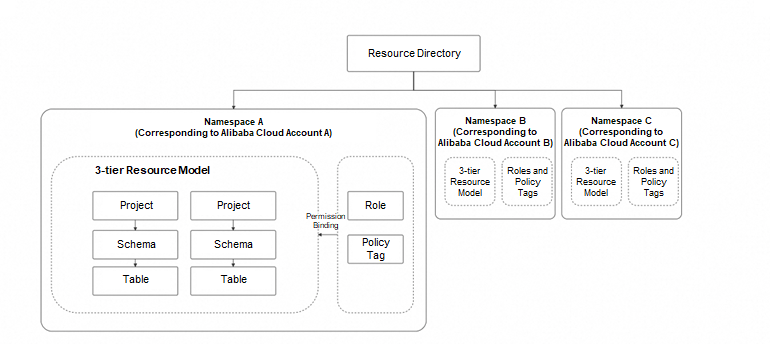
1. Resource directory: A resource directory is a top-level container provided by Alibaba Cloud for organizing and managing resources. A resource directory can contain multiple Alibaba Cloud accounts, representing different departments, subsidiaries, or business units within an enterprise. In MaxCompute, the resource directory is the largest boundary and can contain multiple namespaces, even if their associated projects belong to different Alibaba Cloud accounts within the resource directory.
2. Namespace: A namespace is a new data plane boundary in MaxCompute, larger than a project, allowing for grouping multiple projects under centralized permission management. Users can create custom roles and policy tags at the namespace level by calling the Catalog API or executing data control language (DCL) authorization statements. These custom roles and policy tags can then be applied to all projects within the namespace. Each namespace is associated with a single Alibaba Cloud account.
3. Project: the fundamental organizational unit in MaxCompute. All user operations (e.g., creating tables, executing SQL, submitting jobs) occur within a specific project. A project belongs to only one namespace and can contain multiple schemas.
4. Schema: a logical grouping within a project, used to organize and manage tables and other resources (e.g., table snapshots, functions). A schema belongs to only one project and can contain multiple tables.
5. Table: the basic unit for storing structured data in MaxCompute. Policy tags can be applied to specific table columns to implement dynamic data masking and column-level access control.
A key feature of the new permission system is permission inheritance, allowing permissions to propagate down the resource hierarchy.
Let's illustrate the new permission system using a fictional cross-departmental data collaboration and analysis scenario.
A company has two core business departments: User Service and Order Processing. The company needs to perform data analysis to optimize operations.
user_project.user_data schema within the user_project project.order_project.order_data schema within the order_project project. The Order Processing Department needs to read basic user information from the User Service Department to complete order processing.Resource hierarchy
| Tier | Resource |
|---|---|
| Namespace | 40822 (corresponding to the UID of Alibaba Cloud account company) |
| Project | user_project (User Service Department project) order_project (Order Processing Department project) |
| Schema | user_project.user_data (stores user tables) user_project.user_results (stores analysis results from the User Service Department) order_project.order_data (stores order tables) order_project.order_results (stores analysis results from the Order Processing Department) |
| Table | user_project.user_data.users (user information table) user_project.user_data.users_profilers (user profile table) user_project.user_results.user_summary (user summary table) order_project.order_data.orders (order details table) order_project.order_results.order_summary (order summary table) |
User list
| Identity name | Permission requirement |
|---|---|
| RAM$company:admin | Administrator with highest permissions on all projects. |
| RAM$company:alice | Data developer responsible for developing and maintaining user_project. |
| RAM$company:bob | Data developer responsible for developing and maintaining order_project, and requiring read access to the user_project.user_data.users table. |
| RAM$company:carol | Analyst requiring read access to the final results data from all departments. |
Custom roles (created by calling the Catalog API)
| Role name | Owned permissions |
|---|---|
| Developer | ListSchema GetSchema ListTable GetTable GetTableData CreateTable UpdateTableData CreateSchema UpdateSchema |
| DataViewer | ListSchema GetSchema ListTable GetTable GetTableData |
Permission Configuration and Inheritance Demonstration
Initial state: All users except the administrator have no permissions on any projects, schemas, or tables.
Configuration: The administrator performs the permission configuration.
Step 1: Configure the R&D permissions for the User Service Department.
• Objective: Grant alice full permissions (develop, maintain, and read) on all data within user_project.
• Action: Grant the Developer role to alice at the user_project level.
GRANT `namespaces/40822/roles/Developer` ON PROJECT user_project TO RAM$company:alice
• Effect (permission inheritance):
alice gains all permissions on user_project.ListSchema and GetSchema permissions on the user_project.user_data and user_project.user_results schemas.alice also automatically inherits permissions such as ListTable, GetTable, GetTableData, UpdateTableData, and CreateTable on all tables (users, users_profilers, and user_summary) within these schemas.alice inherits complete development access to all schemas and tables within the project.Step 2: Configure the R&D permissions for the Order Processing Department.
• Objective: Grant bob full permissions (develop, maintain, and read) on all data within order_project.
• Action 1: Grant the Developer role to bob at the order_project level.
GRANT `namespaces/40822/roles/Developer` ON PROJECT order_project TO RAM$company:bob
bob has full permissions on order_project and all its schemas and tables (similar to alice).• Action 2: Grant the DataViewer role to bob on the user_project.user_data.users table.
GRANT `namespaces/40822/roles/DataViewer` ON TABLE user_project.user_data.users TO RAM$company:bob
bob gains read access to the users table. Note that bob does not gain write permissions on user_project or the user_data schema; access is limited to reading this specific table.bob's need to read specific data without granting broader access to other tables in the schema or the entire project.Step 3: Configure data analyst permissions.
• Objective: Grant carol read access to the results data (user_summary and order_summary) from both departments.
• Action 1: Grant the DataViewer role to carol on the user_project.user_results schema.
GRANT `namespaces/40822/roles/DataViewer` ON SCHEMA user_project.user_results TO RAM$company:carol
Effect (permission inheritance):
carol gains GetSchema and ListTable permissions on the user_project.user_results schema.carol automatically gains GetTable and GetTableData permissions on all tables (such as user_summary) within the schema.• Action 2: Grant the DataViewer role to carol on the order_project.order_results schema.
GRANT `namespaces/40822/roles/DataViewer` ON SCHEMA order_project.order_results TO RAM$company:carol
user_results, carol gains read access to all resources within the order_project.order_results schema.• Summary: By granting permissions at the schema level, carol leverages inheritance to gain read-only access to all result tables within both schemas, without requiring individual table-level grants.
To meet GoTerra's stringent sensitive data access controls and compliance requirements, we introduced centralized, dynamic data masking functionality based on policy tags. Inspired by Google BigQuery and optimized for the Alibaba Cloud ecosystem, this feature provides flexible, reusable, and hierarchical column-level access control and data masking capabilities.
• Dynamic data masking: Without requiring modifications to existing SQL queries, sensitive data columns are automatically masked based on the user's identity at access time. This ensures that data is masked during queries, downloads, joins, and user-defined function (UDF) computations, mitigating the risk of leaking sensitive information such as personally identifiable information (PII).
• Policy tag: a metadata tag attached to a table column, indicating the data's sensitivity (e.g., PII, financial data, confidential information).
• Taxonomy: Policy tags can be organized into a hierarchical taxonomy, with parent-child relationships between tags. This structure supports permission inheritance and granular management.
• Data policy: rules associated with a policy tag, defining access behavior for the tagged column. Main types include:
NULL, default value, hashed value) is presented to unauthorized users.• Predefined roles:
MaskedReader: grants access to the masked version of data in tagged columns.FineGrainedReader: grants access to the raw, unmasked data in tagged columns.Policy tags, taxonomies, and data policies are defined at the namespace level. Since a namespace typically corresponds to an Alibaba Cloud account, this allows for centralized creation and management of a unified policy tag system at the account level. This system can be applied to tables across all projects within the namespace, significantly simplifying data security management in multi-project environments and ensuring policy consistency.
Next, we'll use a fictional example to demonstrate how granular access control can be achieved using policy tag hierarchies and role assignments.
Consider a user profile table named proj1.schema1.user_profiles.
| ID Card Number | Priority | Lifetime value | Creation date | |
|---|---|---|---|---|
| 123456789 | High | 40000 | 20200512 | luffy@example.com |
| 223456789 | Medium | 25000 | 19910103 | zz@example.com |
| 323456789 | High | 1000 | 20180222 | loey@example.com |
| 423456789 | Low | 94236 | 19870910 | kk@example.com |
Create policy tags:
Apply tags:
Configure data policies and assign roles:
The following figure shows the configured policy tag hierarchy and role assignments for each tag.
Next, we bind the created policy tags to different table columns, as described in the following table.
| ID Card Number | Priority | Lifetime value | Creation date | |
|---|---|---|---|---|
| 123456789 | High | 40000 | 20200512 | luffy@example.com |
| 223456789 | Medium | 25000 | 19910103 | zz@example.com |
| 323456789 | High | 1000 | 20180222 | loey@example.com |
| 423456789 | Low | 94236 | 19870910 | kk@example.com |
Based on the tags associated with the columns, executing SELECT * FROM proj1.schema1.user_profiles; will produce the following results for different users:
user1: This user has been assigned the MaskedReader role for the PII and Confidential tags. The following results are returned:
| ID Card Number | Priority | Lifetime value | Creation date | |
|---|---|---|---|---|
| NULL | "" | 0 | 20200512 | NULL |
| NULL | "" | 0 | 19910103 | NULL |
| NULL | "" | 0 | 20180222 | NULL |
| NULL | "" | 0 | 19870910 | NULL |
user2: This user has been assigned the FineGrainedReader role for the ID tag. The following results are returned:
| ID Card Number | Priority | Lifetime value | Creation date | |
|---|---|---|---|---|
| 123456789 | "" | 0 | 20200512 | NULL |
| 223456789 | "" | 0 | 19910103 | NULL |
| 323456789 | "" | 0 | 20180222 | NULL |
| 423456789 | "" | 0 | 19870910 | NULL |
user3: This user has been assigned the FineGrainedReader role for the Confidential tag. The following results are returned:
| ID Card Number | Priority | Lifetime value | Creation date | |
|---|---|---|---|---|
| NULL | High | 40000 | 20200512 | NULL |
| NULL | Medium | 25000 | 19910103 | NULL |
| NULL | High | 1000 | 20180222 | NULL |
| NULL | Low | 94236 | 19870910 | NULL |
user4: This user has been assigned the MaskedReader role for the Financial tag. The following results are returned:
| ID Card Number | Priority | Lifetime value | Creation date | |
|---|---|---|---|---|
| 123456789 | "" | Zmy9vydG5q= | 20200512 | NULL |
| 223456789 | "" | GhwTwq6Ynm= | 19910103 | NULL |
| 323456789 | "" | B6y7dsgaT9= | 20180222 | NULL |
| 423456789 | "" | Uh02hnR1sg= | 19870910 | NULL |
All other users: Users not belonging to the preceding groups receive an "access denied" error because they are not assigned the FineGrainedReader or MaskedReader role. To query proj1.schema1.user_profiles, they must specify accessible columns in their SELECT statement.
In enterprise environments, multiple Alibaba Cloud accounts are often used to manage and isolate resources based on varying business needs, departmental responsibilities, asset management, and compliance requirements. For example, data management teams might have dedicated accounts and projects for centralized data storage and writing. Individual business units might use separate accounts and projects for specific data processing tasks. Security teams might have dedicated projects for security audits and other activities.
To ensure strict access control for sensitive information, data managers are directly responsible for granting permissions. This means data providers grant access to specific data consumers. While business users leverage their own projects for computation, access to data in external (provider) projects is governed by predefined authorization rules. This approach enhances data security and promotes cross-team collaboration.
In a multi-account environment, we leverage a resource directory to establish cross-account identity authorization boundaries and provide granular permission management. This enables enterprise data administrators to centrally manage users within the same resource directory in MaxCompute. They can add RAM users and roles within Alibaba Cloud accounts as MaxCompute members and configure detailed permissions without requiring delegated authorization. This ensures data owners retain full control over permissions and reduces security risks associated with Alibaba Cloud account dependencies.
Furthermore, to prevent unauthorized external access to sensitive information, users can utilize resource directory control policies to restrict which users can be added to specific MaxCompute projects, simplifying security management in multi-account scenarios.
The following example shows a resource directory control policy that restricts additions to MaxCompute to only RAM users and roles within the same resource directory:
{
  "Version": "1",
  "Statement": [
    {
      "Effect": "Deny",
      "Action": [
          "odps:AllowCrossAccountAddUser"
      ],
      "Resource": "*",
      "Condition": {
        "Bool": {
          "odps:InSameRD": [
            "false"
          ]
        }
      }
    }
  ]
}For large enterprises like GoTerra, big data operations are highly complex, encompassing both the technical aspects of data processing and analysis and the organizational structures that support these operations. This complexity creates a dual challenge for permission management: ensuring ease of administration while maintaining granular control. Therefore, a robust, flexible, and scalable permission management system, capable of supporting efficient O&M, is a critical capability for such organizations.
To address this, we implement the following features:
A comprehensive, hierarchical management and control system:
Automatic permission inheritance across hierarchical resources:
Dynamic data masking based on policy tags:
Enhanced cross-account access control and compliance:
MaxCompute's new permission and security system, along with enhanced data security capabilities, was released to international regions in March 2025, supporting GoTerra's online business.
We will continue to explore the following areas:
Through close collaboration with GoTerra, MaxCompute is becoming a leading enterprise big data platform, providing secure, reliable, and efficient data processing services globally. The GoTerra migration project represents not only a technical transition but also a significant advancement in MaxCompute's capabilities. We believe these new enterprise-grade data security and access control features will empower more enterprises to maximize the value of their data while ensuring security and compliance.

1,546 posts | 519 followers
FollowAlibaba Cloud Community - October 20, 2025
Alibaba Cloud Community - October 20, 2025
Alibaba Cloud Community - October 17, 2025
Alibaba Cloud Community - October 17, 2025
Alibaba Cloud MaxCompute - January 22, 2021
Alibaba Cloud MaxCompute - December 8, 2020
1,546 posts | 519 followers
Follow Big Data Consulting for Data Technology Solution
Alibaba Cloud provides big data consulting services to help enterprises leverage advanced data technology.
Learn More Cloud Migration Solution
Secure and easy solutions for moving you workloads to the cloud
Learn More MaxCompute
Conduct large-scale data warehousing with MaxCompute
Learn More Big Data Consulting Services for Retail Solution
Alibaba Cloud experts provide retailers with a lightweight and customized big data consulting service to help you assess your big data maturity and plan your big data journey.
Learn MoreMore Posts by Alibaba Cloud Community

