As discussed in my previous article, crypto exchanges typically operate in the cloud. Cloud providers such as Alibaba Cloud organize their infrastructure into regions, which are further subdivided into availability zones (AZs): groups of isolated data centers with their own dedicated network infrastructure.
One of the trickiest latency challenges is improving _last-mile latency_, since much of the underlying network is abstracted away by the cloud provider. The underlay network, which comprises of switches, routers, and physical paths, is effectively invisible.
This article provides a guide to understanding where latency occurs in cloud networking, how to measure it, and strategies for improvement.
Specifically, we’ll look at:
Let’s begin with the first scenario: measuring latency from your workload to the exchange.
To achieve the lowest latency, your infrastructure must be as physically close as possible to the exchange’s matching engine. This means more than just choosing the right region: you also need to identify the exact availability zone (AZ) where the exchange is hosted.
But this is more complicated than it seems, especially when load balancers are involved.
If you don’t have a colocation setup, as mentioned in the previous article, you’ll be trading over the public internet. A typical architecture for connecting to an exchange via WebSocket might look like this:
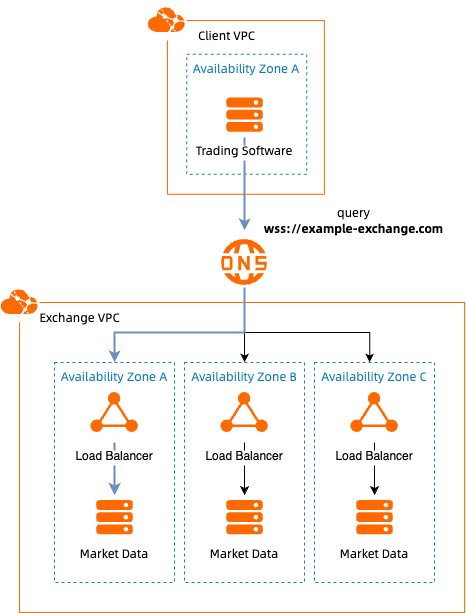
This introduces a key challenge: your DNS provider could route your request to any load balancer, not necessarily one located in the same AZ as your workload.
Even if you can ping the IP address of the load balancer (assuming you have somehow identified this IP address, through a tool such as traceroute), and it shows 1 millisecond latency, that doesn’t guarantee proximity. Cloud providers often use cross-zone load balancing, which means your actual websocket request could be routed from load balancer A to backend servers in AZ B, adding hidden latency.
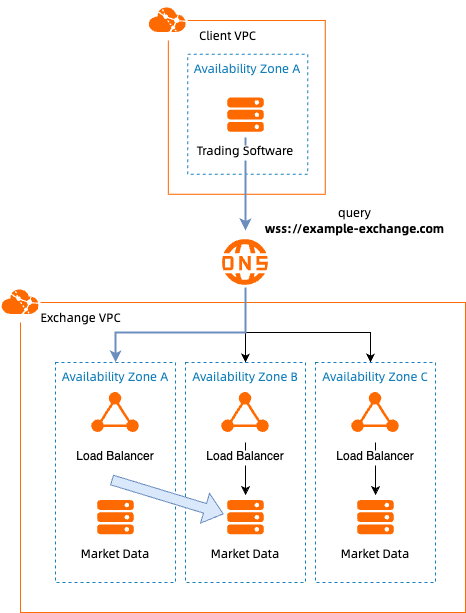
So while ping may report low latency, the true path may be more complex and less optimal.
Further complicating matters, many DNS records resolve to Content Distribution Networks (CDNs), including Alibaba Cloud’s own CDN. CDNs use edge nodes around the globe to accelerate static content delivery, but they do not process the actual exchange data.
For example, connecting from Europe to a Hong Kong-based exchange might first route your request to a European CDN node. However, the actual exchange processing still occurs in Hong Kong, potentially adding hundreds of milliseconds of latency.
To find a better approximation of the network latency, we need more precise tools.
As mentioned before, standard tools like ping only measure network round-trip time to the nearest visible endpoint. They don’t account for internal processing delays at the exchange, cross-zone routing within the cloud, or the actual location of the exchange's matching engine.
To get more useful insights, it's often better to measure end-to-end application latency: the time duration from when the exchange generates a data packet to when it arrives at your system.
Many exchanges include a timestamp in their market data, indicating when the data was produced. By comparing this with the arrival time on your system, you can estimate real-world latency quite accurately.
Clock synchronization in distributed systems is an incredibly complex topic. Any comparison of timestamps between two different devices will always be a rough approximation. Fortunately, Alibaba Cloud Elastic Compute Service (ECS) instances sync with a shared internal NTP (Network Time Protocol) source. If the exchange and your workload both are hosted on Alibaba Cloud, your measurements can be reasonably reliable, although there will always be an error margin on the clock skew. For more information on clock synchronization in Alibaba Cloud, see our NTP documentation.
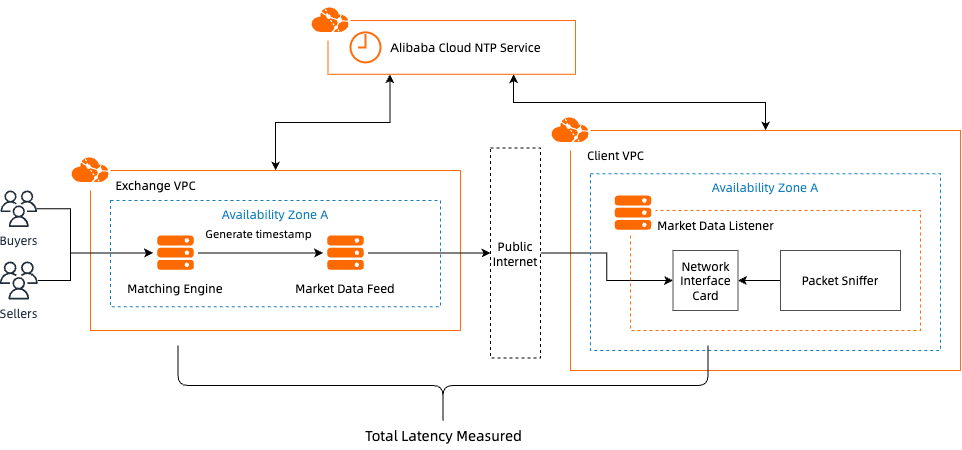
To give an example on how to tackle measuring application latency, I created a small Python tool for this blog called ticktracer. It captures network packets using Wireshark (via libpcap) and compares the timestamp in the packet with its arrival time, providing a semi-real-time latency analysis.
If your workloads communicate across different instances, VPCs, or AZs within Alibaba Cloud, measuring inter- and intra-AZ latency becomes important.
Alibaba Cloud offers the Network Intelligence Service (NIS) for this purpose.
Visit the NIS console.
Navigate to the Cloud Network Performance dashboard.
Select the region you want to inspect.
You’ll see a latency matrix showing the latency between each AZ pair. Hovering over a cell reveals current latency values. Click “Display Latency” to show latency values across the matrix by default.
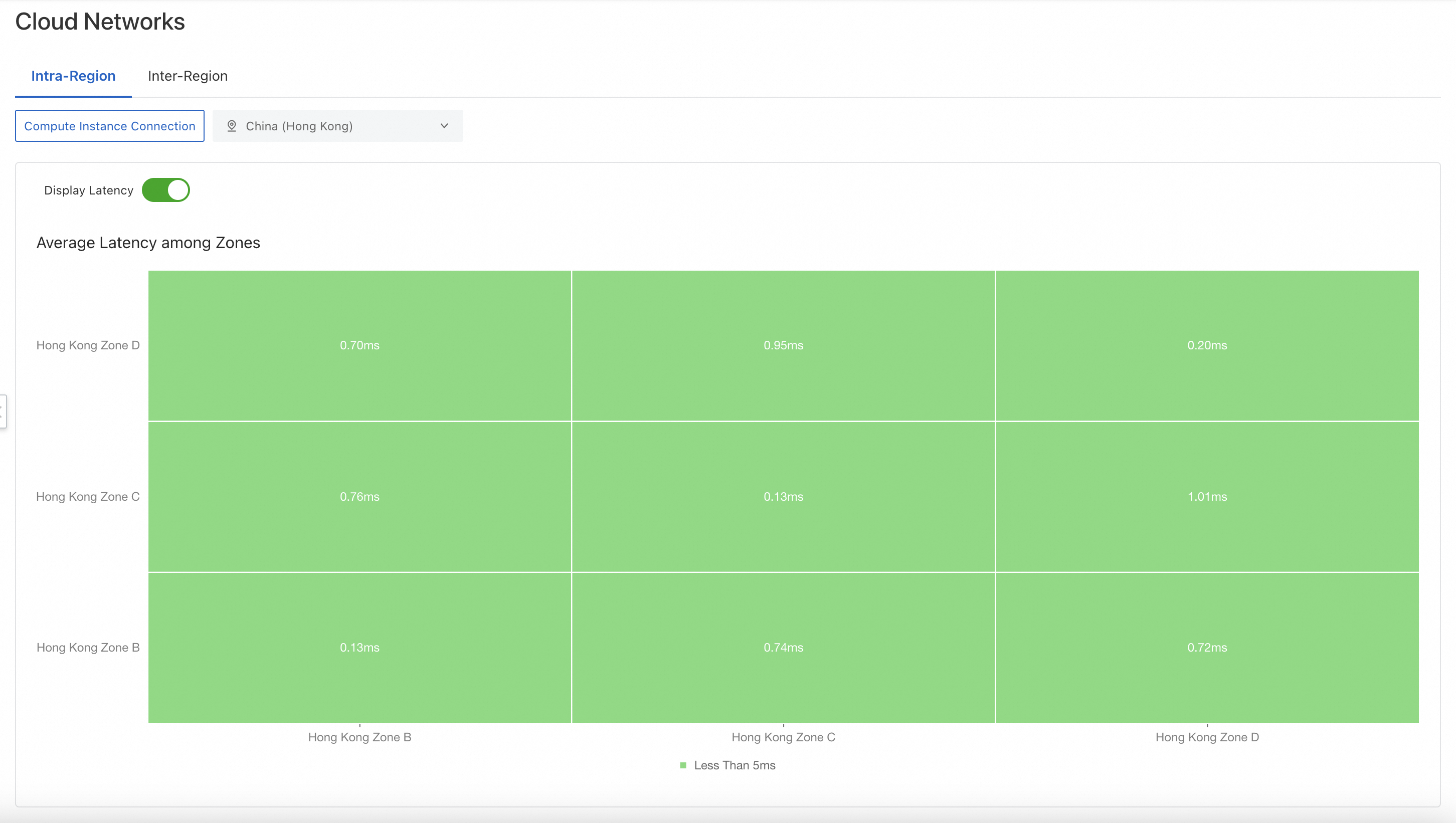
This makes it easy to identify high-latency paths within your deployment.
Not all exchanges are hosted on Alibaba Cloud. If your infrastructure spans multiple cloud providers or physical data centers, achieving low-latency connectivity becomes even more critical.
One common solution is to use leased lines: direct, private connections to Alibaba Cloud’s backbone. Alibaba Cloud offers Express Connect, a dedicated fiber-optic service to link your data center to its access points.
To measure latency from Express Connect access points to your target AZ:
Go to the Express Connect console.
Click “Create Physical Connection.”
Choose “Recommend Mode.”
Under "Access Point Type," select “Manual Select.”
This reveals a latency matrix similar to the one in NIS. Each cell shows the latency between an access point and a specific AZ.
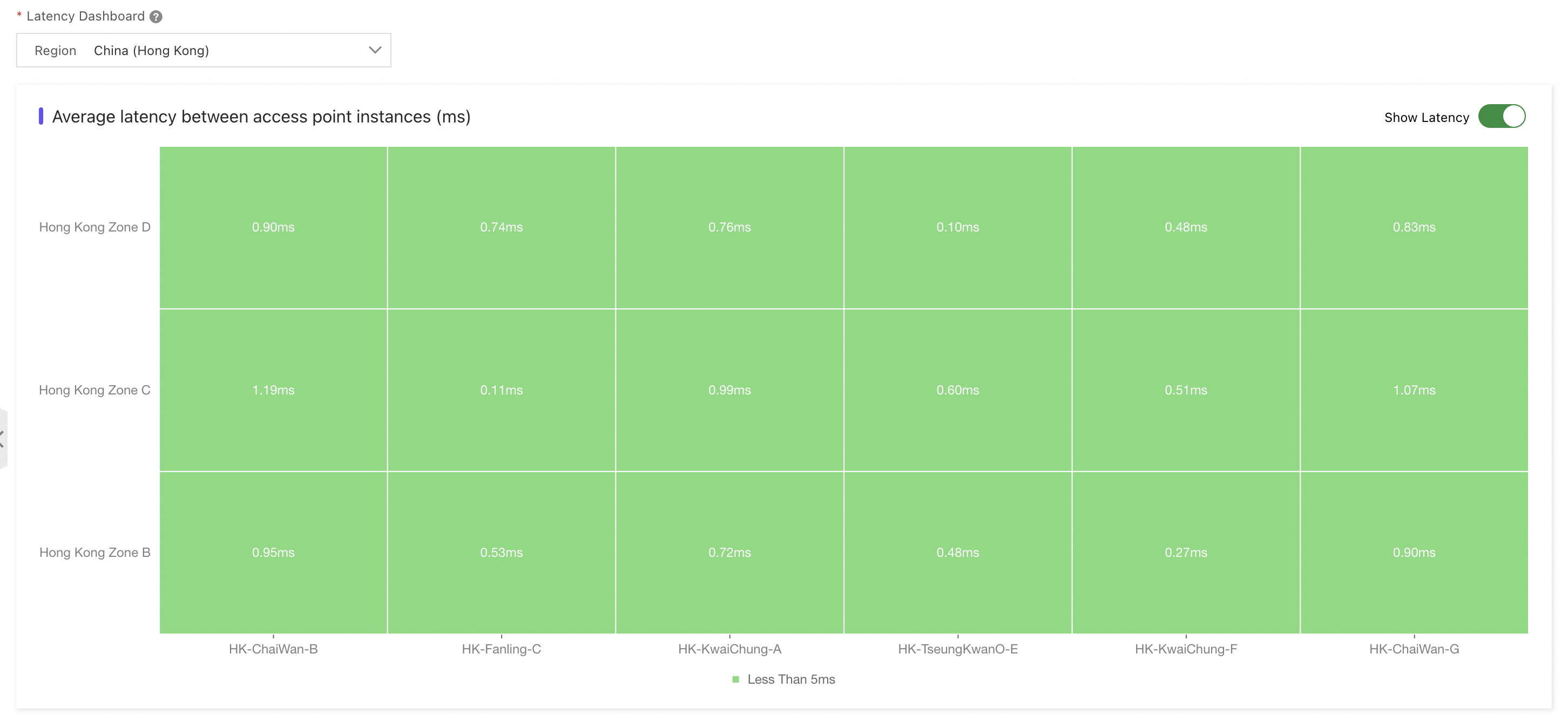
In the example above, we can see that if you're targeting Hong Kong Zone B, Access Point F shows the lowest latency.
You can see that optimizing for latency in Alibaba Cloud requires a clear understanding of how cloud networks are structured, and where latency can creep in. To summarize, the following locations are good initial points to start optimizing:
ping can mislead. Instead, analyze real-time market data with embedded timestamps to more accurately measure end-to-end latency.That wraps up today's guide. In the next post, I’ll share tips on optimizing Alibaba Cloud Elastic Compute Service (ECS) instances for performance.
Got questions or want to exchange thoughts? Feel free to connect with me on LinkedIn.
A Guide to Ultra-Low Latency Crypto Trading on the Cloud: Part 1 - Infrastructure Fundamentals

3 posts | 2 followers
FollowDaniel Molenaars - December 12, 2024
Alibaba Cloud Community - December 13, 2024
Kevin Scolaro, MBA - May 16, 2024
Kidd Ip - May 19, 2025
Justin See - December 1, 2025
Alibaba Cloud Community - June 23, 2026
3 posts | 2 followers
Follow Forex Solution
Alibaba Cloud provides the necessary compliance, security, resilience and scalability capabilities needed for Forex companies to operate effectively on a global scale.
Learn More Accelerated Global Networking Solution for Distance Learning
Alibaba Cloud offers an accelerated global networking solution that makes distance learning just the same as in-class teaching.
Learn More Networking Overview
Connect your business globally with our stable network anytime anywhere.
Learn More Edge Network Acceleration
Establish high-speed dedicated networks for enterprises quickly
Learn More
