Program Shortcuts and Self Build Code Runner on Function Compute WebIDE
keybindings.json
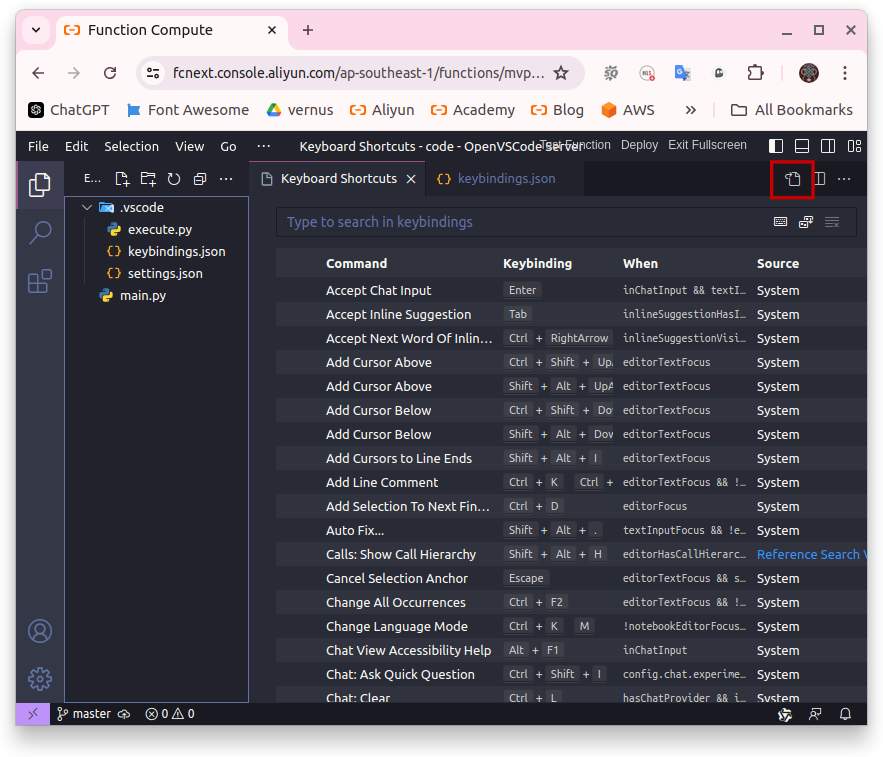
-
ctrl+K+Sto open Keyboard Shortcuts settings. On the right top window, open the filekeybindings.json, then copy this content to the file:
[
  {
    "key": "ctrl+shift+1",
    "command": "workbench.action.terminal.sendSequence",
    "args": {
      "text": "python3 /code/.vscode/execute.py ${file} 1\u000D"
    }
  },
  {
    "key": "ctrl+shift+2",
    "command": "workbench.action.terminal.sendSequence",
    "args": {
      "text": "python3 /code/.vscode/execute.py ${file} 2\u000D"
    }
  },
  // --------------------
  {
    "key": "ctrl+shift+1",
    "command": "-editor.action.replaceOne",
    "when": "editorFocus && findWidgetVisible"
  },
  {
    "key": "ctrl+shift+1",
    "command": "-search.action.replace",
    "when": "matchFocus && replaceActive && searchViewletVisible"
  },
  {
    "key": "ctrl+shift+1",
    "command": "-search.action.replaceAllInFile",
    "when": "fileMatchFocus && replaceActive && searchViewletVisible"
  }
]- Anytime you active these shortcut, VSCode will run the script execute.py by python3
-
python3 /code/.vscode/execute.py ${file} 1:- Give Absolute path of current file to the module execute.py at the 1st position
- Give the Active mode to the module execute.py at the 2nd position
-
\u000D: the Enter character in CLI
-
Active mode:
- ctrl+shift+1: active mode 1
- ctrl+shift+2: active mode 2
- ctrl+shift+3: active mode 3
- "command: -editor.action.replaceOne, -search.action.replace, -search.action.replaceAllInFile" : clear all default settings of
ctrl+shift+1shortcut - Why
ctrl+shfit+1,2,3 not +7,8,9 ? Because it help you quick cast in one hand
execute.py
- Copy this content to the file
/code/.vscode/execute.pyto handle VSCode shortcut
import os, sys

absolute_path, mode, *_ = sys.argv[1:]

print(f'Absolute path of current file: {absolute_path}')
print(f'Mode execute: {mode}')
print('----------')

path = absolute_path.split('/')
file_name = path[-1]
file_ext =  file_name.split('.')[-1]
forder_path = '/'.join(path[:-1])

print(f'File name: {file_name}')
print(f'Extension of file: {file_ext}')
print(f'Folder contain: {forder_path}')- Choose any file and try active shortcut
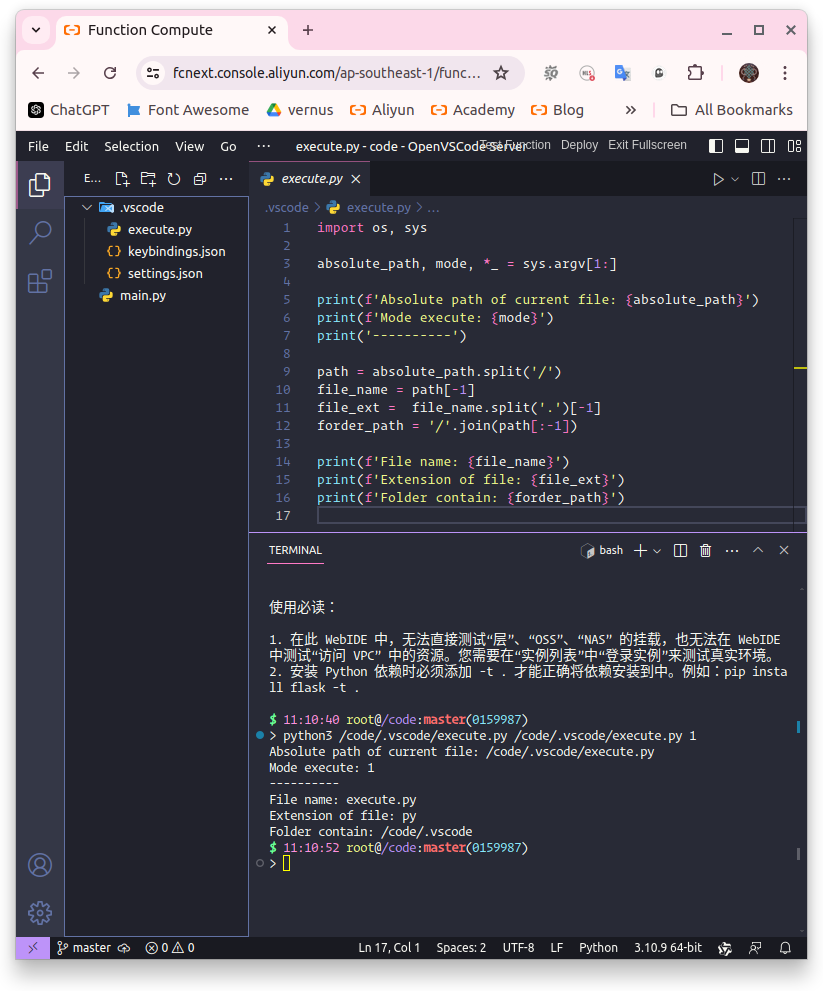
- Debian is the OS enviroment WebIDE of all type runtime Function Compute. And Debian use python3 by default, so you can run this execute.py script in NodeJS, Java, PHP, .Net... runtime
Code Runner
- This is example execute.py handle all interpreted language
import os, sys

class D:
  def __init__(self, absolute_path, mode):
    self.path = absolute_path
    self.mode = str(mode).strip()
    tmp = self.path.split('/')
    self.name = tmp[-1]
    self.ext =  self.ame.split('.')[-1]
    self.forder = '/'.join(tmp[:-1])
    if mode == '1':
      {
        'py': self.exe_py,
        'sh': self.exe_sh,
        'js': self.exe_js,
        'ts': self.exe_ts,
        'php': self.exe_php,
        'rb': self.exe_rb,
        'pl': self.exe_pl,
        'jl': self.exe_jl,
        'lua': self.exe_lua,
        'r': self.exe_r,
        'cd': self.exe_cs,
        'dart': self.exe_dart,
        'exs': self.exe_exs,
      }[self.ext]()

  def exe_py(self):
    py = sys.executable
    os.system(f'{py} {self.path}')
  def exe_sh(self):
    sh = os.environ.get('SHELL', '/usr/bin/sh')
    os.system(f'chmod +x {self.path}')
    os.system(f'{sh} {self.path}')
  def exe_js(self):
    os.system(f'node {self.path}')
  def exe_ts(self):
    os.system(f'tsc {self.path}')
    js = self.path[:-3] + '.js'
    os.system(f'node {js}')
  def exe_php(self):
    os.system(f'php {self.path}')
  def exe_rb(self):
    os.system(f'ruby {self.path}')
  def exe_pl(self):
    os.system(f'/usr/bin/perl {self.path}')
  def exe_jl(self):
    os.system(f'julia {self.path}')
  def exe_lua(self):
    os.system(f'lua {self.path}')
  def exe_r(self):
    os.system(f'Rscript {self.path}')
  def exe_cs(self):
    os.system(f'dotnet-script {self.path}')
  def exe_dart(self):
    os.system(f'dart {self.path}')
  def exe_exs(self):
    os.system(f'elixir {self.path}')

absolute_path, mode, *_ = sys.argv[1:]
EXE(absolute_path, mode)-
In case compiled language, you can set
- Mode 1: complie and run
- Mode 2: just complie
More Advanced
-
You can also define the rule to handle non-program file, these some ideas:
-
yml : Kubernetes
- Mode 1 : apply
- Mode 2 : force destroy
-
tf : Terraform
- Mode 1 : fmt, validate and apply
- Mode 2 : destroy
-
Install and upgrade packages
- requirements.txt
- package.json
- README.md : auto git commit
- Decompress : gz, bz2, rar, zip, 7z
- Mode 3 : execute Ansible, or send command to ECS Alibaba Cloud
- Mode 4 : push file to Object Storage
- Mode 5 : compress folder and push to Object Storage
-
- You can also define pre execute in the first block comment at the top file. For example:
# pip install numpy
import numpy as np
Thats mean the program will load dependency module, before the main promgram is running
# info.json
echo Hello my name is {{NAME}}
echo I'm {{OLD}} years old
The program will get infomation in info.json, parse argument to template, and execute the rendered
# worker1 worker2
# info.json
apt update
Send command and execute to the ECS which has hostname worker1 and woker2, no need inventor file outside like Ansible
# worker1 worker2
# info.json
# output.log
apt update
Write down log to file output.log
Read previous post:
Read next post:
Program VSCode Shortcut upload file and folder to Object Storage OSS

Comments
Related Products
-
 DevOps Solution
Accelerate software development and delivery by integrating DevOps with the cloud
Learn More
More Posts by quangnn
- Cài đặt Cluster Database MongoDB kiến trúc Sharding kết hợp Replica Set bằng Docker Compose
- Cài đặt Cluster Database MongoDB kiến trúc Replica Set bằng Docker Compose
- Cài đặt Database Neo4j bằng Docker Compose, mã hóa SSL
- Tạo tài khoản RAM Accesskey để truy cập Edge Object Storage (EOS)
- Program Shortcut Send Command In Jinja2 Template To ECS Without Internet Connection
- Program VSCode Shortcut upload file and folder to Object Storage OSS
- Customize Prettier Function Compute WebIDE