By Xulun
Now that since from the other tutorials in this tutorial series we have gained some basic knowledge about VSCode plug-ins, LSP, and code programming languages, we can start to build a Client and Server mode LSP plug-in. To do this, in this tutorial we will be writing a complete LSP project from scratch.
As the first step of this tutorial, we will be dealing with the server directory by writing the server code.
First, write package.json. The Microsoft SDK has encapsulated most of the details for us, so in fact, we only need to reference the vscode-languageserver module:
{
    "name": "lsp-demo-server",
    "description": "demo language server",
    "version": "1.0.0",
    "author": "Xulun",
    "license": "MIT",
    "engines": {
        "node": "*"
    },
    "repository": {
        "type": "git",
        "url": "git@code.aliyun.com:lusinga/testlsp.git"
    },
    "dependencies": {
        "vscode-languageserver": "^4.1.3"
    },
    "scripts": {}
}
With package.json, we can run the npm install command in the server directory to install dependencies.
After installation, the following modules will be referenced:
- vscode-jsonrpc
- vscode-languageserver
- vscode-languageserver-protocol
- vscode-languageserver-types vscode-uri
We are to use typescript to write the code for the server, so we use tsconfig.json to configure the Typescript options:
{
    "compilerOptions": {
        "target": "es6",
        "module": "commonjs",
        "moduleResolution": "node",
        "sourceMap": true,
        "outDir": "out",
        "rootDir": "src",
        "lib": ["es6"]
    },
    "include": ["src"],
    "exclude": ["node_modules", ".vscode-test"]
}Next, we start writing ts files for the server. First, we need to introduce the vscode-languageserver and vscode-jsonrpc dependencies:
import {
    createConnection,
    TextDocuments,
    TextDocument,
    Diagnostic,
    DiagnosticSeverity,
    ProposedFeatures,
    InitializeParams,
    DidChangeConfigurationNotification,
    CompletionItem,
    CompletionItemKind,
    TextDocumentPositionParams,
    SymbolInformation,
    WorkspaceSymbolParams,
    WorkspaceEdit,
    WorkspaceFolder
} from 'vscode-languageserver';
import { HandlerResult } from 'vscode-jsonrpc';
Below, we use log4js to print the log for convenience, introduce its module through npm i log4js --save, and initialize it:
import { configure, getLogger } from "log4js";
configure({
    appenders: {
        lsp_demo: {
            type: "dateFile",
            filename: "/Users/ziyingliuziying/working/lsp_demo",
            pattern: "yyyy-MM-dd-hh.log",
            alwaysIncludePattern: true,
        },
    },
    categories: { default: { appenders: ["lsp_demo"], level: "debug" } }
});
const logger = getLogger("lsp_demo");
Then, we can call createConnection to create a connection:
let connection = createConnection(ProposedFeatures.all);Next, we can handle events, such as the initialization events described in section 6:
connection.onInitialize((params: InitializeParams) => {
    let capabilities = params.capabilities;

    return {
        capabilities: {
            completionProvider: {
                resolveProvider: true
            }
        }
    };
});
After the three-way handshake, a message can be displayed on VSCode:
connection.onInitialized(() => {
    connection.window.showInformationMessage('Hello World! form server side');
});
Finally, the code completed in section 5 can be added:
connection.onCompletion(
    (_textDocumentPosition: TextDocumentPositionParams): CompletionItem[] => {

        return [
            {
                label: 'TextView' + _textDocumentPosition.position.character,
                kind: CompletionItemKind.Text,
                data: 1
            },
            {
                label: 'Button' + _textDocumentPosition.position.line,
                kind: CompletionItemKind.Text,
                data: 2
            },
            {
                label: 'ListView',
                kind: CompletionItemKind.Text,
                data: 3
            }
        ];
    }
);

connection.onCompletionResolve(
    (item: CompletionItem): CompletionItem => {
        if (item.data === 1) {
            item.detail = 'TextView';
            item.documentation = 'TextView documentation';
        } else if (item.data === 2) {
            item.detail = 'Button';
            item.documentation = 'JavaScript documentation';
        } else if (item.data === 3) {
            item.detail = 'ListView';
            item.documentation = 'ListView documentation';
        }
        return item;
    }
);At this point, the server is ready. Next, let's develop the client.
Similarly, the first step is to write package.json, which depends on vscode-languageclient. Do not confuse it with the vscode-languageserver library used by the server.
{
    "name": "lspdemo-client",
    "description": "demo language server client",
    "author": "Xulun",
    "license": "MIT",
    "version": "0.0.1",
    "publisher": "Xulun",
    "repository": {
        "type": "git",
        "url": "git@code.aliyun.com:lusinga/testlsp.git"
    },
    "engines": {
        "vscode": "^1.33.1"
    },
    "scripts": {
        "update-vscode": "vscode-install",
        "postinstall": "vscode-install"
    },
    "dependencies": {
        "path": "^0.12.7",
        "vscode-languageclient": "^4.1.4"
    },
    "devDependencies": {
        "vscode": "^1.1.30"
    }
}Anyway, since it is also ts, and the client code doesn't differ from the server code, so just copy the above code:
{
    "compilerOptions": {
        "module": "commonjs",
        "target": "es6",
        "outDir": "out",
        "rootDir": "src",
        "lib": ["es6"],
        "sourceMap": true
    },
    "include": ["src"],
    "exclude": ["node_modules", ".vscode-test"]
}Next, we will write extension.ts. In fact, the client does less work than the server, and so in essence, it is to start the server:
    // Create the language client and start the client.
    client = new LanguageClient(
        'DemoLanguageServer',
        'Demo Language Server',
        serverOptions,
        clientOptions
    );

    // Start the client. This will also launch the server
    client.start();
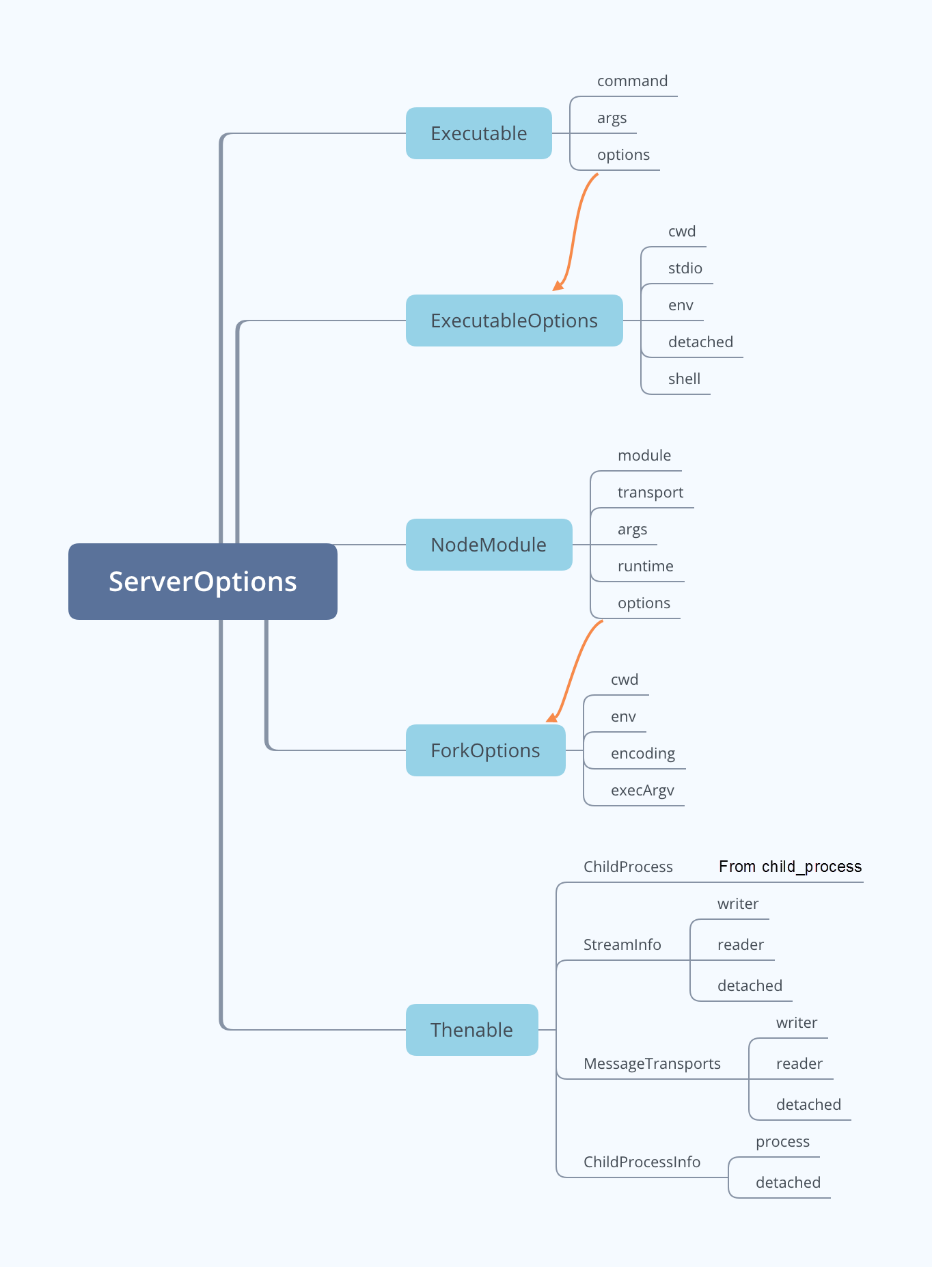
serverOptions is used to configure server parameters. It is defined as:
export type ServerOptions =
Executable |
{ run: Executable; debug: Executable; } |
{ run: NodeModule; debug: NodeModule } |
NodeModule |
(() => Thenable<ChildProcess | StreamInfo | MessageTransports | ChildProcessInfo>);
A brief diagram of the related types is as follows:
Let's configure it as follows:
    // Server side configurations
    let serverModule = context.asAbsolutePath(
        path.join('server', 'out', 'server.js')
    );

    let serverOptions: ServerOptions = {
        module: serverModule, transport: TransportKind.ipc
    };

    // client side configurations
    let clientOptions: LanguageClientOptions = {
        // js is used to trigger things
        documentSelector: [{ scheme: 'file', language: 'js' }],
    };
The complete code of extension.ts is as follows:
import * as path from 'path';
import { workspace, ExtensionContext } from 'vscode';

import {
    LanguageClient,
    LanguageClientOptions,
    ServerOptions,
    TransportKind
} from 'vscode-languageclient';

let client: LanguageClient;

export function activate(context: ExtensionContext) {
    // Server side configurations
    let serverModule = context.asAbsolutePath(
        path.join('server', 'out', 'server.js')
    );

    let serverOptions: ServerOptions = {
        module: serverModule, transport: TransportKind.ipc
    };

    // Client side configurations
    let clientOptions: LanguageClientOptions = {
        // js is used to trigger things
        documentSelector: [{ scheme: 'file', language: 'js' }],
    };

    client = new LanguageClient(
        'DemoLanguageServer',
        'Demo Language Server',
        serverOptions,
        clientOptions
    );

    // Start the client side, and at the same time also start the language server
    client.start();
}

export function deactivate(): Thenable<void> | undefined {
    if (!client) {
        return undefined;
    }
    return client.stop();
}Now, everything is ready except packaging. Let's integrate the above client and server.
Now our focus is mainly on entry functions and activation events:
    "activationEvents": [
        "onLanguage:javascript"
    ],
    "main": "./client/out/extension",
The complete package.json is as follows:
{
    "name": "lsp_demo_server",
    "description": "A demo language server",
    "author": "Xulun",
    "license": "MIT",
    "version": "1.0.0",
    "repository": {
        "type": "git",
        "url": "git@code.aliyun.com:lusinga/testlsp.git"
    },
    "publisher": "Xulun",
    "categories": [],
    "keywords": [],
    "engines": {
        "vscode": "^1.33.1"
    },
    "activationEvents": [
        "onLanguage:javascript"
    ],
    "main": "./client/out/extension",
    "contributes": {},
    "scripts": {
        "vscode:prepublish": "cd client && npm run update-vscode && cd .. && npm run compile",
        "compile": "tsc -b",
        "watch": "tsc -b -w",
        "postinstall": "cd client && npm install && cd ../server && npm install && cd ..",
        "test": "sh ./scripts/e2e.sh"
    },
    "devDependencies": {
        "@types/mocha": "^5.2.0",
        "@types/node": "^8.0.0",
        "tslint": "^5.11.0",
        "typescript": "^3.1.3"
    }
}We also need a general tsconfig.json that references the client and server directories:
{
    "compilerOptions": {
        "module": "commonjs",
        "target": "es6",
        "outDir": "out",
        "rootDir": "src",
        "lib": [ "es6" ],
        "sourceMap": true
    },
    "include": [
        "src"
    ],
    "exclude": [
        "node_modules",
        ".vscode-test"
    ],
    "references": [
        { "path": "./client" },
        { "path": "./server" }
    ]
}Above, we have written the code for the client and the server, and the code for integrating them. Now below, we will write two configuration files in the .vscode directory, so that we can debug and run them more conveniently.
With this file, we have the running configuration, which can be started through F5.
// A launch configuration that compiles the extension and then opens it inside a new window
{
    "version": "0.2.0",
    "configurations": [
        {
            "type": "extensionHost",
            "request": "launch",
            "name": "Launch Client",
            "runtimeExecutable": "${execPath}",
            "args": ["--extensionDevelopmentPath=${workspaceRoot}"],
            "outFiles": ["${workspaceRoot}/client/out/**/*.js"],
            "preLaunchTask": {
                "type": "npm",
                "script": "watch"
            }
        },
        {
            "type": "node",
            "request": "attach",
            "name": "Attach to Server",
            "port": 6009,
            "restart": true,
            "outFiles": ["${workspaceRoot}/server/out/**/*.js"]
        },
    ],
    "compounds": [
        {
            "name": "Client + Server",
            "configurations": ["Launch Client", "Attach to Server"]
        }
    ]
}The npm compile and npm watch scripts are configured.
{
    "version": "2.0.0",
    "tasks": [
        {
            "type": "npm",
            "script": "compile",
            "group": "build",
            "presentation": {
                "panel": "dedicated",
                "reveal": "never"
            },
            "problemMatcher": [
                "$tsc"
            ]
        },
        {
            "type": "npm",
            "script": "watch",
            "isBackground": true,
            "group": {
                "kind": "build",
                "isDefault": true
            },
            "presentation": {
                "panel": "dedicated",
                "reveal": "never"
            },
            "problemMatcher": [
                "$tsc-watch"
            ]
        }
    ]
}
After everything is ready, run the npm install command in the plug-in root directory. Then, run the build command (which is cmd-shift-B on Mac) in VSCode, so js and map under "out" directories of the server and client are built.
Now, it can be run with the F5 key. The source code for this example is stored at code.aliyun.com:lusinga/testlsp.git.
Quick Start to VSCode Plug-Ins: LSP protocol initialization parameters
Louis Liu - August 27, 2019
Louis Liu - August 27, 2019
Louis Liu - August 27, 2019
Alibaba F(x) Team - June 20, 2022
Louis Liu - August 26, 2019
Louis Liu - August 26, 2019
 YiDA Low-code Development Platform
A low-code development platform to make work easier
Learn More mPaaS
mPaaS
Help enterprises build high-quality, stable mobile apps
Learn MoreMore Posts by Louis Liu


