Use tags to mark and classify VPCs, create business-oriented resource views, and simplify resource search and aggregation. This simplifies resource search and aggregation.
Tagging examples.
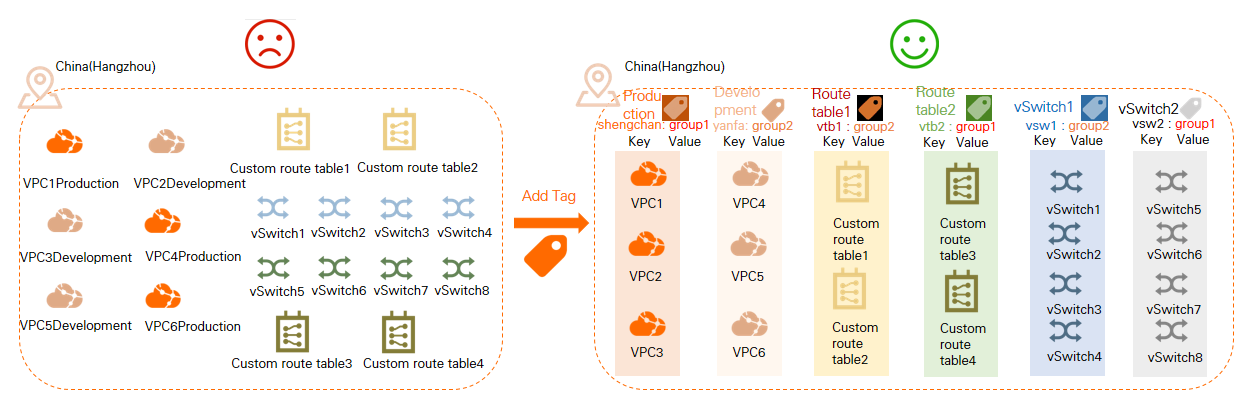
Applicability
Quota: You can attach up to 20 tags to a single VPC, vSwitch, or route table. You cannot request a quota increase.
Security: Do not store sensitive information, such as passwords or AccessKey pairs, in tags. Tag information may appear in plaintext on your bills.
Rules:
Each tag consists of a case-sensitive key-value pair. Tag keys and values cannot start with the
aliyun,acs:,http://, orhttps://prefix.The tag key must be unique for each tag on an instance.
Tags must be attached to an instance. You cannot create empty tags that are not attached to an instance.
Tags are region-specific. For example, tags created in the China (Hangzhou) region are not visible in the China (Shanghai) region.
You can modify the key and value of a tag or remove a tag from an instance. If you delete an instance, all tags attached to it are also deleted. This action does not affect tags attached to other instances.
Add or remove tags
Console
Individual management: Go to the or the VPC console. Hover your mouse pointer over the Tags column’s
 icon, and click Edit or Edit in the tooltip. To delete a tag key-value pair, click the
  icon to its right.
If the Tags column is not displayed, click the
 icon in the upper-right corner of the elastic IP addresses (EIPs) list and select the Tags list item to display it.
Batch management: Select the EIPs to which you want to add or from which you want to remove tags. In the lower-left corner of the page, choose Configure Tags > Batch Add Tags or Configure Tags > Batch Delete Tags.
Precise search: At the top of the list, click Filter by Tag. Select or enter a key-value pair to filter for EIPs that meet the criteria.
API
Call TagResources to create and attach tags to specified resources.
Call UnTagResources to detach tags from a list of specified resources.