Overview
After you transfer a domain name to Alibaba Cloud DNS, you can use the Domain Name System (DNS) traffic analysis feature to observe from which regions DNS requests are sent to the public authoritative DNS servers of Alibaba Cloud DNS. If some regions do not have DNS requests sent to the public authoritative DNS servers, the possible cause is that the DNS servers of Internet service providers (ISPs) in these regions still cache valid DNS records for the domain name.
You can apply this capability only to domain names for which the DNS traffic analysis feature is enabled, regardless of whether the domain names are bound to free Alibaba Cloud DNS instances or paid Alibaba Cloud DNS instances. For more information about how to enable the DNS traffic analysis feature, see Enable the DNS traffic analysis feature for a domain name.
Procedure
Log on to the Alibaba Cloud DNS console.
On the Authoritative Domain Names tab of the Authoritative DNS Resolution page, find the desired domain name and click the line chart icon in the DNS Traffic Analysis column.

On the DNS Traffic Analysis page, click the Analysis of DNS Request Sources tab.
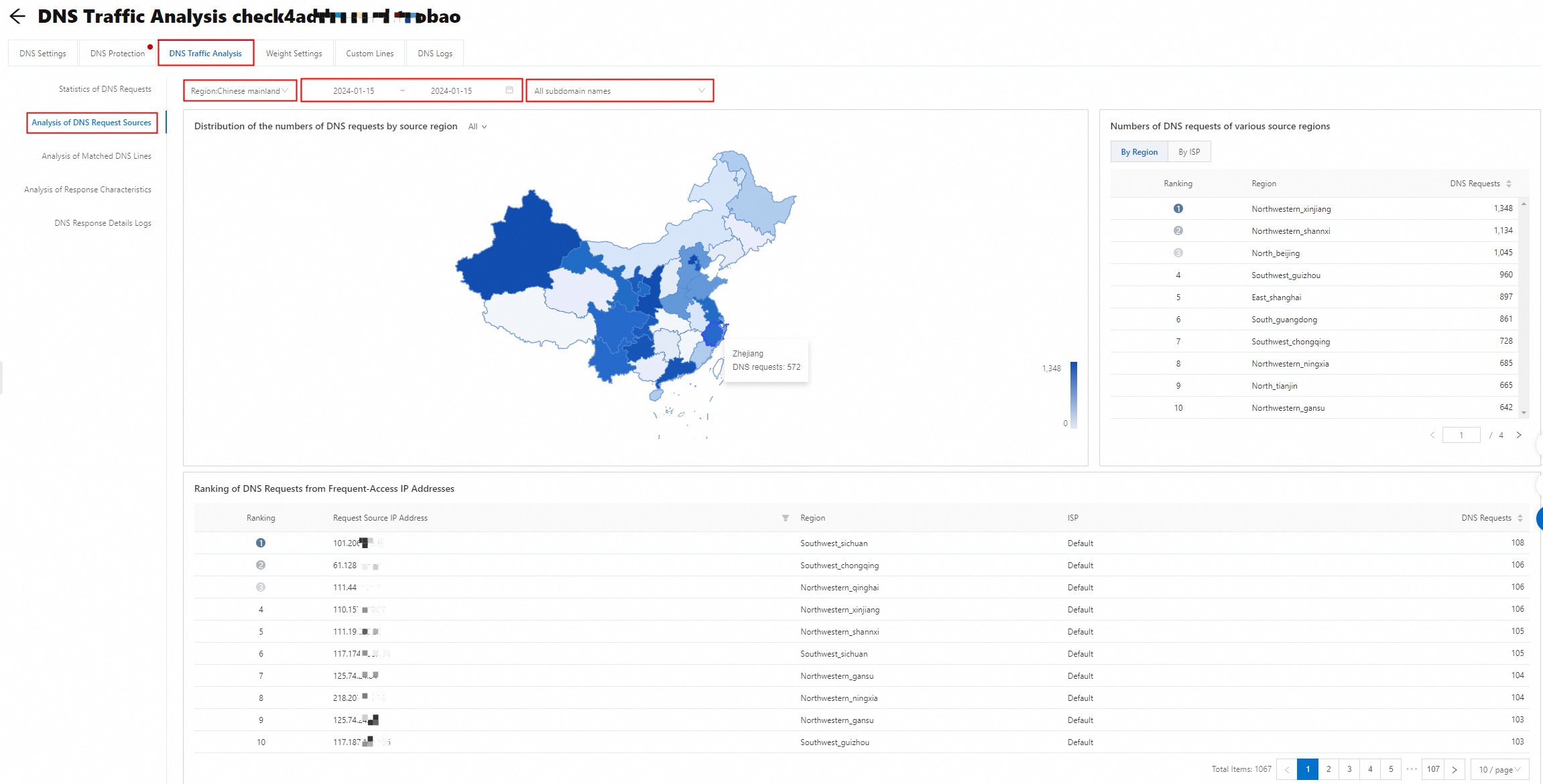
Query data based on specific criteria
Query data by region
You can select Chinese mainland or Global from the drop-down list to view the resolution data of the DNS requests that come from the Chinese mainland and other regions in the world.
Query data by time range
You can query data within up to 90 days. Data collected within the selected time range is aggregated and displayed in the following sections: Distribution of the numbers of DNS requests by source region, Numbers of DNS requests of various source regions, and Ranking of DNS Requests from Frequent-Access IP Addresses.
Query data by domain name
By default, the DNS request sources for all subdomain names are displayed. You can also filter data to view the DNS request sources for a specific subdomain name.